Don't miss your chance to take the Fabric Data Engineer (DP-600) exam for FREE! Find out how by watching the DP-600 session on-demand now through April 28th.
Learn moreJoin the FabCon + SQLCon recap series. Up next: Power BI, Real-Time Intelligence, IQ and AI, and Data Factory take center stage. All sessions are available on-demand after the live show. Register now
Hi all,
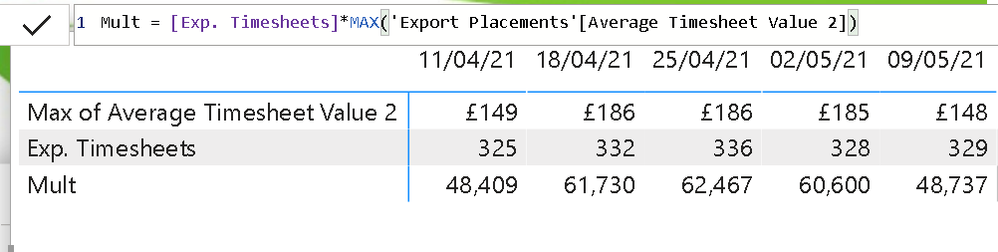
The below 'mult' measure seems to be calculating incorrectly.
325 x 149 = 48,425
the measure returns 48,409? what is causing this error?
Hi @HenryJS
Best Regards,
Community Support Team _ Tang
If this post helps, please consider Accept it as the solution to help the other members find it more quickly.
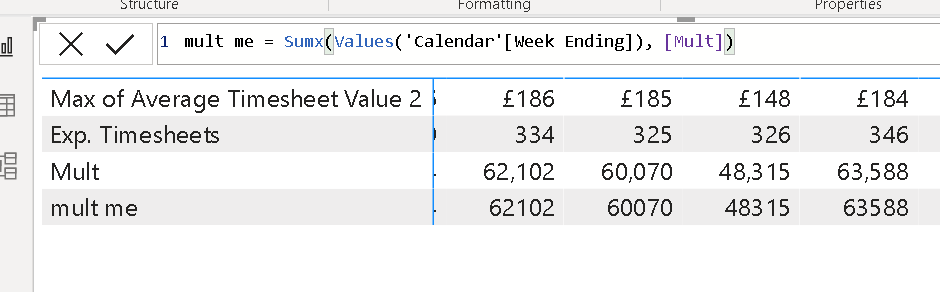
@HenryJS , Multiplication should be done at line level. If not use values or summarize to get correct total
Sumx(Values(Table[Date]), [Multi Meaure])
or
sumx(summarize(Table, Table[Date], Table[Other grouping of visual] , "_1",[Multi Meaure]), [_1])
Check out the April 2026 Power BI update to learn about new features.
If you have recently started exploring Fabric, we'd love to hear how it's going. Your feedback can help with product improvements.
A new Power BI DataViz World Championship is coming this June! Don't miss out on submitting your entry.
| User | Count |
|---|---|
| 41 | |
| 38 | |
| 32 | |
| 21 | |
| 15 |
| User | Count |
|---|---|
| 64 | |
| 59 | |
| 31 | |
| 27 | |
| 25 |