cancel
Showing results for 
Search instead for 
Did you mean: 

Get Fabric certified for FREE! Don't miss your chance! Learn more

Reply
HenryJS
Post Prodigy
Post Prodigy

Measure Multiply Calculation

Hi all,


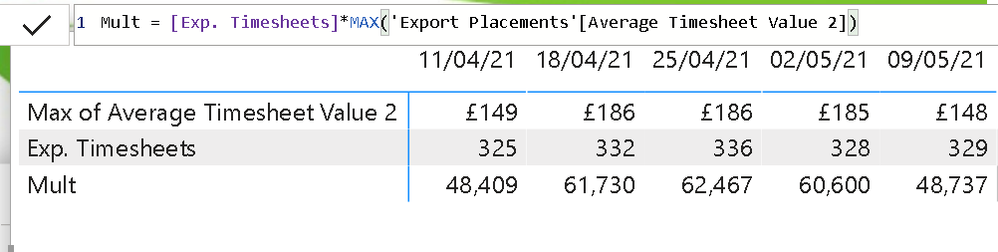
The below 'mult' measure seems to be calculating incorrectly.


325 x 149 = 48,425


the measure returns 48,409? what is causing this error?


Capture.PNG

4 REPLIES 4
v-xiaotang
Community Support
Community Support

Hi @HenryJS 

 
Have you solved this problem? If solved, can you share your solution so that others have same problem can refer to it? If not, can you provide more details?


Best Regards,

Community Support Team _ Tang

If this post helps, please consider Accept it as the solution to help the other members find it more quickly.

amitchandak
Super User
Super User

@HenryJS , Multiplication should be done at line level. If not use values or summarize to get correct total


Sumx(Values(Table[Date]), [Multi Meaure])


or


sumx(summarize(Table, Table[Date], Table[Other grouping of visual] , "_1",[Multi Meaure]), [_1])

Share with Power BI Enthusiasts: Full Power BI Video (20 Hours) YouTube
Microsoft Fabric Series 60+ Videos YouTube
Microsoft Fabric Hindi End to End YouTube

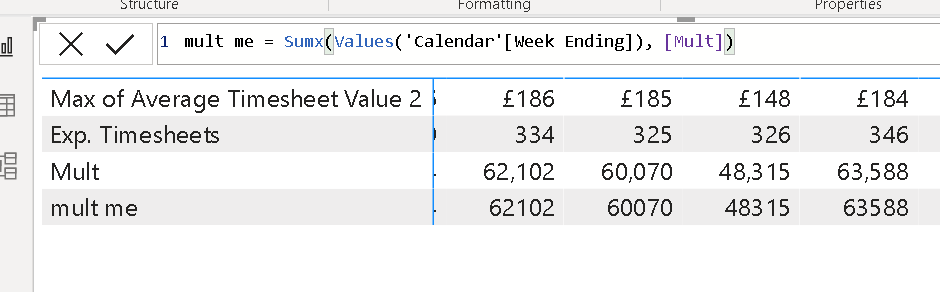
@amitchandak  unfortunately this just returned the same result. see below


Capture.PNG

@HenryJS , If possible, Can you share sample data and sample output in table format? Or a sample pbix after removing sensitive data.

Share with Power BI Enthusiasts: Full Power BI Video (20 Hours) YouTube
Microsoft Fabric Series 60+ Videos YouTube
Microsoft Fabric Hindi End to End YouTube

Helpful resources

Announcements
Join our Fabric User Panel

Join our Fabric User Panel

Share feedback directly with Fabric product managers, participate in targeted research studies and influence the Fabric roadmap.

FabCon Atlanta 2026 carousel

FabCon Atlanta 2026

Join us at FabCon Atlanta, March 16-20, for the ultimate Fabric, Power BI, AI and SQL community-led event. Save $200 with code FABCOMM.