Join us at FabCon Atlanta from March 16 - 20, 2026, for the ultimate Fabric, Power BI, AI and SQL community-led event. Save $200 with code FABCOMM.
Register now!The Power BI Data Visualization World Championships is back! It's time to submit your entry. Live now!
Hi, I'm trying to create a measure that calculates my top 10 buyers/customers who have bought an specific product (my top product from an specific year) which is calculated with another measure called Mas Vendidos, so here is my code:
Top Clientes =
VAR
Prod = [Mas Vendido]
VAR
Cliente = VALUES(Clientes[CompanyName])
RETURN
CALCULATE([Ventas Total];
FILTER(Cliente;
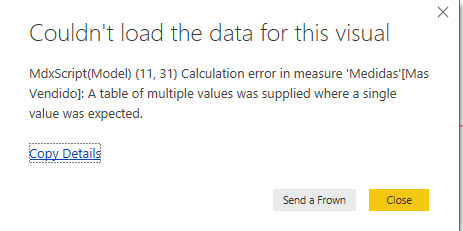
RANKX(ALL(Clientes[CompanyName]); [Ventas Total];;DESC) <= 10); Productos[ProductName] = Prod)The thing is it returns an error:
"...a table of multiple values was supplied where a single value was expected"
And if I delete the Prod variable and change it at the end with "Halter Dress" (my top product) then it is correct.
Top Clientes P =
VAR
Cliente = VALUES(Clientes[CompanyName])
RETURN
CALCULATE([Ventas Total];
FILTER(Cliente;
RANKX(ALL(Clientes[CompanyName]); [Ventas Total];;DESC) <= 10); Productos[ProductName] = "Halter Dress")
PSD: Mas Vendidos Code:
Mas Vendido = TOPN(1; ALL(Productos[ProductName]); [Ventas Total];DESC)
Error (with Prod variable)
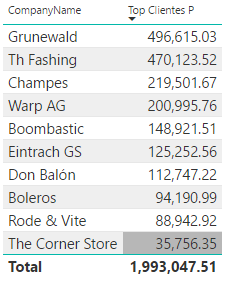
What I want it to show (with "Halter Dress" instead of Prod variable)
Solved! Go to Solution.
I believe the error is because Dax engine has detected that your TOPN function in "Mas Vendido" could return more than one value (in a tie situation) So I think you eithe either need to test if "Prod" variable has more than one row and respond accordingly, or perhaps wrap it in a FIRSTNONBLANK call like so:
Mas Vendido = FIRSTNONBLANK ( TOPN(1; ALL(Productos[ProductName]); [Ventas Total];DESC), 1 )
I believe the error is because Dax engine has detected that your TOPN function in "Mas Vendido" could return more than one value (in a tie situation) So I think you eithe either need to test if "Prod" variable has more than one row and respond accordingly, or perhaps wrap it in a FIRSTNONBLANK call like so:
Mas Vendido = FIRSTNONBLANK ( TOPN(1; ALL(Productos[ProductName]); [Ventas Total];DESC), 1 )
Thanks a lot. It solved my problem just how i wanted it.
The Power BI Data Visualization World Championships is back! It's time to submit your entry.
Check out the January 2026 Power BI update to learn about new features.
| User | Count |
|---|---|
| 60 | |
| 47 | |
| 30 | |
| 25 | |
| 23 |
| User | Count |
|---|---|
| 141 | |
| 110 | |
| 65 | |
| 38 | |
| 33 |