cancel
Showing results for 
Search instead for 
Did you mean: 

The Power BI Data Visualization World Championships is back! Get ahead of the game and start preparing now! Learn more

Reply
Raul
Post Patron
Post Patron

Measure IF Function

Hello everyone.
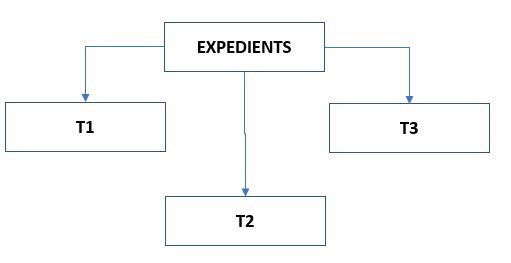
I have the following data model:


Model.JPG


And the following measure:

Invoiced =
VAR
       LinT1= CALCULATE(SUM(T1[Import]); T1[Type]=1)
VAR
      LinT2 = CALCULATE(SUM(T2[Import]))
VAR
      LinT3 = CALCULATE(SUM(T3[Import]); T3[Type]=1)

RETURN
      IF(Expedients[Master] = X ; LinT1 + LinT2; LinT1 + LinT3)


In a matrix visualization, I show the Collaborator, CodExpedient and the previous measurement:

COLLABORATORAll 
   
COLLABORATORCODEXPEDIENTInvoiced
C1A 
C1B 
C1C 
C1D 
C1E 
C2F 
C2G 
C2B 
C2D 


Where COLLABORATOR: All is a filter for the collaborator code.


What should be the expression X of the condition of the if function to perform a calculation or another depending on whether the value of the Master field of the Expedient table for each expedient is equal to the value of the Collaborator field of each expedient?


For exemple:


COLLABORATORCODEXPEDIENTMASTERINVOICED
C1AC1LinT1 + LinT2
C1BC1LinT1 + LinT2
C1CC1LinT1 + LinT2
C1DC3LinT1 + LinT3
C1EC1LinT1 + LinT2
C2FC4LinT1 + LinT3
C2GC2LinT1 + LinT2
C2BC1LinT1 + LinT3
C2DC3LinT1 + LinT3


Thank you for your help.

4 REPLIES 4
v-jiascu-msft
Microsoft Employee
Microsoft Employee

Hi @Raul,


Can you share your dummy pbix file please? Or the original data. I have no idea about "C3, C4". Which table do these columns belong to? Maybe you can try it like this:

Min(Expedients[Master]) = min(expendients[MASTER])

Best Regards,

Dale

Community Support Team _ Dale
If this post helps, then please consider Accept it as the solution to help the other members find it more quickly.

Hi @v-jiascu-msft,

The result of this formula is not correct. Always return false.

Any other suggestion?

Ok, I have a new situation. I have managed to show in a new column (ISMASTER) into the table a 1 value if a condition is true and a 0 value if it is not. Now I need to know how to evaluate the value of each record in one measure to obtain one result or another.


This is the matrix visualization:

CODEXPEDIENTTOTALMax ISMASTER
E1 $       113,750
E3 $    1.010,000
E23 $          39,500
E24 $          55,251
E30 $                 -  1
E32 $          16,250


I want a new measure to obtain this result:

Measure = IF(T1.[ISMASTER] = 1; SUM(T1.[Import]); SUM(T2.[Import]))


What should be the condition of the IF function? Thank you.

Hi @v-jiascu-msft,

I can't share de pbix original file because the data model of the previous message is a portion of the all data model. But I can especificate you the structure of each table:


EXPEDIENTS
CODEXPEDIENT
DATEEXP
MASTER
 
 
T1
CODT1
COLLABORATOR
TYPE
IMPORT
 
T2
CODT2
COLLABORATOR
TYPE
IMPORT
 
T3
CODT3
COLLABORATOR
TYPE
IMPORT


Thanks for your post.

Helpful resources

Announcements
Power BI DataViz World Championships

Power BI Dataviz World Championships

The Power BI Data Visualization World Championships is back! Get ahead of the game and start preparing now!

December 2025 Power BI Update Carousel

Power BI Monthly Update - December 2025

Check out the December 2025 Power BI Holiday Recap!

FabCon Atlanta 2026 carousel

FabCon Atlanta 2026

Join us at FabCon Atlanta, March 16-20, for the ultimate Fabric, Power BI, AI and SQL community-led event. Save $200 with code FABCOMM.