cancel
Showing results for 
Search instead for 
Did you mean: 

Get Fabric Certified for FREE during Fabric Data Days. Don't miss your chance! Request now

Reply
Anonymous
Not applicable

Measure: Distinctcount per order and Customer. Sum and Average

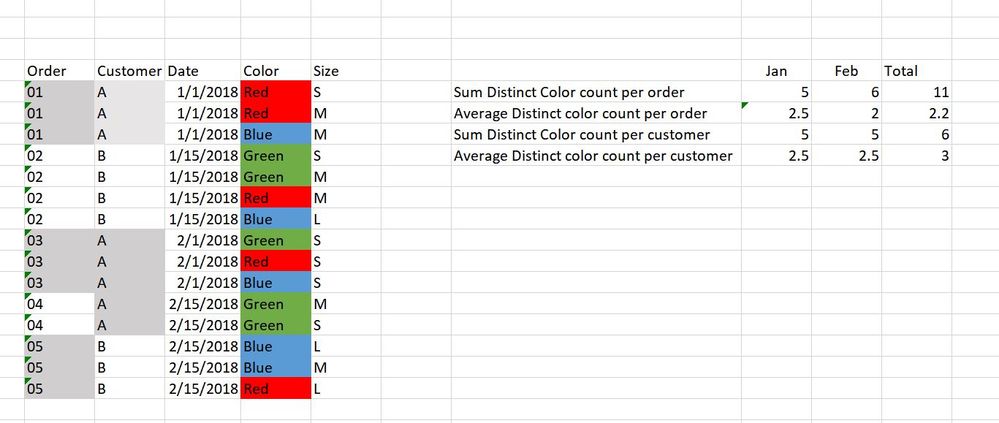
I am trying to create a measure that calculates distinct count of colors ordered based on customer and order. See excel example below and desired results. 


Capture.JPG

1 ACCEPTED SOLUTION
richbenmintz
Resident Rockstar
Resident Rockstar

Hi @Anonymous


Based on your requirement you can use the following 5 Measures which will provide the result in the image. Note the data must be formatted like you example data for the formulas to work as written 


Distinct Counts.PNG


base distinct count = DISTINCTCOUNT(Table1[Color])

Distinct Count Per Customer = 
var tab = SUMMARIZE(Table1,Table1[Customer], "orderid", [base distinct count])
return CALCULATE(SUMX(tab, [base distinct count]))

Distinct Count Per Order = 
var tab = SUMMARIZE(Table1,Table1[Order], "orderid", [base distinct count])
return CALCULATE(SUMX(tab, [base distinct count]))

Avg Distinct Count Per Customer = 
var tab = SUMMARIZE(Table1,Table1[Customer], "Cust", [base distinct count])
return CALCULATE(AVERAGEX(tab, [base distinct count]))

Avg Distinct Count Per Order = 
var tab = SUMMARIZE(Table1,Table1[Order], "cust", [base distinct count])
return CALCULATE(AVERAGEX(tab, [base distinct count]))


I hope this helps,
Richard

Did I answer your question? Mark my post as a solution! Kudos Appreciated!

Proud to be a Super User!


View solution in original post

1 REPLY 1
richbenmintz
Resident Rockstar
Resident Rockstar

Hi @Anonymous


Based on your requirement you can use the following 5 Measures which will provide the result in the image. Note the data must be formatted like you example data for the formulas to work as written 


Distinct Counts.PNG


base distinct count = DISTINCTCOUNT(Table1[Color])

Distinct Count Per Customer = 
var tab = SUMMARIZE(Table1,Table1[Customer], "orderid", [base distinct count])
return CALCULATE(SUMX(tab, [base distinct count]))

Distinct Count Per Order = 
var tab = SUMMARIZE(Table1,Table1[Order], "orderid", [base distinct count])
return CALCULATE(SUMX(tab, [base distinct count]))

Avg Distinct Count Per Customer = 
var tab = SUMMARIZE(Table1,Table1[Customer], "Cust", [base distinct count])
return CALCULATE(AVERAGEX(tab, [base distinct count]))

Avg Distinct Count Per Order = 
var tab = SUMMARIZE(Table1,Table1[Order], "cust", [base distinct count])
return CALCULATE(AVERAGEX(tab, [base distinct count]))


I hope this helps,
Richard

Did I answer your question? Mark my post as a solution! Kudos Appreciated!

Proud to be a Super User!


Helpful resources

Announcements
November Power BI Update Carousel

Power BI Monthly Update - November 2025

Check out the November 2025 Power BI update to learn about new features.

Fabric Data Days Carousel

Fabric Data Days

Advance your Data & AI career with 50 days of live learning, contests, hands-on challenges, study groups & certifications and more!

FabCon Atlanta 2026 carousel

FabCon Atlanta 2026

Join us at FabCon Atlanta, March 16-20, for the ultimate Fabric, Power BI, AI and SQL community-led event. Save $200 with code FABCOMM.

Top Solution Authors
Top Kudoed Authors