Join us at FabCon Atlanta from March 16 - 20, 2026, for the ultimate Fabric, Power BI, AI and SQL community-led event. Save $200 with code FABCOMM.
Register now!The Power BI Data Visualization World Championships is back! Get ahead of the game and start preparing now! Learn more
Hi,
I had a measure working that I was counting the days "out of stock".
CountDaysOOS2 = CALCULATE(COUNTROWS(FILTER('ns vwInventorySnapshot','ns vwInventorySnapshot'[DetereminedQuantity] =0 && 'ns vwInventorySnapshot'[Date] > ('ns vwInventorySnapshot'[ns vwFirstDateInStockByLocation.FirstDateInStock]) && 'ns vwInventorySnapshot'[Date] < if(ISBLANK('ns vwInventorySnapshot'[ns ValogixPlanning.PhaseOutDate]),"12/31/2099",'ns vwInventorySnapshot'[ns ValogixPlanning.PhaseOutDate]))))So lets say this is what the table looks like, with the out of stock being what I would consider the CountDaysOOS2. For Internal ID 5 the first date that it was in Stock was 12/9, but on 12/10 we had 0 Quantity, this means we have been out of stock one day.
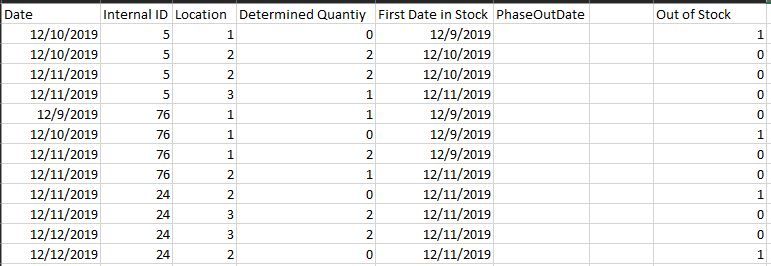
This measure worked before I put locations into the matrix, as before they were just grouped together. Now I get the same CountDaysOOS2 as they were when they are grouped. It doesn't appear that my measure is breaking out the item internal ID at each loctionID.
I am just lost in what to do or even understanding what is happening.
Thanks,
Noel
Hi @NBOnecall ,
You could add some filters in the calculate formula to show correct values. You could refer to the following DAX:
ALLEXCEPT('ns vwInventorySnapshot','ns vwInventorySnapshot'[Location])
I get the same results with the following measure. I am not sure I am using all expect correctly.
CountDaysOOS2.1 = CALCULATE(COUNTROWS(FILTER('ns vwInventorySnapshot','ns vwInventorySnapshot'[DetereminedQuantity] =0 && 'ns vwInventorySnapshot'[Date] > ('ns vwInventorySnapshot'[ns vwFirstDateInStockByLocation.FirstDateInStock]) && 'ns vwInventorySnapshot'[Date] < if(ISBLANK('ns vwInventorySnapshot'[ns ValogixPlanning.PhaseOutDate]),"12/31/2099",'ns vwInventorySnapshot'[ns ValogixPlanning.PhaseOutDate]))),ALLEXCEPT('ns vwInventorySnapshot','ns vwInventorySnapshot'[LocationId]))
The Power BI Data Visualization World Championships is back! Get ahead of the game and start preparing now!
Check out the November 2025 Power BI update to learn about new features.
| User | Count |
|---|---|
| 59 | |
| 46 | |
| 42 | |
| 23 | |
| 18 |
| User | Count |
|---|---|
| 192 | |
| 125 | |
| 99 | |
| 67 | |
| 48 |