I'm not even sure where to begin with this one...I'll try to keep it as simple as possible.
We are trying to do a very basic market basket analysis. For each of our POS orders, we are tracking the item categories included on that check. Some sample data may look like this:
Order # | Basket
-----------------------------------------
123 | Water;Sandwich
456 | Water;Protein;Salad
789 | Water;Pizza
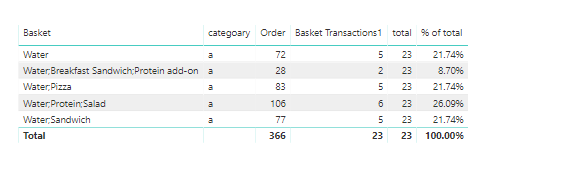
The end goal is to have a dropdown of distinct categories, to select a single category at a time and then to see all of the baskets that include that category in some shape or form. From there, we would have a measure that calculates the total number of transactions for each basket, a measure that calculates the total number of transactions for all baskets including that category, and a measure that would simply divide the former by the latter to get the percentage of the total. Here is a very basic example of what that might look like when someone selects "Water" from the dropdown:
Basket | Basket Transactions | Total Transactions | % of Total
---------------------------------------------------------------------------------------------------------------------------------
Water | 52 | 117 | 44.4%
Water;Sandwich | 28 | 117 | 23.9%
Water;Protein;Salad | 20 | 117 | 17.1%
Water;Pizza | 12 | 117 | 10.3%
Water;Breakfast Sandwich;Protein add-on | 5 | 117 | 4.3%
Total | 117 | 117 | 100.0%
Here are the measures I've created so far. 'Product A' is the table of distinct categories that is being used to populate the dropdown. It is a standalone table with no relationships to any other tables in the model.
Basket Transactions :=
VAR A_SELECTION =
    HASONEVALUE ( 'Product A'[Product A] )
VAR A_VALUE =
    VALUES ( 'Product A'[Product A] )
RETURN
    IF (
        A_SELECTION = FALSE (),
        BLANK (),
        CALCULATE (
            [Total Orders],
            FILTER (
                'POS Order Detail',
                'POS Order Detail'[Basket] = A_VALUE
                    || RIGHT ( 'POS Order Detail'[Basket], LEN ( A_VALUE ) + 1 )
                        = ";" & A_VALUE
                    || LEFT ( 'POS Order Detail'[Basket], LEN ( A_VALUE ) + 1 )
                        = A_VALUE & ";"
                    || SEARCH ( ";" & A_VALUE & ";", 'POS Order Detail'[Basket], 1, 0 )
                        > 0
            )
        )
    )
Category Transactions :=
VAR A_SELECTION =
    HASONEVALUE ( 'Product A'[Product A] )
VAR A_VALUE =
    VALUES ( 'Product A'[Product A] )
RETURN
    IF (
        A_SELECTION = FALSE (),
        BLANK (),
        IF (
            ISBLANK ( [Basket Transactions] ),
            BLANK (),
            CALCULATE (
                [Total Orders],
                'POS Order Detail'[Basket] = A_VALUE
                    || RIGHT ( 'POS Order Detail'[Basket], LEN ( A_VALUE ) + 1 )
                        = ";" & A_VALUE
                    || LEFT ( 'POS Order Detail'[Basket], LEN ( A_VALUE ) + 1 )
                        = A_VALUE & ";"
                    || SEARCH ( ";" & A_VALUE & ";", 'POS Order Detail'[Basket], 1, 0 )
                        > 0
            )
        )
    )
These measures worked perfectly when using a single day's worth of data for testing. I've now scaled my testing up to two months of data, and these calculations are taking minutes to return (if at all). This is a huge problem for us because while those two months of data in DEV include about 130M records, there will be 1B+ records when this goes up to PRD.
I'm sure that the biggest issue is probably with all of the filters being used to identify the baskets that match the dropdown, so I guess my first question should be whether this is the best way to handle this. The selected category will either be alone in a basket or fall somewhere at the beginning, middle, or end of a basket that includes multiple categories, so I wasn't sure how else to handle this. When I first started, the plan was to use the category dropdown to dynamically limit the displayed baskets, at which point the measures would be very simple to calculate. I couldn't find a way to do that, though, which is why the filters ended up in my measures.
Any help is much appreciated!