Join us at FabCon Atlanta from March 16 - 20, 2026, for the ultimate Fabric, Power BI, AI and SQL community-led event. Save $200 with code FABCOMM.
Register now!The Power BI Data Visualization World Championships is back! Get ahead of the game and start preparing now! Learn more
Hello,
I am calculating Sales Rate using the formula- Sum of Table1[Amt]/ Sum of Table2[Amt]
If either of the amt is zero, I have to show blank which is what I am doing using the current measure
Sales Rate=IFERROR([A]/[B], BLANK())
where A- Sum of Table 1[Amt]
B- Sum of Table 2[Amt]
when I am selecting multiple date range, I am not getting average value. How do I calculate average for a measure in this scenario?
Thanks in advance.
@Anonymous
According to your description, you want to calculate average baesd on the result of a calculated measure on row level. Right?
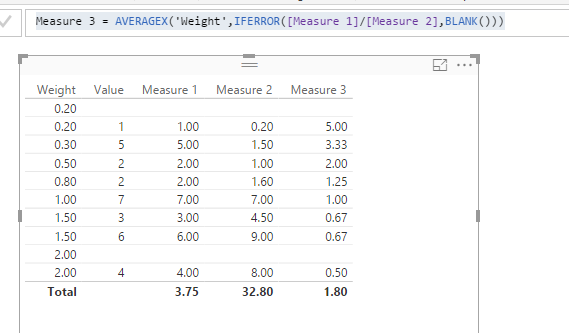
Since your calculation need to be evaluated on each row, you should put your calculated measure expression into AVERAGEX() function.
Sales Rate = AVERAGEX('Table',IFERROR([Measure 1]/[Measure 2],BLANK()))
Regards,
Thanks for replying. What is happening in this current context is, If I select 2016 and 2017 in my year slicer for the month of Jan, it is calculating Sum of (Table1)Amount for Jan 2016 + Sum of (Table1)Amount for Jan 2017/Sum of (Table2)Amount for Jan 2016+ Sum of (Table2) Amount for Jan 2017.
What I would like is Rate1= Sum of (Table1)Amount for Jan 2016/ Sum of (Table2)Amount for Jan 2016
Rate 2= Sum of (Table1)Amount for Jan 2017/ Sum of (Table2)Amount for Jan 2017
then Final Rate= (Rate 1+ Rate 2)/2
I tried using the solution that you provided, but I am confused what to use in "Table". I used Date table since it is given relationship with both Tables. Not getting desired result.
Thanks in advance.
The Power BI Data Visualization World Championships is back! Get ahead of the game and start preparing now!
| User | Count |
|---|---|
| 39 | |
| 37 | |
| 33 | |
| 32 | |
| 29 |
| User | Count |
|---|---|
| 133 | |
| 88 | |
| 85 | |
| 68 | |
| 64 |