Get certified for free when you join Fabric Data Days 2026 and dive into Fabric, Power BI, SQL, AI, and other essential data skills.
Join nowTry your skills in the Power BI Dataviz World Championship! Round one ends June 26. Join now
Hi there,
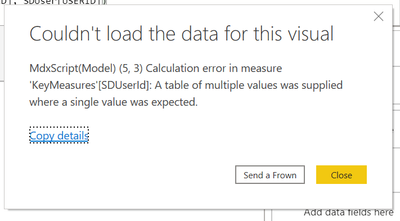
I am getting an error
for the Measures :
I have a sql query like below :
SELECT top 10 "wo"."WORKORDERID" AS "Request ID",
"aau"."FIRST_NAME" AS "Requester",
"ti"."FIRST_NAME" AS "Technician",
"wo"."CREATEDTIME" AS "Created Time"
FROM "WorkOrder" "wo" LEFT JOIN "SDUser" "sdu"
ON "wo"."REQUESTERID"="sdu"."USERID"
LEFT JOIN "AaaUser" "aau" ON "sdu"."USERID"="aau"."USER_ID"
LEFT JOIN "WorkOrderStates" "wos" ON "wo"."WORKORDERID"="wos"."WORKORDERID"
LEFT JOIN "SDUser" "td" ON "wos"."OWNERID"="td"."USERID"
LEFT JOIN "AaaUser" "ti" ON "td"."USERID"="ti"."USER_ID"
To get the Technicial value , I have to create userrelationship() but its not working.
Please kindly assist.
Thanks
Solved! Go to Solution.
@suvechha , you need have some operation like , min , max , count , sum
SDUserId = CALCULATE(
Count(SDUser[USERID]),
USERELATIONSHIP(WorkOrderStates[OWNERID], SDUser[USERID])
)
to get top 10, use topn or rank
For Rank Refer these links
https://radacad.com/how-to-use-rankx-in-dax-part-2-of-3-calculated-measures
https://radacad.com/how-to-use-rankx-in-dax-part-1-of-3-calculated-columns
https://radacad.com/how-to-use-rankx-in-dax-part-3-of-3-the-finale
https://community.powerbi.com/t5/Community-Blog/Dynamic-TopN-made-easy-with-What-If-Parameter/ba-p/3...
Hi , @suvechha
Take a try to use FIRSTNONBLANK(SDUser[USERID], 1) instead of SDUser[USERID].
Best Regards,
Community Support Team _ Eason
@suvechha , you need have some operation like , min , max , count , sum
SDUserId = CALCULATE(
Count(SDUser[USERID]),
USERELATIONSHIP(WorkOrderStates[OWNERID], SDUser[USERID])
)
to get top 10, use topn or rank
For Rank Refer these links
https://radacad.com/how-to-use-rankx-in-dax-part-2-of-3-calculated-measures
https://radacad.com/how-to-use-rankx-in-dax-part-1-of-3-calculated-columns
https://radacad.com/how-to-use-rankx-in-dax-part-3-of-3-the-finale
https://community.powerbi.com/t5/Community-Blog/Dynamic-TopN-made-easy-with-What-If-Parameter/ba-p/3...
| User | Count |
|---|---|
| 23 | |
| 21 | |
| 20 | |
| 17 | |
| 11 |
| User | Count |
|---|---|
| 55 | |
| 53 | |
| 41 | |
| 36 | |
| 32 |