Join us at FabCon Atlanta from March 16 - 20, 2026, for the ultimate Fabric, Power BI, AI and SQL community-led event. Save $200 with code FABCOMM.
Register now!The Power BI Data Visualization World Championships is back! Get ahead of the game and start preparing now! Learn more
Hi community, I have an interesting problem that I'm not able to find a solution for anywhere here:
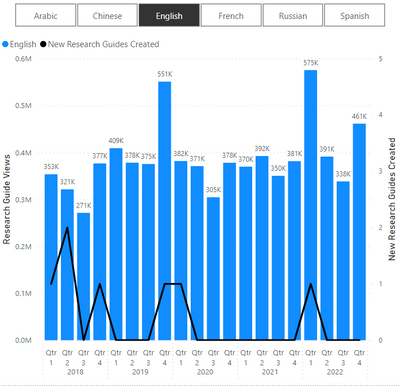
Here is the bar chart below, with [measure] on the secondary-axis as a black line:
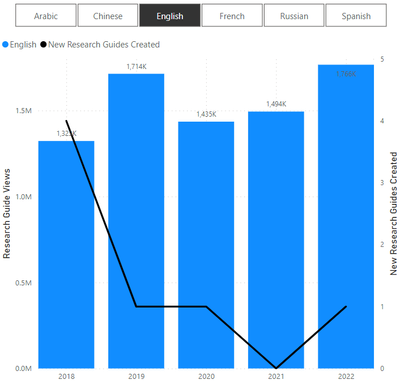
In the above, the date hierarchy level is quarter, and at this specified level, the max of [measure] is 2, therefore I want my desired measure to return 2. In the below however, the date level is year, and here I want my desired measure to return 4.
Note also that my desired measure also needs to be dynamic based off of slicer filtering - in this case, for language.
Is this possible?
@daweedle , Based on what I got
Switch( True() ,
isinscope(Date[Date]) , [M1],
isinscope(Date[Month]) , [M2],
isinscope(Date[Qtr]) , [M3],
[M4]
)
This does not work. My desired measure needs to return the maximum at the grand total level, i.e. the maximum value of [measure] for the whole data set (with filtering).
The challenge is that I require a 2-step calculation. The 1st calculation is for [measure], which is calculated at different levels as per user-selected hierarchy level. The 2nd calculation is performed at the grand total level, to get the max value of [measure] across all values returned from the 1st calculation. Using ISINSCOPE will return a blank for the 2nd calculation since it will return FALSE at the 2nd calculation.
Another way of thinking about this problem - I basically want the following expression:
MAXX(SUMMARIZE(Table, [DateLevel], "M", [measure]), [M])
where [DateLevel] is dynamic and specified by the date level of the visual. ISINSCOPE does allow me to check the date level but only for calculations at that same level - and unfortunately not for calculating at a higher level to get the aggregate maximum.
The Power BI Data Visualization World Championships is back! Get ahead of the game and start preparing now!
Check out the November 2025 Power BI update to learn about new features.
| User | Count |
|---|---|
| 59 | |
| 46 | |
| 42 | |
| 23 | |
| 18 |
| User | Count |
|---|---|
| 193 | |
| 123 | |
| 99 | |
| 67 | |
| 49 |