Get certified for free when you join Fabric Data Days 2026 and dive into Fabric, Power BI, SQL, AI, and other essential data skills.
Join nowData Days is here! Join us now for 60+ days of learning, challenges, and connection. Learn more
Hey,
I just published the report on my test env but it crashes because it consumes a lot of memory. My test databases have a limited number of table rows (max 1M).
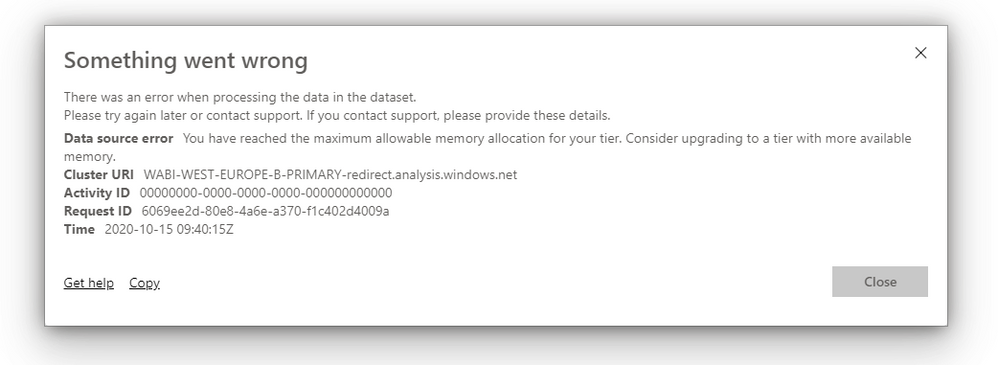
Is it possible to optimize the report so it can handle million rows of data, error message attached.
Raising the tier is not an option as this will make the whole proposition far too expensive.
Data is currently being imported, will changing to direct query help?
Solved! Go to Solution.
Check how much memory you have and how much space you have used.
According to my research, at some point this may be a temporary error.
You might have a reference to these two similar threads that have been resolved.
https://stackoverflow.com/questions/45634697/azure-analysis-services-maximum-allowable-memory-issue
Paul Zheng _ Community Support Team
If this post helps, please accept it as the solution to help the other members find it faster.
Check how much memory you have and how much space you have used.
According to my research, at some point this may be a temporary error.
You might have a reference to these two similar threads that have been resolved.
https://stackoverflow.com/questions/45634697/azure-analysis-services-maximum-allowable-memory-issue
Paul Zheng _ Community Support Team
If this post helps, please accept it as the solution to help the other members find it faster.
@magnify-bi , Log an issue -https://community.powerbi.com/t5/Issues/idb-p/Issues
Don't miss out on Data Days, June 15 through August 7. Learn Fabric, Power BI, SQL, AI and more.
Check out the May 2026 Power BI update to learn about new features.
| User | Count |
|---|---|
| 23 | |
| 23 | |
| 21 | |
| 17 | |
| 14 |
| User | Count |
|---|---|
| 58 | |
| 50 | |
| 37 | |
| 29 | |
| 24 |