Join us in Barcelona for FabCon and SQLCon, September 28 - October 1, 2026.
This is best Fabric, Power BI, SQL and AI community event. How do we know? The last event sold out! Save €200 with code FABCMTY200.
Register now- Power BI forums
- Get Help with Power BI
- Desktop
- Service
- Report Server
- Power Query
- Mobile Apps
- Developer
- DAX Commands and Tips
- Custom Visuals Development Discussion
- Health and Life Sciences
- Power BI Spanish forums
- Translated Spanish Desktop
- Training and Consulting
- Instructor Led Training
- Dashboard in a Day for Women, by Women
- Galleries
- Data Stories Gallery
- Themes Gallery
- Contests Gallery
- QuickViz Gallery
- Quick Measures Gallery
- Visual Calculations Gallery
- Fabric Apps Gallery
- Notebook Gallery
- Translytical Task Flow Gallery
- TMDL Gallery
- R Script Showcase
- Webinars and Video Gallery
- Ideas
- Custom Visuals Ideas (read-only)
- Issues
- Issues
- Events
- Upcoming Events
The Fabric community is now in read-only for platform upgrade. Learn more
- Power BI forums
- Forums
- Get Help with Power BI
- Desktop
- Max value date
- Subscribe to RSS Feed
- Mark Topic as New
- Mark Topic as Read
- Float this Topic for Current User
- Bookmark
- Subscribe
- Printer Friendly Page

- Mark as New
- Bookmark
- Subscribe
- Mute
- Subscribe to RSS Feed
- Permalink
Max value date
We are trying to create a measure which shows us the created date. To determine this we use the max function (or maxx), but we will not see values. Our formula is the following:
max created date = MAX('Dim_....'[CreatedDate])
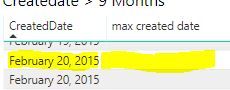
As prt screen shows, it will not give me any values. Same formula does work in the date table. Anybody any idea what can be the reason that it is not working for other values? Can it be a specific setting of the column?


- Mark as New
- Bookmark
- Subscribe
- Mute
- Subscribe to RSS Feed
- Permalink
@tex628 Dataformat is date/time. Tried to change it to date as well, but that also doesn't give any output.


- Mark as New
- Bookmark
- Subscribe
- Mute
- Subscribe to RSS Feed
- Permalink
Hi @Anonymous ,
I tried with Both the Date/Time and Date data type and it gives me output. If possible so can please put your created date column in seperate pbix file and send the file here with masking of your data.
Please take a quick glance at newly created dashboards : Restaurant Management Dashboard , HR Analytics Report , Hotel Management Report, Sales Analysis Report , Fortune 500 Companies Analysis , Revenue Tracking Dashboard
- Mark as New
- Bookmark
- Subscribe
- Mute
- Subscribe to RSS Feed
- Permalink
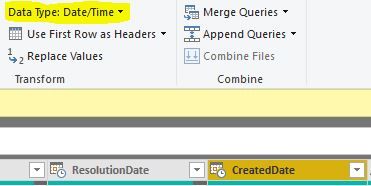
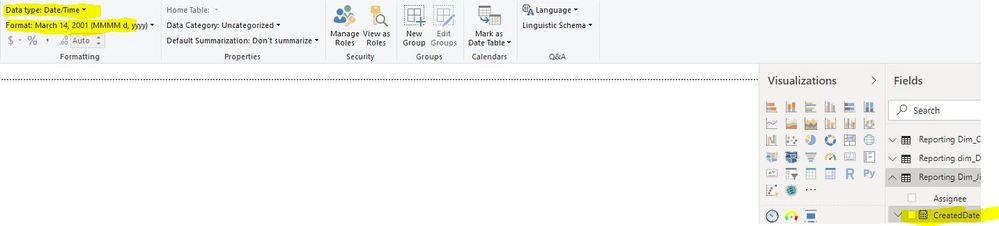
@Tahreem24 I know, but i just the datatypes and this seems to be right. (See prt screens query editor and pbi attached). For both I selected same "createddate" column.
- Mark as New
- Bookmark
- Subscribe
- Mute
- Subscribe to RSS Feed
- Permalink
Well thats strange.. Because you're not wrong, MAX should indeed work in this situation.
If you take a new plain table. Add only the date column and your measure, do you get the same result?
/J
Connect on LinkedIn
- Mark as New
- Bookmark
- Subscribe
- Mute
- Subscribe to RSS Feed
- Permalink
@tex628 What do you mean? Do you mean same as i already provided in the prt screen in the original post? There you see created date and the outcome of the measure? Or do you mean something else?
- Mark as New
- Bookmark
- Subscribe
- Mute
- Subscribe to RSS Feed
- Permalink
Considering that Feb 20 appears twice it looks like there are more dimensions in the table from your screenshot.
If you are able to share the file it would make this alot easier.
Connect on LinkedIn
- Mark as New
- Bookmark
- Subscribe
- Mute
- Subscribe to RSS Feed
- Permalink
@tex628 Aahh, I think you're right!!! If I only select createdDate and max createdDate i don't get any values!! Do you have any idea how to fix that? I would like to now whether my created date is more than 6 months ago. Therefore i would like to compare created day with today. Measure would be easy if i have created day
- Mark as New
- Bookmark
- Subscribe
- Mute
- Subscribe to RSS Feed
- Permalink
@tex628 Oohh sorry, i just dubble check.. Both values are located in same dimension, although if i only use created date and max created date i only see blanc values. Any idea how this is possible?
- Mark as New
- Bookmark
- Subscribe
- Mute
- Subscribe to RSS Feed
- Permalink
Hi @tex628 ,
Hopefully you had a great holiday! Did you already had time to take a closer look? 🙂 I still have no idea how to fix it!
- Mark as New
- Bookmark
- Subscribe
- Mute
- Subscribe to RSS Feed
- Permalink
Thank you!
The createdDate column, is it just a plain date column or is it a calculated column?
If its a calculated column, are you using the FORMAT() syntax?
Is it possible for you to send the pbix or is it confidential information?
Br,
J
Connect on LinkedIn
Helpful resources

FabCon & SQLCon – Barcelona 2026
Join us in Barcelona for FabCon and SQLCon, the Fabric, Power BI, SQL, and AI community event. Save €200 with code FABCMTY200.

Power BI DataViz World Championships - June 2026
A new Power BI DataViz World Championship is coming this June! Don't miss out on submitting your entry.

| User | Count |
|---|---|
| 23 | |
| 22 | |
| 14 | |
| 14 | |
| 13 |


| User | Count |
|---|---|
| 47 | |
| 39 | |
| 24 | |
| 20 | |
| 20 |


