Join us at FabCon Atlanta from March 16 - 20, 2026, for the ultimate Fabric, Power BI, AI and SQL community-led event. Save $200 with code FABCOMM.
Register now!The Power BI Data Visualization World Championships is back! Get ahead of the game and start preparing now! Learn more
Hi team,
I have created Matrxi visual in Power BI
My matrxi rows:year,Month,Day(date hierachy)
Columns:INDIA,USA,UK
Source:Azure sql server query
MY question:
When day data not availble my source query should be zero in columns
table1:current my data
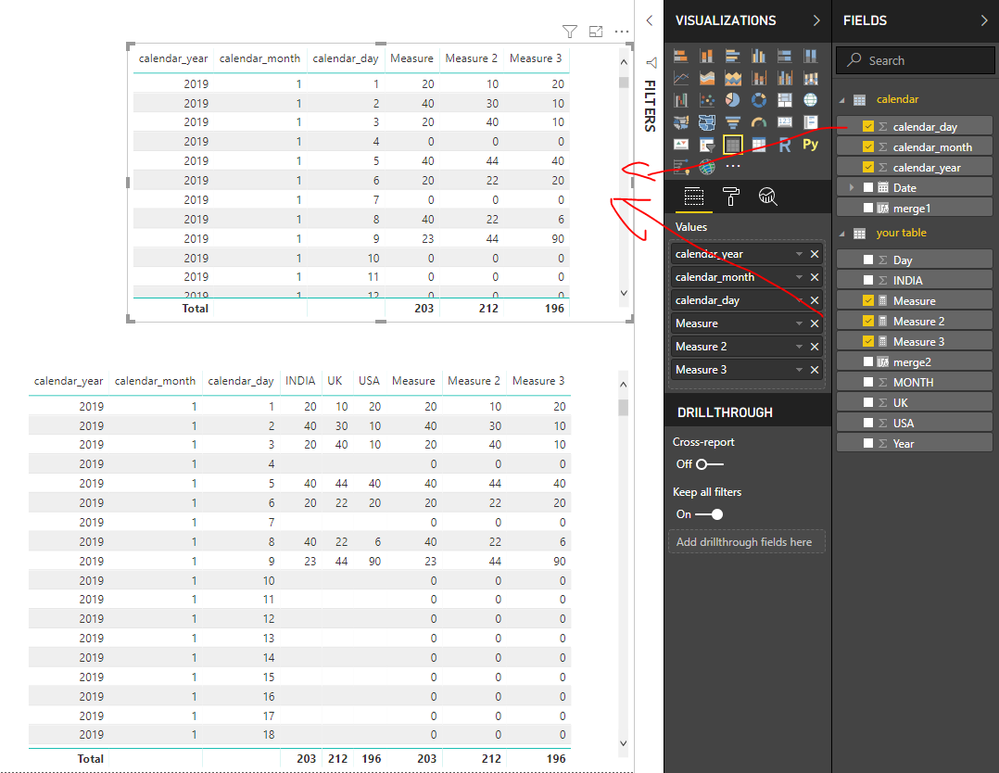
table 2:Expected output(4 and 7 day data not availble in source(table1) but i am expecting 4 and 7 date should be zero values
Table1:
| Year | MONTH | Day | INDIA | USA | UK |
| 2019 | 1 | 1 | 20 | 20 | 10 |
| 2019 | 1 | 2 | 40 | 10 | 30 |
| 2019 | 1 | 3 | 20 | 10 | 40 |
| 2019 | 1 | 5 | 40 | 40 | 44 |
| 2019 | 1 | 6 | 20 | 20 | 22 |
| 2019 | 1 | 8 | 40 | 6 | 22 |
| 2019 | 1 | 9 | 23 | 90 | 44 |
Expected OUTPUT table2:
| Year | MONTH | Day | INDIA | USA | UK |
| 2019 | 1 | 1 | 20 | 20 | 10 |
| 2019 | 1 | 2 | 40 | 10 | 30 |
| 2019 | 1 | 3 | 20 | 10 | 40 |
| 2019 | 1 | 4 | 0 | 0 | 0 |
| 2019 | 1 | 5 | 40 | 40 | 44 |
| 2019 | 1 | 6 | 20 | 20 | 22 |
| 2019 | 1 | 7 | 0 | 0 | 0 |
| 2019 | 1 | 8 | 40 | 6 | 22 |
| 2019 | 1 | 9 | 23 | 90 | 44 |
Thanks
Shanvitha
Solved! Go to Solution.
Hi @Anonymous
1. Create a new table
calendar =
ADDCOLUMNS (
CALENDAR (
DATE ( CALCULATE ( MIN ( 'your table'[Year] ), ALL ( 'your table' ) ), 1, 1 ),
DATE ( CALCULATE ( MAX ( 'your table'[Year] ), ALL ( 'your table' ) ), 12, 31 )
),
"calendar_year", YEAR ( [Date] ),
"calendar_month", MONTH ( [Date] ),
"calendar_day", DAY ( [Date] )
)
2. Create calculated columns in your table and new table
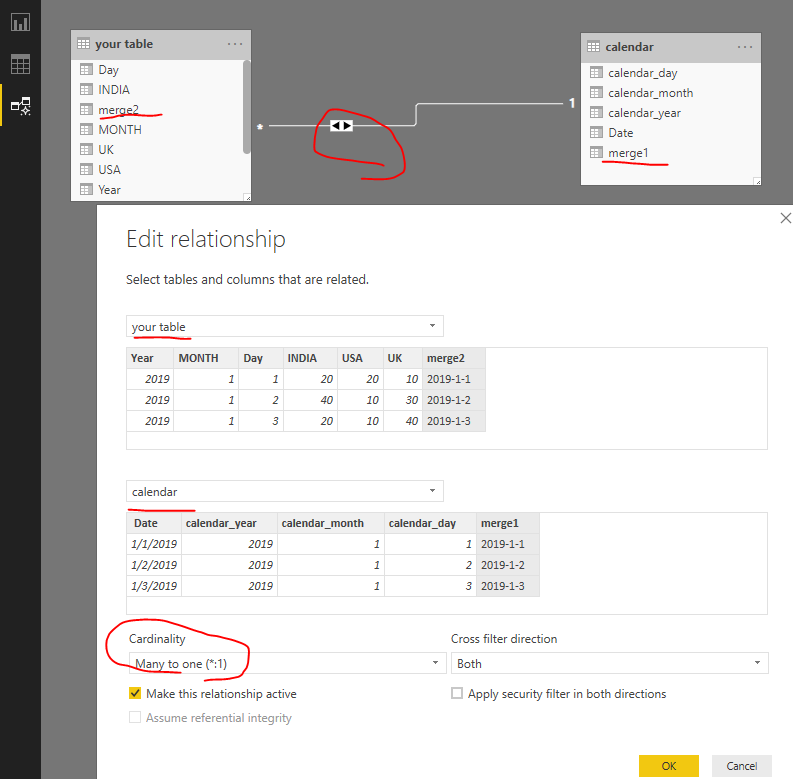
in calendar table merge1 = [calendar_year]&"-"&[calendar_month]&"-"&[calendar_day] in your table merge2 = [Year]&"-"&[MONTH]&"-"&[Day]
3. create relationships as below
4. create measures in your table
Measure = IF(SUM('your table'[INDIA])=BLANK(),0,SUM('your table'[INDIA]))
Measure 2 = IF(SUM('your table'[UK])=BLANK(),0,SUM('your table'[UK]))
Measure 3 = IF(SUM('your table'[USA])=BLANK(),0,SUM('your table'[USA]))
Best Regards
Maggie
Community Support Team _ Maggie Li
If this post helps, then please consider Accept it as the solution to help the other members find it more quickly.
Hi @Anonymous
1. Create a new table
calendar =
ADDCOLUMNS (
CALENDAR (
DATE ( CALCULATE ( MIN ( 'your table'[Year] ), ALL ( 'your table' ) ), 1, 1 ),
DATE ( CALCULATE ( MAX ( 'your table'[Year] ), ALL ( 'your table' ) ), 12, 31 )
),
"calendar_year", YEAR ( [Date] ),
"calendar_month", MONTH ( [Date] ),
"calendar_day", DAY ( [Date] )
)
2. Create calculated columns in your table and new table
in calendar table merge1 = [calendar_year]&"-"&[calendar_month]&"-"&[calendar_day] in your table merge2 = [Year]&"-"&[MONTH]&"-"&[Day]
3. create relationships as below
4. create measures in your table
Measure = IF(SUM('your table'[INDIA])=BLANK(),0,SUM('your table'[INDIA]))
Measure 2 = IF(SUM('your table'[UK])=BLANK(),0,SUM('your table'[UK]))
Measure 3 = IF(SUM('your table'[USA])=BLANK(),0,SUM('your table'[USA]))
Best Regards
Maggie
Community Support Team _ Maggie Li
If this post helps, then please consider Accept it as the solution to help the other members find it more quickly.
Hi @Anonymous
Do you import data in to Power BI Desktop or use direct query/ live connection?
Best Regards
Maggie
Hi Maggie,
My data is import data method,
thanks
Shanvitha
The Power BI Data Visualization World Championships is back! Get ahead of the game and start preparing now!
| User | Count |
|---|---|
| 40 | |
| 36 | |
| 34 | |
| 31 | |
| 27 |
| User | Count |
|---|---|
| 136 | |
| 103 | |
| 67 | |
| 65 | |
| 56 |