Learn from the best! Meet the four finalists headed to the FINALS of the Power BI Dataviz World Championships! Register now
Hi team,
I have created Matrxi visual in Power BI
My matrxi rows:year,Month,Day(date hierachy)
Columns:INDIA,USA,UK
Source:Azure sql server query
MY question:
When day data not availble my source query should be zero in columns
table1:current my data
table 2:Expected output(4 and 7 day data not availble in source(table1) but i am expecting 4 and 7 date should be zero values
Table1:
| Year | MONTH | Day | INDIA | USA | UK |
| 2019 | 1 | 1 | 20 | 20 | 10 |
| 2019 | 1 | 2 | 40 | 10 | 30 |
| 2019 | 1 | 3 | 20 | 10 | 40 |
| 2019 | 1 | 5 | 40 | 40 | 44 |
| 2019 | 1 | 6 | 20 | 20 | 22 |
| 2019 | 1 | 8 | 40 | 6 | 22 |
| 2019 | 1 | 9 | 23 | 90 | 44 |
Expected OUTPUT table2:
| Year | MONTH | Day | INDIA | USA | UK |
| 2019 | 1 | 1 | 20 | 20 | 10 |
| 2019 | 1 | 2 | 40 | 10 | 30 |
| 2019 | 1 | 3 | 20 | 10 | 40 |
| 2019 | 1 | 4 | 0 | 0 | 0 |
| 2019 | 1 | 5 | 40 | 40 | 44 |
| 2019 | 1 | 6 | 20 | 20 | 22 |
| 2019 | 1 | 7 | 0 | 0 | 0 |
| 2019 | 1 | 8 | 40 | 6 | 22 |
| 2019 | 1 | 9 | 23 | 90 | 44 |
Thanks
Shanvitha
Solved! Go to Solution.
Hi @Anonymous
1. Create a new table
calendar =
ADDCOLUMNS (
CALENDAR (
DATE ( CALCULATE ( MIN ( 'your table'[Year] ), ALL ( 'your table' ) ), 1, 1 ),
DATE ( CALCULATE ( MAX ( 'your table'[Year] ), ALL ( 'your table' ) ), 12, 31 )
),
"calendar_year", YEAR ( [Date] ),
"calendar_month", MONTH ( [Date] ),
"calendar_day", DAY ( [Date] )
)
2. Create calculated columns in your table and new table
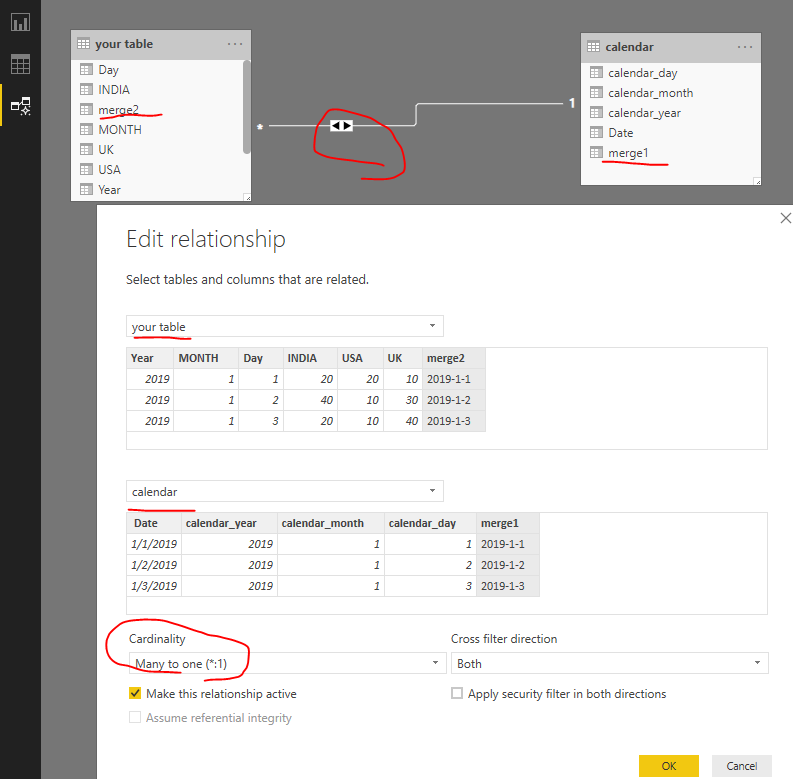
in calendar table merge1 = [calendar_year]&"-"&[calendar_month]&"-"&[calendar_day] in your table merge2 = [Year]&"-"&[MONTH]&"-"&[Day]
3. create relationships as below
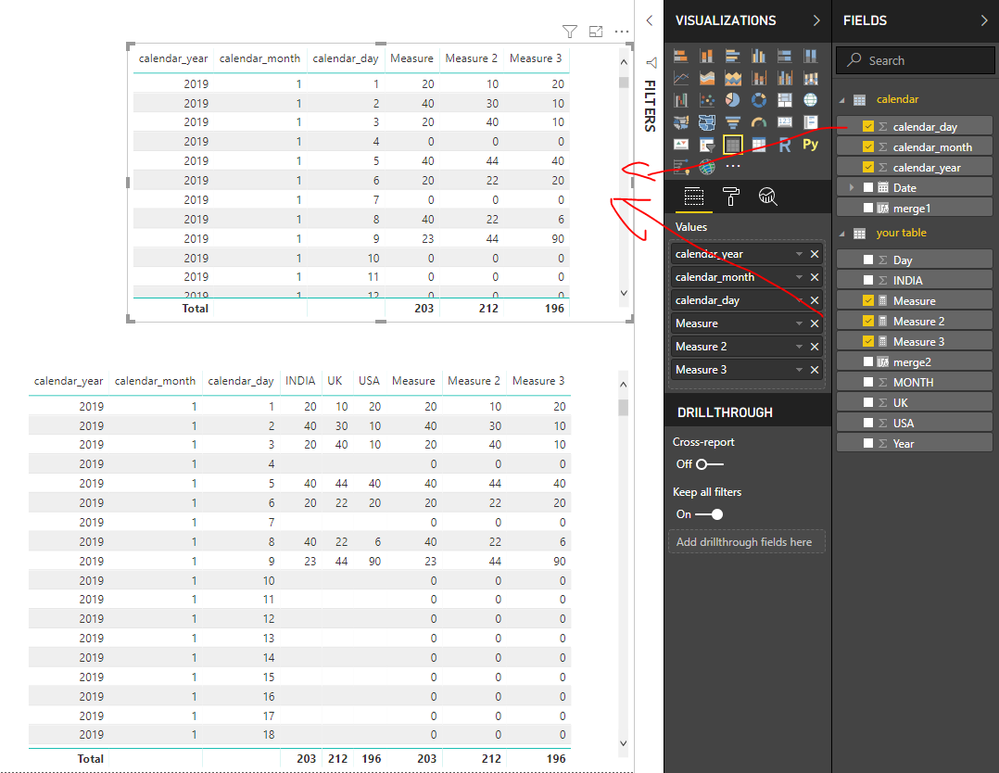
4. create measures in your table
Measure = IF(SUM('your table'[INDIA])=BLANK(),0,SUM('your table'[INDIA]))
Measure 2 = IF(SUM('your table'[UK])=BLANK(),0,SUM('your table'[UK]))
Measure 3 = IF(SUM('your table'[USA])=BLANK(),0,SUM('your table'[USA]))
Best Regards
Maggie
Community Support Team _ Maggie Li
If this post helps, then please consider Accept it as the solution to help the other members find it more quickly.
Hi @Anonymous
1. Create a new table
calendar =
ADDCOLUMNS (
CALENDAR (
DATE ( CALCULATE ( MIN ( 'your table'[Year] ), ALL ( 'your table' ) ), 1, 1 ),
DATE ( CALCULATE ( MAX ( 'your table'[Year] ), ALL ( 'your table' ) ), 12, 31 )
),
"calendar_year", YEAR ( [Date] ),
"calendar_month", MONTH ( [Date] ),
"calendar_day", DAY ( [Date] )
)
2. Create calculated columns in your table and new table
in calendar table merge1 = [calendar_year]&"-"&[calendar_month]&"-"&[calendar_day] in your table merge2 = [Year]&"-"&[MONTH]&"-"&[Day]
3. create relationships as below
4. create measures in your table
Measure = IF(SUM('your table'[INDIA])=BLANK(),0,SUM('your table'[INDIA]))
Measure 2 = IF(SUM('your table'[UK])=BLANK(),0,SUM('your table'[UK]))
Measure 3 = IF(SUM('your table'[USA])=BLANK(),0,SUM('your table'[USA]))
Best Regards
Maggie
Community Support Team _ Maggie Li
If this post helps, then please consider Accept it as the solution to help the other members find it more quickly.
Hi @Anonymous
Do you import data in to Power BI Desktop or use direct query/ live connection?
Best Regards
Maggie
Hi Maggie,
My data is import data method,
thanks
Shanvitha
| User | Count |
|---|---|
| 50 | |
| 36 | |
| 29 | |
| 18 | |
| 17 |
| User | Count |
|---|---|
| 66 | |
| 58 | |
| 40 | |
| 21 | |
| 20 |