cancel
Showing results for 
Search instead for 
Did you mean: 

The Power BI Data Visualization World Championships is back! Get ahead of the game and start preparing now! Learn more

Reply
HenryJS
Post Prodigy
Post Prodigy

Matrix

Hi all,


How can I get a matrix with Week Ending along columns but link to a table with two different date fields?


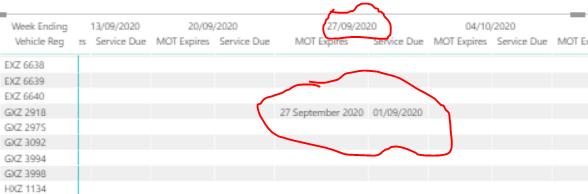
As below I linked the calendar table to 'MOT Expires' but this causes the 'Service Due' field to fall into the wrong date on the matrix.


Please see below example for GXZ 2918. 


I would like to have a matrix with week endings along columns and be able to drop in date fields from multiple fields.


Vehicle Reg MOT expiresService Due 
DXZ 964221/01/202122/01/2021
EXZ 594625/06/202123/01/2021
EXZ 663702/06/202124/01/2021
EXZ 663811/06/202125/01/2021
EXZ 663925/10/202026/01/2021
EXZ 664003/06/202127/01/2021
GXZ 291827/09/202001/09/2020


Capture.PNG


1 ACCEPTED SOLUTION

@HenryJS, see if this can solve the purpose

Share with Power BI Enthusiasts: Full Power BI Video (20 Hours) YouTube
Microsoft Fabric Series 60+ Videos YouTube
Microsoft Fabric Hindi End to End YouTube

View solution in original post

5 REPLIES 5
amitchandak
Super User
Super User

@HenryJS , Have a month or week table with dates . No need to join

And use measures like this for these dates

MOT expires measure = minx(filter(table,[MOT expires] <=Date[Date] && [Service Due] >= Date[Date]),[MOT expires] )
Service Due measure = maxx(filter(table,[MOT expires] <=Date[Date] && [Service Due] >= Date[Date]),[Service Due] )


The week on column   and Vehicle Reg  on row


Calendar with week

https://community.powerbi.com/t5/Community-Blog/Any-Weekday-Week-Decoding-Date-and-Calendar-2-5-Powe...

Share with Power BI Enthusiasts: Full Power BI Video (20 Hours) YouTube
Microsoft Fabric Series 60+ Videos YouTube
Microsoft Fabric Hindi End to End YouTube

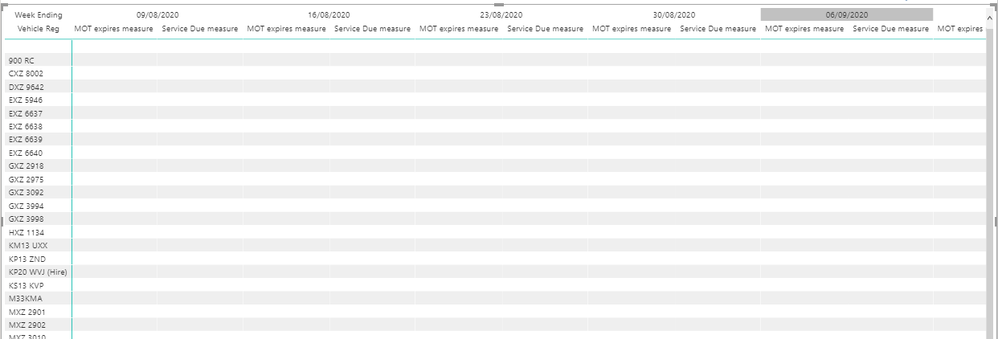
@amitchandak it did not work with the measure you sent - please see below


MOT expires measure = minx(filter('Vehicle Fleet Data',[MOT expires] <= 'calendar'[Date] && 'Vehicle Fleet Data'[Estimate Month Service Due] >= 'calendar'[Date]),'Vehicle Fleet Data'[MOT expires] )
 
Capture.PNG

@HenryJS , My mistake

Try like

MOT expires measure = minx(filter(table,table[MOT expires] <=max(Date[Date]) && table[Service Due] >= max(Date[Date])),table[MOT expires] )
Service Due measure = maxx(filter(table,table[MOT expires] <=max(Date[Date]) && table[Service Due] >= max(Date[Date])),table[Service Due] )

Share with Power BI Enthusiasts: Full Power BI Video (20 Hours) YouTube
Microsoft Fabric Series 60+ Videos YouTube
Microsoft Fabric Hindi End to End YouTube

@amitchandak none of the dates appeared in the matrix!


please see below


Capture.PNG

@HenryJS, see if this can solve the purpose

Share with Power BI Enthusiasts: Full Power BI Video (20 Hours) YouTube
Microsoft Fabric Series 60+ Videos YouTube
Microsoft Fabric Hindi End to End YouTube

Helpful resources

Announcements
Power BI DataViz World Championships

Power BI Dataviz World Championships

The Power BI Data Visualization World Championships is back! Get ahead of the game and start preparing now!

December 2025 Power BI Update Carousel

Power BI Monthly Update - December 2025

Check out the December 2025 Power BI Holiday Recap!

FabCon Atlanta 2026 carousel

FabCon Atlanta 2026

Join us at FabCon Atlanta, March 16-20, for the ultimate Fabric, Power BI, AI and SQL community-led event. Save $200 with code FABCOMM.