cancel
Showing results for 
Search instead for 
Did you mean: 

The Power BI Data Visualization World Championships is back! It's time to submit your entry. Live now!

Reply
HenryJS
Post Prodigy
Post Prodigy

Matrix

Hi all,


How can I get a matrix with Week Ending along columns but link to a table with two different date fields?


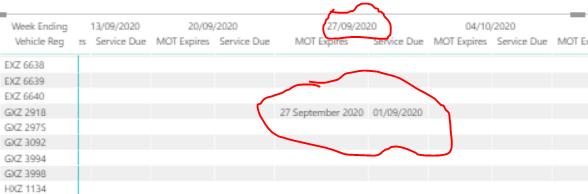
As below I linked the calendar table to 'MOT Expires' but this causes the 'Service Due' field to fall into the wrong date on the matrix.


Please see below example for GXZ 2918. 


I would like to have a matrix with week endings along columns and be able to drop in date fields from multiple fields.


Vehicle Reg MOT expiresService Due 
DXZ 964221/01/202122/01/2021
EXZ 594625/06/202123/01/2021
EXZ 663702/06/202124/01/2021
EXZ 663811/06/202125/01/2021
EXZ 663925/10/202026/01/2021
EXZ 664003/06/202127/01/2021
GXZ 291827/09/202001/09/2020


Capture.PNG


1 ACCEPTED SOLUTION

@HenryJS, see if this can solve the purpose

Share with Power BI Enthusiasts: Full Power BI Video (20 Hours) YouTube
Microsoft Fabric Series 60+ Videos YouTube
Microsoft Fabric Hindi End to End YouTube

View solution in original post

5 REPLIES 5
amitchandak
Super User
Super User

@HenryJS , Have a month or week table with dates . No need to join

And use measures like this for these dates

MOT expires measure = minx(filter(table,[MOT expires] <=Date[Date] && [Service Due] >= Date[Date]),[MOT expires] )
Service Due measure = maxx(filter(table,[MOT expires] <=Date[Date] && [Service Due] >= Date[Date]),[Service Due] )


The week on column   and Vehicle Reg  on row


Calendar with week

https://community.powerbi.com/t5/Community-Blog/Any-Weekday-Week-Decoding-Date-and-Calendar-2-5-Powe...

Share with Power BI Enthusiasts: Full Power BI Video (20 Hours) YouTube
Microsoft Fabric Series 60+ Videos YouTube
Microsoft Fabric Hindi End to End YouTube

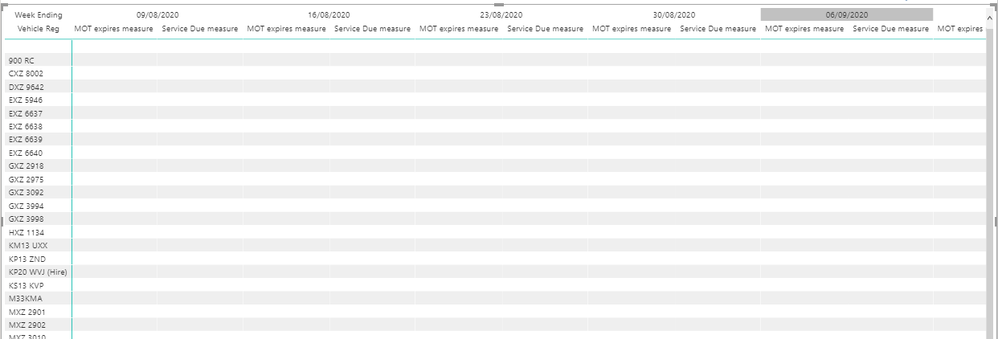
@amitchandak it did not work with the measure you sent - please see below


MOT expires measure = minx(filter('Vehicle Fleet Data',[MOT expires] <= 'calendar'[Date] && 'Vehicle Fleet Data'[Estimate Month Service Due] >= 'calendar'[Date]),'Vehicle Fleet Data'[MOT expires] )
 
Capture.PNG

@HenryJS , My mistake

Try like

MOT expires measure = minx(filter(table,table[MOT expires] <=max(Date[Date]) && table[Service Due] >= max(Date[Date])),table[MOT expires] )
Service Due measure = maxx(filter(table,table[MOT expires] <=max(Date[Date]) && table[Service Due] >= max(Date[Date])),table[Service Due] )

Share with Power BI Enthusiasts: Full Power BI Video (20 Hours) YouTube
Microsoft Fabric Series 60+ Videos YouTube
Microsoft Fabric Hindi End to End YouTube

@amitchandak none of the dates appeared in the matrix!


please see below


Capture.PNG

@HenryJS, see if this can solve the purpose

Share with Power BI Enthusiasts: Full Power BI Video (20 Hours) YouTube
Microsoft Fabric Series 60+ Videos YouTube
Microsoft Fabric Hindi End to End YouTube

Helpful resources

Announcements
FabCon Atlanta 2026 carousel

FabCon Atlanta 2026

Join us at FabCon Atlanta, March 16-20, for the ultimate Fabric, Power BI, AI and SQL community-led event. Save $200 with code FABCOMM.