Get certified for free when you join Fabric Data Days 2026 and dive into Fabric, Power BI, SQL, AI, and other essential data skills.
Join nowJuly 7 - July 17 | Round 2 of the Power BI Dataviz World Championships. Don't miss your chance! Learn more
Hi All,
I enjoy doing power BI and would like to add more graphs!
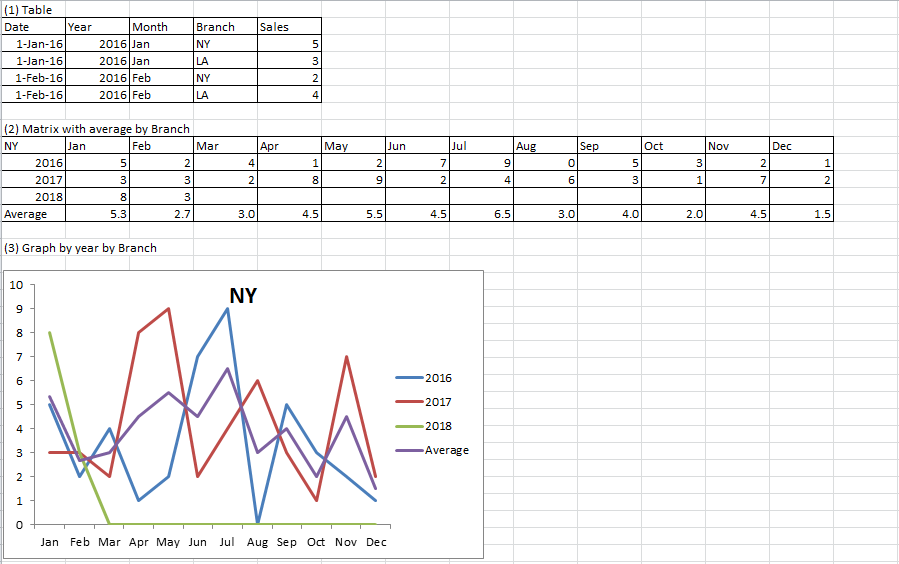
I have a table with month, branch and sales.(1) I created a matrix in vizualization.
I would like to see average instead of total (2) and create a graph(3).
It appeas I can not get average and create the graph based on matrix?
What is best approach to solve the solution? Thank you all for your help.
All the best,
cocomy
Hi,
I can get the Table (2) for your (from Table (1)). However, i do not know how to plot the Grand Total row (where you want the Average) on the Graph. If that is OK with you, then share the link from where i can download your data.
Hello
Thank you very much for trying.
As I mentioned, I want to compare sales by month, by branch in the graph.
Here is a link of my example table.
https://1drv.ms/x/s!Aknc1y0x4jcCbOR6foDoIGO802g
All the best,
cocomy
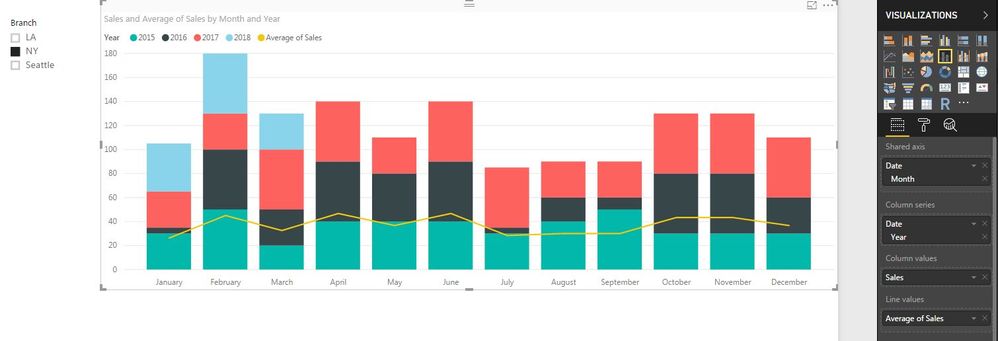
Hi @cocomy, Try using "Line and Stacked / clustered column chart". I've created a similar one using your data.
HI BI-Lingual,
Thank you for your suggestion. I want see them in lines idealy. Appreciate your try!
All the bset,
cocomy
Join us in Barcelona for FabCon and SQLCon, the Fabric, Power BI, SQL, and AI community event. Save €200 with code FABCMTY200.
Join Fabric Data Days 2026: 60 days of free live/on-demand sessions, challenges, study groups, and certification opportunities.
| User | Count |
|---|---|
| 23 | |
| 19 | |
| 18 | |
| 17 | |
| 13 |
| User | Count |
|---|---|
| 61 | |
| 53 | |
| 47 | |
| 40 | |
| 38 |