Get Fabric or SQL Certified for Free.
Get certified for free when you join Fabric Data Days 2026 and dive into Fabric, Power BI, SQL, AI, and other essential data skills.
Join now- Power BI forums
- Get Help with Power BI
- Desktop
- Service
- Report Server
- Power Query
- Mobile Apps
- Developer
- DAX Commands and Tips
- Custom Visuals Development Discussion
- Health and Life Sciences
- Power BI Spanish forums
- Translated Spanish Desktop
- Training and Consulting
- Instructor Led Training
- Dashboard in a Day for Women, by Women
- Galleries
- Data Stories Gallery
- Themes Gallery
- Contests Gallery
- QuickViz Gallery
- Quick Measures Gallery
- Visual Calculations Gallery
- Notebook Gallery
- Translytical Task Flow Gallery
- TMDL Gallery
- R Script Showcase
- Webinars and Video Gallery
- Ideas
- Custom Visuals Ideas (read-only)
- Issues
- Issues
- Events
- Upcoming Events
July 7 - July 17 | Round 2 of the Power BI Dataviz World Championships. Don't miss your chance! Learn more
- Power BI forums
- Forums
- Get Help with Power BI
- Desktop
- Re: Matrix with Multiple Group
- Subscribe to RSS Feed
- Mark Topic as New
- Mark Topic as Read
- Float this Topic for Current User
- Bookmark
- Subscribe
- Printer Friendly Page

- Mark as New
- Bookmark
- Subscribe
- Mute
- Subscribe to RSS Feed
- Permalink
- Report Inappropriate Content
Matrix with Multiple Group
Dear Team,
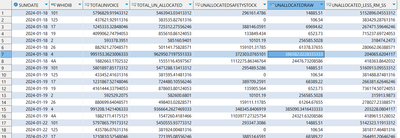
I have a table with values for Date,WarehouseID,TotalInvoice,TotalUnAllocated,UnAllocatedSafetyStock,UnAllocatedRAW, (TotalUnAllocated-UnAllocatedSafetyStock-UnAllocatedRAW) as UnAllocated_Less_RM_SS. I need to create a matrix with Date as Column and (TotalInvoice,TotalUnAllocated,UnAllocatedSafetyStock,UnAllocatedRAW,UnAllocated_Less_RM_SS) as Rows for each WarhouseIDs. Also I need to have GrandTotal for all warehouses for each date at the bottom of matrix.
Here is the sample data:
Expected Result:
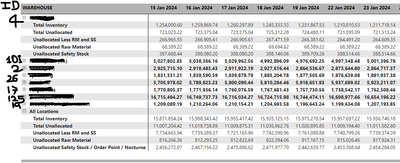
Any help would be appreciated greatly.
Thanks in advance.
- Mark as New
- Bookmark
- Subscribe
- Mute
- Subscribe to RSS Feed
- Permalink
- Report Inappropriate Content
@PijushRoy Here is the link for sample data https://drive.google.com/file/d/1wfomYish9U5AVZzcqUxYKVzal-CFAgYO/view?usp=sharing
Thank you.


- Mark as New
- Bookmark
- Subscribe
- Mute
- Subscribe to RSS Feed
- Permalink
- Report Inappropriate Content
- Mark as New
- Bookmark
- Subscribe
- Mute
- Subscribe to RSS Feed
- Permalink
- Report Inappropriate Content
@PijushRoy Thank you for the quick response. But my request is "On expanding" each warehouse ID, it should show the rows for " Total Invoice,Total Un Allocated, UnAllocated Safety Stock,UnAllocated RAW material, UnAllocated_Less_RM_SS)
same as given below:
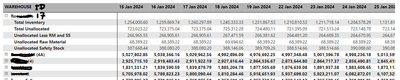
Also it should show the Total as "ALL Locations" with details in rows.
eg:
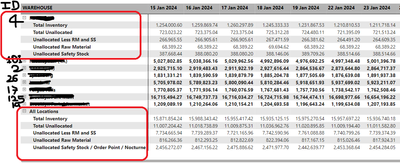
Let me know if you have any solution on this.
Thank you.
- Mark as New
- Bookmark
- Subscribe
- Mute
- Subscribe to RSS Feed
- Permalink
- Report Inappropriate Content
Hi @chinma
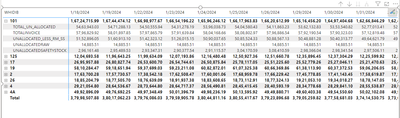
https://drive.google.com/file/d/1cX1U_QjidoMZrxsKwJM4UfEEvo0wSztb/view?usp=drive_link
If your requirement is solved, please make sure to MARK AS SOLUTION ✔️ and help other users find the solution quickly. Please hit the LIKE 👍 button if this comment helps you.
Thanks
Pijush
Proud to be a Super User! |  |
- Mark as New
- Bookmark
- Subscribe
- Mute
- Subscribe to RSS Feed
- Permalink
- Report Inappropriate Content
@PijushRoy Thank you for your solution . Its almost worked except that I need to have expandable section for Total at the bottm of the matrix as " All locations" for sum of each attributes with details as shown below:

Any help would be grateful.
Thank you.
- Mark as New
- Bookmark
- Subscribe
- Mute
- Subscribe to RSS Feed
- Permalink
- Report Inappropriate Content
Hi @chinma
For this requirement, you have to change the row order
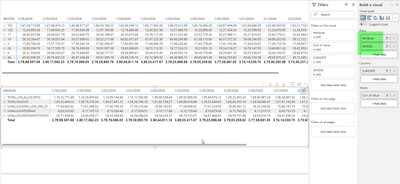
https://drive.google.com/file/d/1cX1U_QjidoMZrxsKwJM4UfEEvo0wSztb/view?usp=drive_link
If your requirement is solved, please make sure to MARK AS SOLUTION and help other users find the solution quickly. Please hit the LIKE button if this comment helps you.
Thanks
Pijush
Proud to be a Super User! | |
- Mark as New
- Bookmark
- Subscribe
- Mute
- Subscribe to RSS Feed
- Permalink
- Report Inappropriate Content
@PijushRoy My requirement was to have detail section for Total as well. It should be the sum of Total_Un_Allocated, Sum of Total Invoice....etc for all the warehouse IDs for each day.
eg:
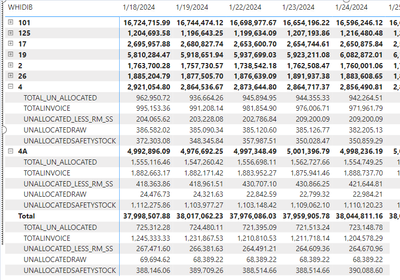
Please let me know how to achieve this.
Thank you.
- Mark as New
- Bookmark
- Subscribe
- Mute
- Subscribe to RSS Feed
- Permalink
- Report Inappropriate Content
Hi @chinma
As per my idea, you can combine two tables to achieve this
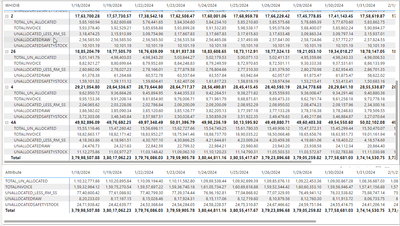
If your requirement is solved, please make sure to MARK AS SOLUTION and help other users find the solution quickly. Please hit the LIKE button if this comment helps you.
Thanks
Pijush
Proud to be a Super User! | |
- Mark as New
- Bookmark
- Subscribe
- Mute
- Subscribe to RSS Feed
- Permalink
- Report Inappropriate Content
Hi @chinma
Sample data link is not working, please check
Proud to be a Super User! | |

Helpful resources

FabCon & SQLCon – Barcelona 2026
Join us in Barcelona for FabCon and SQLCon, the Fabric, Power BI, SQL, and AI community event. Save €200 with code FABCMTY200.

Data Days 2026
Join Data Days 2026: 60 days of free live/on-demand sessions, challenges, study groups, and certification opportunities.

Power BI DataViz World Championships - June 2026
A new Power BI DataViz World Championship is coming this June! Don't miss out on submitting your entry.

| User | Count |
|---|---|
| 29 | |
| 23 | |
| 18 | |
| 18 | |
| 15 |


| User | Count |
|---|---|
| 51 | |
| 44 | |
| 43 | |
| 39 | |
| 32 |


