Join us at FabCon Atlanta from March 16 - 20, 2026, for the ultimate Fabric, Power BI, AI and SQL community-led event. Save $200 with code FABCOMM.
Register now!The Power BI Data Visualization World Championships is back! It's time to submit your entry. Live now!
Hello,
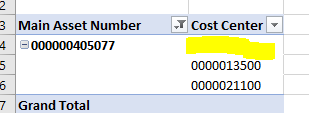
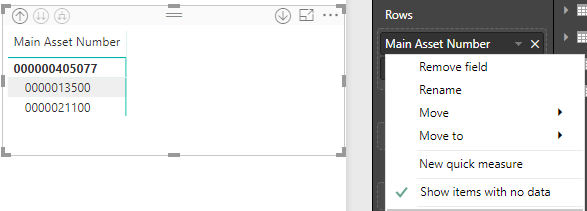
Any idea why a matrix in Power BI would not show the same result as a pivot in excel? The excel is reading from the Power BI dataset published in the service.
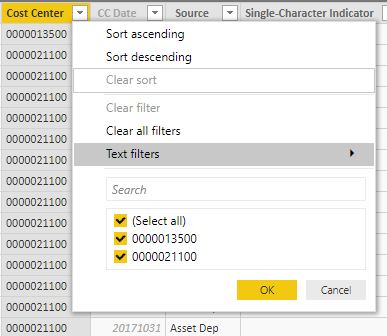
Looking at the table in Power BI I confirm there are no blanks in Cost Center:
Thoughts?
Solved! Go to Solution.
Turns out there was blank rows. Not sure how I missed them, especially since I check with the filters.
Thanks all!
Hi @Aron_Moore
The blank cell actually represents the total items , you could change the option setting if you’d like to show the same visual as Matrix:
Uncheck the “Classic PivotTable Layout”
Best regards,
Dina Ye
Turns out there was blank rows. Not sure how I missed them, especially since I check with the filters.
Thanks all!
The Power BI Data Visualization World Championships is back! It's time to submit your entry.
Check out the January 2026 Power BI update to learn about new features.
| User | Count |
|---|---|
| 61 | |
| 41 | |
| 30 | |
| 26 | |
| 23 |
| User | Count |
|---|---|
| 129 | |
| 111 | |
| 56 | |
| 39 | |
| 35 |