Join us at FabCon Atlanta from March 16 - 20, 2026, for the ultimate Fabric, Power BI, AI and SQL community-led event. Save $200 with code FABCOMM.
Register now!The Power BI Data Visualization World Championships is back! It's time to submit your entry. Live now!
Hello,
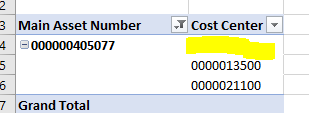
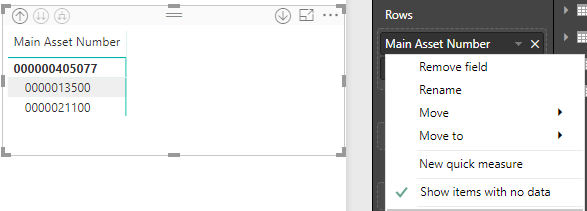
Any idea why a matrix in Power BI would not show the same result as a pivot in excel? The excel is reading from the Power BI dataset published in the service.
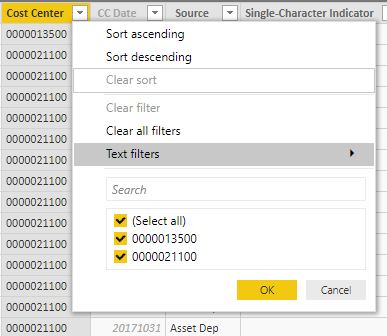
Looking at the table in Power BI I confirm there are no blanks in Cost Center:
Thoughts?
Solved! Go to Solution.
Turns out there was blank rows. Not sure how I missed them, especially since I check with the filters.
Thanks all!
Hi @Aron_Moore
The blank cell actually represents the total items , you could change the option setting if you’d like to show the same visual as Matrix:
Uncheck the “Classic PivotTable Layout”
Best regards,
Dina Ye
Turns out there was blank rows. Not sure how I missed them, especially since I check with the filters.
Thanks all!
| User | Count |
|---|---|
| 56 | |
| 39 | |
| 37 | |
| 21 | |
| 19 |
| User | Count |
|---|---|
| 140 | |
| 102 | |
| 63 | |
| 36 | |
| 35 |