cancel
Showing results for 
Search instead for 
Did you mean: 

The Power BI Data Visualization World Championships is back! It's time to submit your entry. Live now!

Reply
Anonymous
Not applicable

Matrix visual with tabular data

Hello,


I have a tabular data that is stored in the form of a matrix with multiple hierarchies. I want to show this data in the form of a matrix with both expand and collapse option. However, the issue here is that the values in that hierarchy are to be shown without any aggregation such as sum, max, min etc. However, in matrix this is not possible. It is always shown as aggregated value. Is it possible to customize matrix visual to show without any aggregation or is there any other visual, may be a custom one for the same purpose?


Thanks,


4 REPLIES 4
v-chenwuz-msft
Community Support
Community Support

Hi @Anonymous ,


I have a few suggestions for you to see if they work.

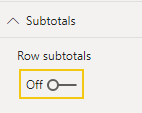
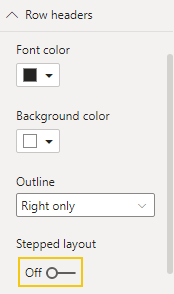
Set the matrix visual format

1 turn off the Row subtotals

vchenwuzmsft_0-1632878056789.png

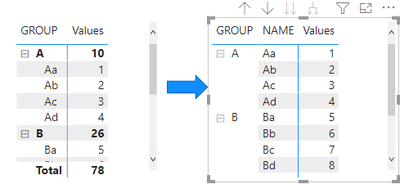
Result:

vchenwuzmsft_1-1632878056791.png

2 turn off the Stepped layout

vchenwuzmsft_2-1632878056793.png

Result:

vchenwuzmsft_3-1632878056796.png


Is this the result you want?


Best Regards

Community Support Team _ chenwu zhu


If this post helps, then please consider Accept it as the solution to help the other members find it more quickly.

Anonymous
Not applicable

Thanks for the comments but the values are still reported as aggregated when collapsed to the top level or in between. What I want is the actual values to be reported without any sum or min or max or avg. Seems like this is only supported in table but that visual misses out the +/- icons.

Fowmy
Super User
Super User

@Anonymous 

In order to get the desired result, you can add an index column in the power query to your data table and use it in your matrix to show the level of granularity you need.

Did I answer your question? Mark my post as a solution! and hit thumbs up


Subscribe and learn Power BI from these videos

Website LinkedIn PBI User Group

Anonymous
Not applicable

Thanks for the help. I did try using index column and it worked partially as I can see the actual values when all rows are expanded. However, when I collapsed to the top level, the total sum is again evaluated and the wrong values are reported on the columns. It seems that index does a trick but only when all the rows are expanded and without stepped layout. But this trick does misses out the sole purpose of navigating through +/- icons. Still better than the rest. And hence, looking for some other proper alternatives, otherwise I will close this post marking it as accepted.


Thanks again

Helpful resources

Announcements
Power BI DataViz World Championships

Power BI Dataviz World Championships

The Power BI Data Visualization World Championships is back! It's time to submit your entry.

January Power BI Update Carousel

Power BI Monthly Update - January 2026

Check out the January 2026 Power BI update to learn about new features.

FabCon Atlanta 2026 carousel

FabCon Atlanta 2026

Join us at FabCon Atlanta, March 16-20, for the ultimate Fabric, Power BI, AI and SQL community-led event. Save $200 with code FABCOMM.