Don't miss your chance to take the Fabric Data Engineer (DP-600) exam for FREE! Find out how by attending the DP-600 session on April 23rd (pacific time), live or on-demand.
Learn moreNext up in the FabCon + SQLCon recap series: The roadmap for Microsoft SQL and Maximizing Developer experiences in Fabric. All sessions are available on-demand after the live show. Register now
Hi,
Apologies if this has already been covered, I couldn't find an answer.
I have two products. I have monthly data for both.
I would like to show a matrix with fiscal year as rows, products as first level of column headers, months as second level of column headers (as shown below).
Problem is fiscal year is different for product 1 and product 2. I tried to put a "month_order" column where for product 1 : Oct = 0, Nov = 1 etc.. and for product 2, Sep = 0, Oct = 1, Nov = 2, etc...
When ordering by month_order, an error is thrown because Oct has two values and it doesn't like it, even if there are products in column header top level.
I could have more than 2 products in the future.
Thanks a lot for your help !
Solved! Go to Solution.
Hi @bastien_l ,
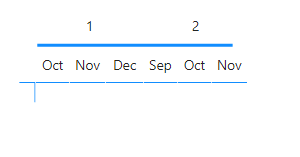
You are correct, my work around is not getting the values on the sort by column since has you refer it does not allows you to sort it out what I was thinking was to add a new step on tyhe hierarchy with the ID so you would get something similar to this:
Now you can add a blank square or a line to hide that row:
If you don't want to add that additional row the only way to have it done is to place also the number of the product on the month itself something similar to 1.Oct 1. Nov 1. Dec - 2.Sep 2.Oct 2.Nov and then sort this column by the ID.
Regards
Miguel Félix
Proud to be a Super User!
Check out my blog: Power BI em PortuguêsHi @bastien_l ,
How do you know the correct order of the dates within products? Asking this because if you only have two products would would only need to use a disconnected dimension table where you would place the order of the products months something similar to this.
| Product | Month | SortID |
| Product1 | Oct | 0101 |
| Product1 | Nov | 0102 |
| ... | ... | ... |
| Product1 | Sep | 0112 |
| Product2 | Sep | 0201 |
| Product2 | Oct | 0202 |
| ... | ... | ... |
| Product2 | Aug | 0212 |
The using a switch function you could calculate the values you need.
Is there any table or field where you know that the first month of the fiscal year is October for product 1 and September for Product 2?
Also be aware that this calculation for the switch need to take into account the year.
Regards
Miguel Félix
Proud to be a Super User!
Check out my blog: Power BI em PortuguêsThanks for your reply. Indeed I have a table where I have product / fiscal year start columns where I know that product 1 starts 9 and product 2 starts 10
I had tried the solution you suggests above but problem is, when I want to sort "Month" by "SortID", Oct for example will have "0101" and "0202" and power BI throws me an error :
"We can't sort the 'Month' column by 'SortID'. There can't be more than one value in 'SortID' for the same value in 'Month'. Please choose a different column for sorting or update the data in 'SortID'"
Hi @bastien_l ,
You are correct, my work around is not getting the values on the sort by column since has you refer it does not allows you to sort it out what I was thinking was to add a new step on tyhe hierarchy with the ID so you would get something similar to this:
Now you can add a blank square or a line to hide that row:
If you don't want to add that additional row the only way to have it done is to place also the number of the product on the month itself something similar to 1.Oct 1. Nov 1. Dec - 2.Sep 2.Oct 2.Nov and then sort this column by the ID.
Regards
Miguel Félix
Proud to be a Super User!
Check out my blog: Power BI em PortuguêsIf you have recently started exploring Fabric, we'd love to hear how it's going. Your feedback can help with product improvements.
A new Power BI DataViz World Championship is coming this June! Don't miss out on submitting your entry.
Share feedback directly with Fabric product managers, participate in targeted research studies and influence the Fabric roadmap.
| User | Count |
|---|---|
| 48 | |
| 45 | |
| 41 | |
| 20 | |
| 17 |
| User | Count |
|---|---|
| 69 | |
| 64 | |
| 32 | |
| 31 | |
| 27 |