Join us at FabCon Atlanta from March 16 - 20, 2026, for the ultimate Fabric, Power BI, AI and SQL community-led event. Save $200 with code FABCOMM.
Register now!The Power BI Data Visualization World Championships is back! It's time to submit your entry. Live now!
Hi All,
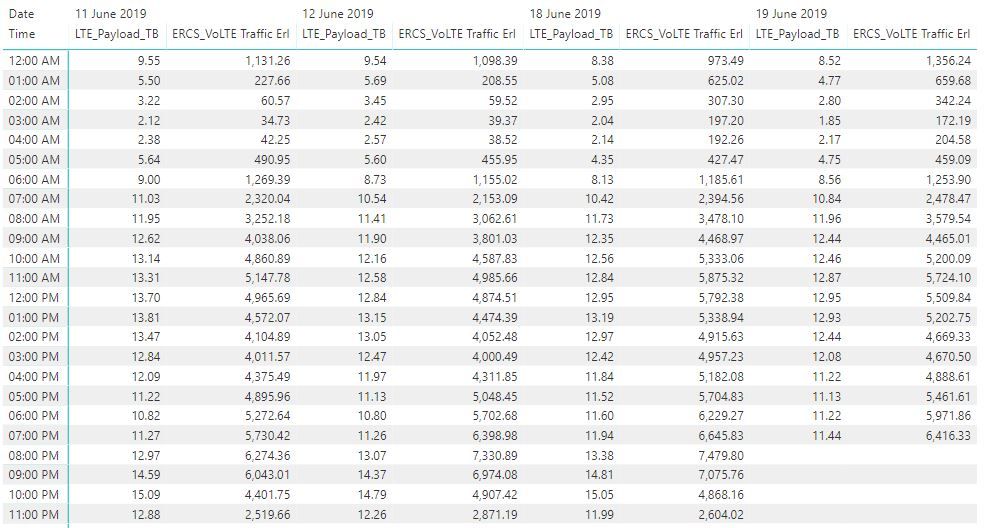
I need help in changing header order in matix visulization.
Eg: What i made from power BI
What i need in actual.
Thanks in advance
Harish Kumar
Hi @Anonymous ,
For your desired output, you need to drag the LTE_Payload_TB under the column Field and above the date column.
If it is convenient, could you share your sample data in text-tabular format in addition to (or instead of) screen captures. That allows people trying to help to readily copy the data and run a quick test, plus it increases the likelihood of your question being answered. Just use 'Copy table' in Power BI and paste it here. Or, ideally, share the pbix (beware of confidential data).
Best Regards,
Cherry
Hi,
Please find the attached pbix file & excel file for your reference. Refer to page3 in pbix which i need to make modifications.
pbix file google link : https://drive.google.com/file/d/1HK3qu0Qdmh1Nt5bmS7X4IjxCKdTEG2YV/view
excel file link : https://drive.google.com/file/d/1G6AWEO4ftl4ZBmJmZw1Dk295ZPm9f8Vc/view
Thanks in advance
Harish Kumar
I have tried as per your suggestion but i am still now getting the desired output. I have shared pbix & excel file in above post. Kindly check once.
Thanks for the help.
| User | Count |
|---|---|
| 49 | |
| 37 | |
| 33 | |
| 22 | |
| 18 |
| User | Count |
|---|---|
| 131 | |
| 99 | |
| 56 | |
| 37 | |
| 37 |