Join us at FabCon Atlanta from March 16 - 20, 2026, for the ultimate Fabric, Power BI, AI and SQL community-led event. Save $200 with code FABCOMM.
Register now!The Power BI Data Visualization World Championships is back! Get ahead of the game and start preparing now! Learn more
Hi everyone,
I've been struggling to find a way to calculate the total of a matrix.
I'm trying to divide the sum total of the column by 15.
Is there a way to do that?
Like in excel, we can just sum up the table and divide it by any numbers, but I can't do it in power bi
Solved! Go to Solution.
Hi @mavdom18 ,
In Power BI, the Total row can't be customized. If you want to get the expected result, you need to create a new table contains value "Enterprise" and define its value. Here's my solution:
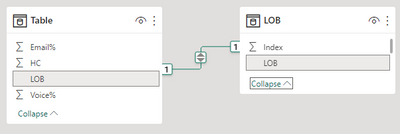
1.Create a new table. Sort LOB by Index column.
Create relationship between the two tables with LOB column.
2.Create three measures.
HC =
IF (
SUM ( 'Table'[HC] ) <> BLANK (),
SUM ( 'Table'[HC] ),
SUMX ( ALL ( 'Table' ), 'Table'[HC] ) / 15
)
Email% =
IF (
MAX ( 'Table'[Email%] ) <> BLANK (),
MAX ( 'Table'[Email%] ),
AVERAGEX ( ALL ( 'Table' ), 'Table'[Email%] )
)
Voice% =
IF (
MAX ( 'Table'[Voice%] ) <> BLANK (),
MAX ( 'Table'[Voice%] ),
AVERAGEX ( ALL ( 'Table' ), 'Table'[Voice%] )
)
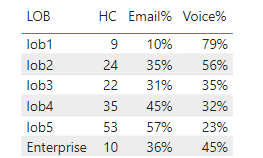
Get the result:
I attach my sample below for your reference.
Best Regards,
Community Support Team _ kalyj
If this post helps, then please consider Accept it as the solution to help the other members find it more quickly.
Hi @mavdom18 ,
In Power BI, the Total row can't be customized. If you want to get the expected result, you need to create a new table contains value "Enterprise" and define its value. Here's my solution:
1.Create a new table. Sort LOB by Index column.
Create relationship between the two tables with LOB column.
2.Create three measures.
HC =
IF (
SUM ( 'Table'[HC] ) <> BLANK (),
SUM ( 'Table'[HC] ),
SUMX ( ALL ( 'Table' ), 'Table'[HC] ) / 15
)
Email% =
IF (
MAX ( 'Table'[Email%] ) <> BLANK (),
MAX ( 'Table'[Email%] ),
AVERAGEX ( ALL ( 'Table' ), 'Table'[Email%] )
)
Voice% =
IF (
MAX ( 'Table'[Voice%] ) <> BLANK (),
MAX ( 'Table'[Voice%] ),
AVERAGEX ( ALL ( 'Table' ), 'Table'[Voice%] )
)
Get the result:
I attach my sample below for your reference.
Best Regards,
Community Support Team _ kalyj
If this post helps, then please consider Accept it as the solution to help the other members find it more quickly.
Apologies, I just realized that the image is confusing. To give more context, enterprise is my grand total. Instead of it being just the sum of all the lob combined, I want it to be divided by 15. However, the problem is that it's not as easy as doing it in excel where I can just edit the total formula to be divided by 15.
The Power BI Data Visualization World Championships is back! Get ahead of the game and start preparing now!
Check out the November 2025 Power BI update to learn about new features.
| User | Count |
|---|---|
| 59 | |
| 46 | |
| 42 | |
| 23 | |
| 18 |
| User | Count |
|---|---|
| 190 | |
| 122 | |
| 96 | |
| 66 | |
| 47 |