cancel
Showing results for 
Search instead for 
Did you mean: 

View all the Fabric Data Days sessions on demand. View schedule

Reply
Anonymous
Not applicable

Matrix table

Hi everyone,


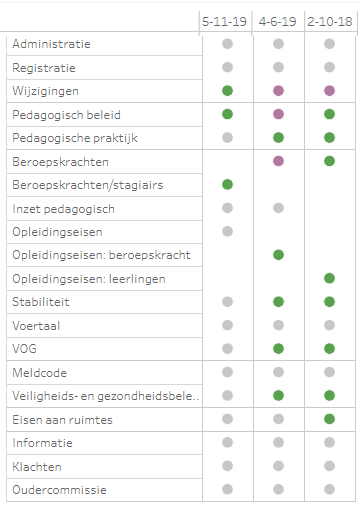
I want to create a matrix table, but it is more complex than usual. I want to assign colours for each value (and there are only three values: 1, -1 or the cell is empty. The result should be like this:

Report of a location.png


The value 1 is the colour green, -1 is purple en the empty cell is grey. The Excel-sheet looks like this:

https://docs.google.com/spreadsheets/d/1aI6ikWyc5-k1hnRSS9l061RYfxONcv5S7Q2auKtYO9U/edit?usp=sharing


Could someone help me with this, please?

1 ACCEPTED SOLUTION
Anonymous
Not applicable

Hello again @Anonymous ,


Yeah it's not that good the way you see it, I suppose you're using more value variables which will return a pretty ugly matrix is that it?


If you create a measure for each column you won't have that problem.


Let me know if that was it.


Best Regards

Duarte Raminhos


View solution in original post

4 REPLIES 4
Anonymous
Not applicable

Hi @Anonymous ,


You use the matrix visual assign the rows and columns fields as you usually would.


To show colors instead of numbers I've been formating the values font to white so it's not seen, after that you have to use the "Conditional Formating" and assign each color to each value.


Let me know if it helped,


Best Regards,

Duarte Raminhos 😁


Anonymous
Not applicable

Hi @Anonymous ,


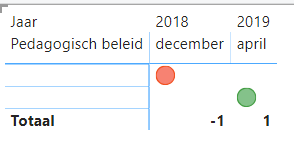
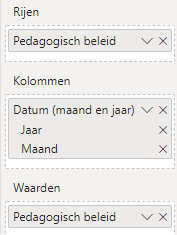
Thanks for your reply. It is a start, but it isn't sufficient. inspectie_test result.pngused variables.png

I made two screenshots. I used only one variable to simplify the example.

I am not satisfied with the visualisation; 'Pedagogisch beleid is shown above and the values (-1 and 1 which have a white font now) are shown in the rows. But it should be like this:


                                          dec-2018                april-2019

Pedagogisch beleid          red circle                green circle


Anonymous
Not applicable

Hello again @Anonymous ,


Yeah it's not that good the way you see it, I suppose you're using more value variables which will return a pretty ugly matrix is that it?


If you create a measure for each column you won't have that problem.


Let me know if that was it.


Best Regards

Duarte Raminhos


Anonymous
Not applicable

Hi @Anonymous ,


You were right; I unpivot all the columns I needed, so that I retained one column. 

I used the following measure for the colour system: 


KPI light = IF(

HASONEVALUE('table'[new unpivot column]);
UNICHAR(11044);
BLANK())
 
Under 'Conditional Formatting', I could choose the colour I wanted, like you said. 
 
Thanks for your help!


Helpful resources

Announcements
November Power BI Update Carousel

Power BI Monthly Update - November 2025

Check out the November 2025 Power BI update to learn about new features.

Fabric Data Days Carousel

Fabric Data Days

Advance your Data & AI career with 50 days of live learning, contests, hands-on challenges, study groups & certifications and more!

FabCon Atlanta 2026 carousel

FabCon Atlanta 2026

Join us at FabCon Atlanta, March 16-20, for the ultimate Fabric, Power BI, AI and SQL community-led event. Save $200 with code FABCOMM.

Top Solution Authors
Top Kudoed Authors