Join us at FabCon Atlanta from March 16 - 20, 2026, for the ultimate Fabric, Power BI, AI and SQL community-led event. Save $200 with code FABCOMM.
Register now!The Power BI Data Visualization World Championships is back! Get ahead of the game and start preparing now! Learn more
I'm trying to get a matrix table into the format below where my rows are my metrics and I have two column hierarchies: Time and Current/Prior. For each metric I want to have the raw values for "Current" and then a %increase/decrease in the "Prior" column.
This data is coming via DirectQuery from SQL and it looks like this:
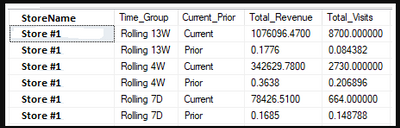
I'm doing the % calculation in the SQL query, but if it's easier to create a measure to do that work then I can pull in the raw values.
Ideally what I need is the ability to have the Current values be formatted as currency and the prior values formatted as a percent. Unfortunately I can't use the FORMAT() function with direct query so that's off the table. Is there any other way to achieve this?
Solved! Go to Solution.
What I wound up doing was reformatting the SQL code to look like this:

That way Current/Prior are have two separate values and the "metric" is categorical. I got the idea from this post: Simple way to transpose columns and rows in SQL?
What I wound up doing was reformatting the SQL code to look like this:

That way Current/Prior are have two separate values and the "metric" is categorical. I got the idea from this post: Simple way to transpose columns and rows in SQL?
@Anonymous,
You might try using a calculation group. Each calculation item within a calculation group has a format property.
https://www.sqlbi.com/articles/controlling-format-strings-in-calculation-groups/
Proud to be a Super User!
The Power BI Data Visualization World Championships is back! Get ahead of the game and start preparing now!
| User | Count |
|---|---|
| 40 | |
| 37 | |
| 33 | |
| 29 | |
| 27 |
| User | Count |
|---|---|
| 133 | |
| 104 | |
| 61 | |
| 59 | |
| 55 |