cancel
Showing results for 
Search instead for 
Did you mean: 

Get Fabric Certified for FREE during Fabric Data Days. Don't miss your chance! Request now

Reply
AltusTellus
Helper III
Helper III

Matrix several Measures in one column

Hi all,


I have a problem with creating a view in a matrix table. First some extra information:


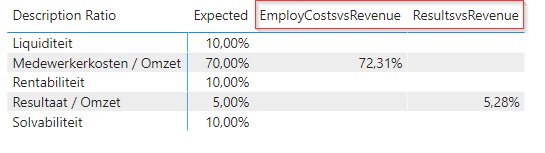
One table with KPI's with different measures like [EmployCostsvsRevenue] and [ResultsvsRevenue]:


EmployCostsvsRevenue = SUMX(FILTER('KPI Description';'KPI Description'[RefCode]=2); [EmployeeCosts] / [AmountRevenue] *-1)
ResultsvsRevenue = SUMX(FILTER('KPI Description';'KPI Description'[RefCode]=1); [AmountResult] / [AmountRevenue])


The outcome is okay, but I want to create one column with the different values among each other, filtered by the KPI description Ratio. Like one column named [Value] e.g.


Matrix desciption and KPI's.png

I think I need to create one "big" measure so that I have one column, but I don't know how to build this. Please help, thnx for your support!


1 ACCEPTED SOLUTION
Mariusz
Community Champion
Community Champion

HI @AltusTellus 


Try the COALESCE function if the values will show next to the right description by default.

https://docs.microsoft.com/en-us/dax/coalesce-function-dax

Otherwise, you can use SWITCH with 

Measure 2 = 
SWITCH(
    SELECTEDVALUE( 'Table'[Descriptions] ),
    "description 1", [EmployCostsvsRevenue] 
    "description 2", [ResultsvsRevenue],
    [Measure]
)


Best Regards,
Mariusz

If this post helps, then please consider Accepting it as the solution.

Please feel free to connect with me.
LinkedIn


View solution in original post

4 REPLIES 4
amitchandak
Super User
Super User

@AltusTellus , are the column values are categorical ?

Or you looking for slicer

https://community.powerbi.com/t5/Desktop/Slicer-MTD-QTD-YTD-to-filter-dates-using-the-slicer/td-p/50...

Share with Power BI Enthusiasts: Full Power BI Video (20 Hours) YouTube
Microsoft Fabric Series 60+ Videos YouTube
Microsoft Fabric Hindi End to End YouTube
Mariusz
Community Champion
Community Champion

HI @AltusTellus 


Try the COALESCE function if the values will show next to the right description by default.

https://docs.microsoft.com/en-us/dax/coalesce-function-dax

Otherwise, you can use SWITCH with 

Measure 2 = 
SWITCH(
    SELECTEDVALUE( 'Table'[Descriptions] ),
    "description 1", [EmployCostsvsRevenue] 
    "description 2", [ResultsvsRevenue],
    [Measure]
)


Best Regards,
Mariusz

If this post helps, then please consider Accepting it as the solution.

Please feel free to connect with me.
LinkedIn


Hi Mariusz,

Thnx (!) for your solution, the next is working!


Measure_2 =
SWITCH(SELECTEDVALUE('KPI'[Description]);
"Pers. Kst. / Omzet"; [EmployCostsvsRevenue];
"Resultaat / Omzet"; [ResultsvsRevenue]
)
 
Note: where 'KPI'[Description] = table with descriptions and the different KPI's (measures).
MFelix
Super User
Super User

Hi @AltusTellus ,


On the matrix option search the option values show on rows turn it on and the measure will be placed on rows instead of columns.


Regards

Miguel Félix


Did I answer your question? Mark my post as a solution!

Proud to be a Super User!

Check out my blog: Power BI em Português


Helpful resources

Announcements
November Power BI Update Carousel

Power BI Monthly Update - November 2025

Check out the November 2025 Power BI update to learn about new features.

Fabric Data Days Carousel

Fabric Data Days

Advance your Data & AI career with 50 days of live learning, contests, hands-on challenges, study groups & certifications and more!

FabCon Atlanta 2026 carousel

FabCon Atlanta 2026

Join us at FabCon Atlanta, March 16-20, for the ultimate Fabric, Power BI, AI and SQL community-led event. Save $200 with code FABCOMM.

Top Solution Authors
Top Kudoed Authors