Join us at FabCon Atlanta from March 16 - 20, 2026, for the ultimate Fabric, Power BI, AI and SQL community-led event. Save $200 with code FABCOMM.
Register now!Get Fabric Certified for FREE during Fabric Data Days. Don't miss your chance! Request now
Hi all,
I have a problem with creating a view in a matrix table. First some extra information:
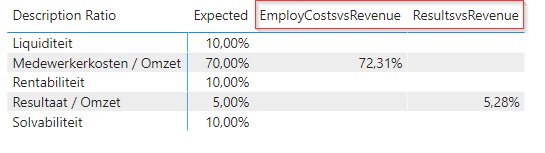
One table with KPI's with different measures like [EmployCostsvsRevenue] and [ResultsvsRevenue]:
The outcome is okay, but I want to create one column with the different values among each other, filtered by the KPI description Ratio. Like one column named [Value] e.g.
I think I need to create one "big" measure so that I have one column, but I don't know how to build this. Please help, thnx for your support!
Solved! Go to Solution.
HI @AltusTellus
Try the COALESCE function if the values will show next to the right description by default.
https://docs.microsoft.com/en-us/dax/coalesce-function-dax
Otherwise, you can use SWITCH with
Measure 2 =
SWITCH(
SELECTEDVALUE( 'Table'[Descriptions] ),
"description 1", [EmployCostsvsRevenue]
"description 2", [ResultsvsRevenue],
[Measure]
)
@AltusTellus , are the column values are categorical ?
Or you looking for slicer
HI @AltusTellus
Try the COALESCE function if the values will show next to the right description by default.
https://docs.microsoft.com/en-us/dax/coalesce-function-dax
Otherwise, you can use SWITCH with
Measure 2 =
SWITCH(
SELECTEDVALUE( 'Table'[Descriptions] ),
"description 1", [EmployCostsvsRevenue]
"description 2", [ResultsvsRevenue],
[Measure]
)
Hi Mariusz,
Thnx (!) for your solution, the next is working!
Hi @AltusTellus ,
On the matrix option search the option values show on rows turn it on and the measure will be placed on rows instead of columns.
Regards
Miguel Félix
Proud to be a Super User!
Check out my blog: Power BI em PortuguêsCheck out the November 2025 Power BI update to learn about new features.
Advance your Data & AI career with 50 days of live learning, contests, hands-on challenges, study groups & certifications and more!