cancel
Showing results for 
Search instead for 
Did you mean: 

The Power BI Data Visualization World Championships is back! Get ahead of the game and start preparing now! Learn more

Reply
javigold
Frequent Visitor

Matrix rows not filtering properly

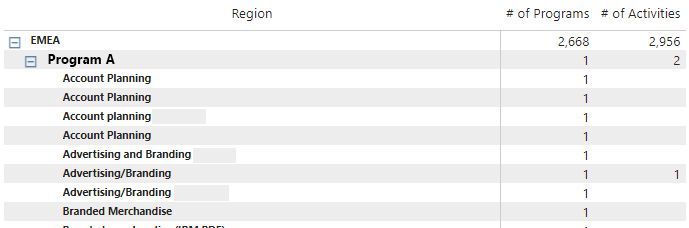
I have a matrix:

Test matrix.jpg


So my model is Region 1 - many on Programs.   Programs 1 - many on Activities.   


2 measures:


# of Programs= CALCULATE(COUNT('Programs'[Id]))
 
# of Activities= CALCULATE(COUNT('Activities'[Id]))
 
How do I filter out rows of activities that aren't associated with the program??
 
Thx!


1 ACCEPTED SOLUTION

Click on the table and open filter pane. Then with measure # of Activities go to advanced and select option "is not blank". That's it. 🙂


Did I answer your question? Mark my post as a solution!

Proud to be a Super User!


View solution in original post

4 REPLIES 4
grantsamborn
Solution Sage
Solution Sage

Hi @javigold 

If you have a many-to-one relationship between Programs and Activities, it should be easy to find any activities that aren't associated with a program.


Could you show:

(a) sample source dataset

(b) your expected end result

(c) a description of how you would expect to get from (a) to (b).


https://community.powerbi.com/t5/Desktop/How-to-Get-Your-Question-Answered-Quickly/m-p/1447523

https://community.powerbi.com/t5/Community-Blog/How-to-provide-sample-data-in-the-Power-BI-Forum/ba-...


Thanks,

Grant

Yeah, realized I didn't really get enough info in the question to make sense.  😉


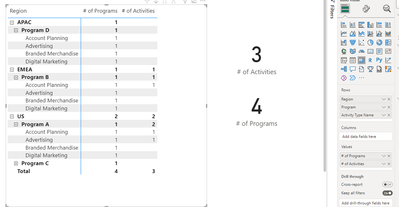
So, my data model is this:

Model New.png

And the matrix ends up like this: MatrixNew.png


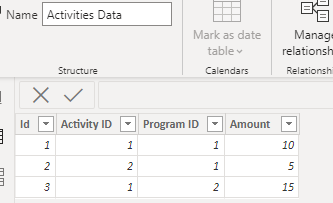
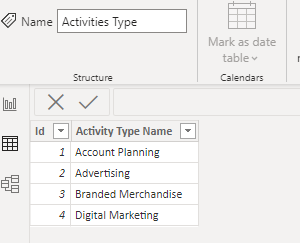
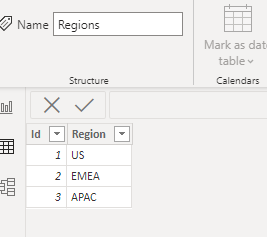
My data tables are: Activities Table.pngActivities Type.pngPrograms Table.pngRegions Table.png


What I am expecting is for the activities to only show up in a matrix row when they have a count of 1 or more.   Hopefully, that makes more sense. 

Click on the table and open filter pane. Then with measure # of Activities go to advanced and select option "is not blank". That's it. 🙂


Did I answer your question? Mark my post as a solution!

Proud to be a Super User!


Hi @javigold 

Thanks for the additional info.

Is there any way you can copy the source data as described in the following link?   It makes any troubleshooting mush easier.

A pbix with sample data would be ideal.


Here are the links again.

https://community.powerbi.com/t5/Desktop/How-to-Get-Your-Question-Answered-Quickly/m-p/1447523

https://community.powerbi.com/t5/Community-Blog/How-to-provide-sample-data-in-the-Power-BI-Forum/ba-...


Thanks,

Grant


Helpful resources

Announcements
Power BI DataViz World Championships

Power BI Dataviz World Championships

The Power BI Data Visualization World Championships is back! Get ahead of the game and start preparing now!

December 2025 Power BI Update Carousel

Power BI Monthly Update - December 2025

Check out the December 2025 Power BI Holiday Recap!

FabCon Atlanta 2026 carousel

FabCon Atlanta 2026

Join us at FabCon Atlanta, March 16-20, for the ultimate Fabric, Power BI, AI and SQL community-led event. Save $200 with code FABCOMM.