cancel
Showing results for 
Search instead for 
Did you mean: 

The Power BI Data Visualization World Championships is back! Get ahead of the game and start preparing now! Learn more

Reply
Anonymous
Not applicable

Matrix report trend value

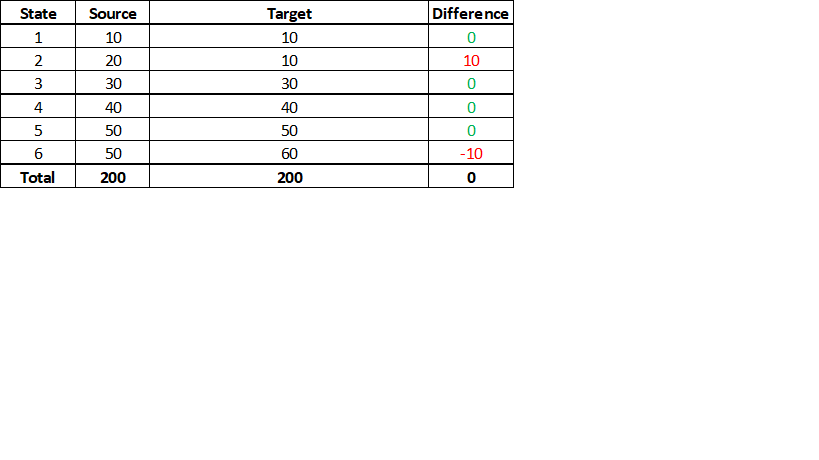
 I have a matrix report which has following values. But , need to show trend as seperate ICON at the top of the Matrix report.


Trend should be Postive ,if All  are Zeros in the difference value

Trend should be Negative ,if any of the difference value having variation.


Can someone help me DAX how to achive trend value.


Example: The below scenerio ,Trend value is Negative since states 2,6 are having variation in the difference value.


                                                 TREND - NEGATIVE

   PowerBI.png


3 ACCEPTED SOLUTIONS
amitchandak
Super User
Super User

@Anonymous , Try like

if(
countx(filter(summarize(Table, Table[state], "_1", sumx(Table, if(Table[source]-Table[Target]<0,1,0))),[_1]>0),[state]) >0, "Negative","Positive")
Share with Power BI Enthusiasts: Full Power BI Video (20 Hours) YouTube
Microsoft Fabric Series 60+ Videos YouTube
Microsoft Fabric Hindi End to End YouTube

View solution in original post

@Anonymous , Data is grouped at the state level first and then filtered and then aggregated gain

Share with Power BI Enthusiasts: Full Power BI Video (20 Hours) YouTube
Microsoft Fabric Series 60+ Videos YouTube
Microsoft Fabric Hindi End to End YouTube

View solution in original post

Anonymous
Not applicable

Thanks a lot. Its working perfect after making the changes as per my requriment. 

View solution in original post

4 REPLIES 4
amitchandak
Super User
Super User

@Anonymous , Try like

if(
countx(filter(summarize(Table, Table[state], "_1", sumx(Table, if(Table[source]-Table[Target]<0,1,0))),[_1]>0),[state]) >0, "Negative","Positive")
Share with Power BI Enthusiasts: Full Power BI Video (20 Hours) YouTube
Microsoft Fabric Series 60+ Videos YouTube
Microsoft Fabric Hindi End to End YouTube
Anonymous
Not applicable

Thank,Amit. Its working somehow. But need to do through testing for my entire report. Can you please explain me this syantax what is happening here?


@Anonymous , Data is grouped at the state level first and then filtered and then aggregated gain

Share with Power BI Enthusiasts: Full Power BI Video (20 Hours) YouTube
Microsoft Fabric Series 60+ Videos YouTube
Microsoft Fabric Hindi End to End YouTube
Anonymous
Not applicable

Thanks a lot. Its working perfect after making the changes as per my requriment. 

Helpful resources

Announcements
Power BI DataViz World Championships

Power BI Dataviz World Championships

The Power BI Data Visualization World Championships is back! Get ahead of the game and start preparing now!

December 2025 Power BI Update Carousel

Power BI Monthly Update - December 2025

Check out the December 2025 Power BI Holiday Recap!

FabCon Atlanta 2026 carousel

FabCon Atlanta 2026

Join us at FabCon Atlanta, March 16-20, for the ultimate Fabric, Power BI, AI and SQL community-led event. Save $200 with code FABCOMM.