This is best Fabric, Power BI, SQL and AI community event. How do we know? The last event sold out! Save €200 with code FABCMTY200.
Register nowA new Data Days event is coming soon! This time we’re going bigger than ever. Fabric, Power BI, SQL, AI and more. Don't miss out.
Hi everybody!
I would like to have a matrix layout like the one in the following picture:
Example
I would like to have the navigation possibility keeping some defining elements (like the years, Budget and so on) always present for every level.
Many thanks!
HI @KeyDiego,
Currently, power bi matrix does not support 'pin' or 'sticky' some of the category labels to display them on the top level.
Maybe you can try to modify your matrix row fields orders to use year level which you mentioned before current parent fields to change your matrix grouping. ('Mese' before 'IT/EST')
Regards,
Xiaoxin Sheng
Hey @KeyDiego ,
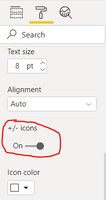
You can certainly achieve that by adding the desired fields as rows in the matrix visual and enabling the +/- icon (see image below) in the Row Headers option in the Formating tab of the Visualisations pane.
Check out the May 2026 Power BI update to learn about new features.
Sign up to receive a private message when registration opens and key events begin.
If you have recently started exploring Fabric, we'd love to hear how it's going. Your feedback can help with product improvements.
| User | Count |
|---|---|
| 27 | |
| 26 | |
| 22 | |
| 19 | |
| 17 |
| User | Count |
|---|---|
| 45 | |
| 42 | |
| 41 | |
| 21 | |
| 18 |