Join us at FabCon Atlanta from March 16 - 20, 2026, for the ultimate Fabric, Power BI, AI and SQL community-led event. Save $200 with code FABCOMM.
Register now!Get Fabric Certified for FREE during Fabric Data Days. Don't miss your chance! Request now
Hello,
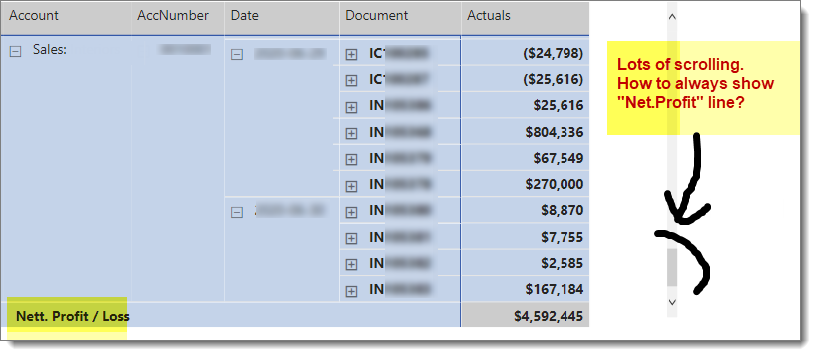
I have a really long list in my Matrix. In order to see the grand total, I have to scroll a loooong way down. Is there a way I can make the grand total stick, always? I have seen this functionality. I just cannot remember how to do it.
Regards, Michelle
Solved! Go to Solution.
Hi @amitchandak and @vanessafvg. Thank you both taking the time to reply. If I set the row position to the top, it still isn't stick. That is, when I scroll I loose sight of it. I have however figured out how to stop this happening. But it only works when using a stepped layout.
Solution:
Below are the settings which achieves what I want. Putting it there should anyone else need them.
Regards, Michelle
PS Thanks @amitchandak for the link to that document. It's given me some great ideas!
@michellepace , Both for grand total and sun total you will option sow on top
https://docs.microsoft.com/en-us/power-bi/visuals/desktop-matrix-visual
Hi @amitchandak and @vanessafvg. Thank you both taking the time to reply. If I set the row position to the top, it still isn't stick. That is, when I scroll I loose sight of it. I have however figured out how to stop this happening. But it only works when using a stepped layout.
Solution:
Below are the settings which achieves what I want. Putting it there should anyone else need them.
Regards, Michelle
PS Thanks @amitchandak for the link to that document. It's given me some great ideas!
Proud to be a Super User!
Check out the November 2025 Power BI update to learn about new features.
Advance your Data & AI career with 50 days of live learning, contests, hands-on challenges, study groups & certifications and more!