cancel
Showing results for 
Search instead for 
Did you mean: 

The Power BI Data Visualization World Championships is back! Get ahead of the game and start preparing now! Learn more

Reply
AlB
Community Champion
Community Champion

Matrix formatting

Hi all,

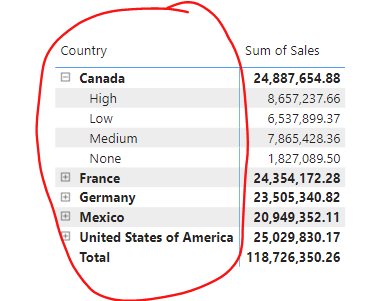
We have a simple matrix visual with two fields (Country, Discount band) in rows and Sales in values:


AlB_0-1712505393038.png


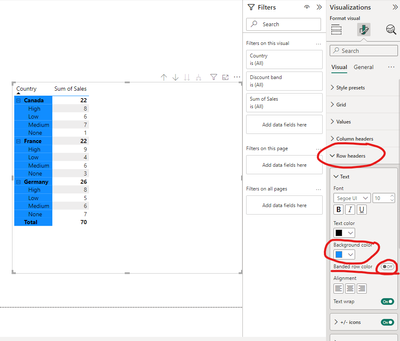
We have alternating colors (white, gray). We would like to keep this alternating colors in the values areas (Sum of Sales) but have the area with Country and Discount band (in the red circle) in a different color, let's say blue (not alternating).
Is this possible at all? How?

Thanks 


1 ACCEPTED SOLUTION
Anonymous
Not applicable

Hi @AlB ,

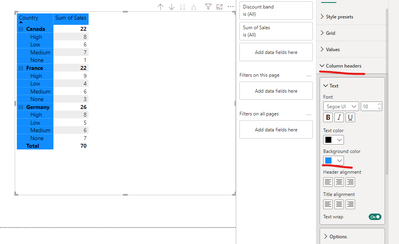
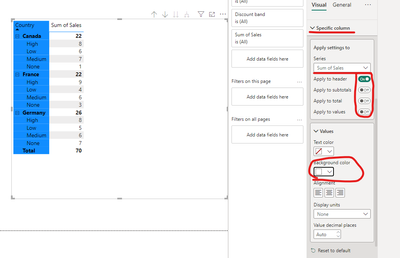
After my test, you can try this way:
First:

vjunyantmsft_0-1712559110747.png

Then:

vjunyantmsft_1-1712559165642.png


Just set both places at the same time.
Other than that, after testing, there seems to be no other way to set up a separate column header

Best Regards,
Dino Tao
If this post helps, then please consider Accept it as the solution to help the other members find it more quickly.

View solution in original post

3 REPLIES 3
AlB
Community Champion
Community Champion

Thank you

Is there a way to color the area that reads Country at the top of the first column in blue as well?


Anonymous
Not applicable

Hi @AlB ,

After my test, you can try this way:
First:

vjunyantmsft_0-1712559110747.png

Then:

vjunyantmsft_1-1712559165642.png


Just set both places at the same time.
Other than that, after testing, there seems to be no other way to set up a separate column header

Best Regards,
Dino Tao
If this post helps, then please consider Accept it as the solution to help the other members find it more quickly.

Anonymous
Not applicable

Hi @AlB ,

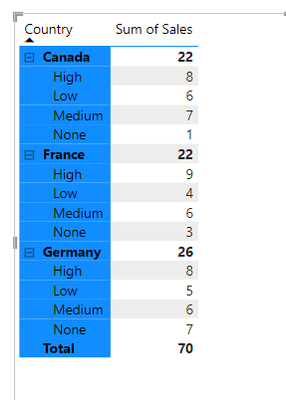
Do you mean like this?

vjunyantmsft_0-1712539061531.png

Please follow the steps below to achieve this effect:

vjunyantmsft_1-1712539140458.png


Best Regards,
Dino Tao
If this post helps, then please consider Accept it as the solution to help the other members find it more quickly.

Helpful resources

Announcements
Power BI DataViz World Championships

Power BI Dataviz World Championships

The Power BI Data Visualization World Championships is back! Get ahead of the game and start preparing now!

December 2025 Power BI Update Carousel

Power BI Monthly Update - December 2025

Check out the December 2025 Power BI Holiday Recap!

FabCon Atlanta 2026 carousel

FabCon Atlanta 2026

Join us at FabCon Atlanta, March 16-20, for the ultimate Fabric, Power BI, AI and SQL community-led event. Save $200 with code FABCOMM.

Top Solution Authors