




cancel
Showing results for 
Search instead for 
Did you mean: 

Join the FabCon + SQLCon recap series. Up next: Power BI, Real-Time Intelligence, IQ and AI, and Data Factory take center stage. All sessions are available on-demand after the live show. Register now

Reply
newhopepdx
Resolver I
Resolver I

Matrix data disappearing

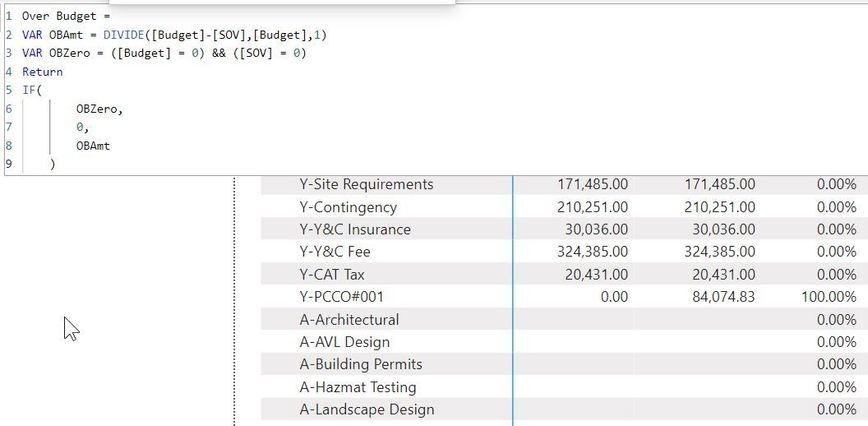
I'm trying to create a Measure to yield the proper % Over Budget. The SOV table is consists of amounts that are classed (via a column) as "Budgeted", "Change Orders" & "Over-Budget". My first stab at the measure worked, except that items that have no budget and no SOV value show up as 100% over budget.  Version 1 was: Over Budget = DIVIDE( [Budget] - [SOV], [Budget], 1) 

p2.jpg

p3.jpg

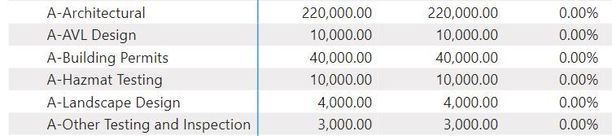
When I add logic to the measure using an IF() statement to correct this a whole section of the data disappears (bottom of the image, section beginning with "A-Architectural"). See the second image to see data with the original measure.

Zero.jpg

PreZero.jpg

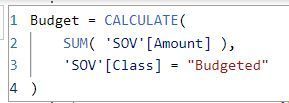
Here are the [SOV] & [Budget] measures...

budget.jpgSOV.jpg

4 REPLIES 4
newhopepdx
Resolver I
Resolver I

I figured out what was happening.

Following the measure's Return statement I had this IF() function: IF( FinalAmount < 0, ABS(FinalAmount). With the measure written that way, all the rows where the result was zero (for some reason) caused the two columns to the left (Budget and SOV values) to disappear.

Simply moving that IF() above Return and assigning it to anohter VAR, and then returning that last VAR, made everything work perfectly. Rows with Budget & SOV greater than zero where SOV > Budget have % overbudget, other rows have nothing in that column.


Aparently DAX doesn't like two functions being computed in the returned value.

newhopepdx
Resolver I
Resolver I

Yes, that's fine for all situations except where there is a zero budget and a change order has created $$s in the SOV. In the image below Y-PCC0#001 should be 100%. That's why I was attempting to add an IF() condition to the measure to cover that situation.


p1.jpgp2.jpg


This measure works. It returns a 1 (100% overbudget) for the odd situation:

Over Budget =
VAR LessThanBudgeted = DIVIDE([Budget]-[SOV],[Budget],0)
Return
    IF(AND([SOV] > 0, [Budget] = 0), 1, LessThanBudgeted)
 
Just curious that the other measure caused non-related rows to vanish.
Thanks for your help.

@newhopepdx 

The above explanation is confusing, Can you provide a sample data and desired output.

NaveenGandhi
Memorable Member
Memorable Member

Hello @newhopepdx 


Is there a reason why you using 1 for alternate result in divide function? Just doing this change in your first version of the measure should work.


DIVIDE( [Budget] - [SOV], [Budget], 0) 


Appreciate your Kudos!

If this helps, please mark this as solution.


Helpful resources

Announcements
April Power BI Update Carousel

Power BI Monthly Update - April 2026

Check out the April 2026 Power BI update to learn about new features.

New to Fabric survey Carousel

New to Fabric Survey

If you have recently started exploring Fabric, we'd love to hear how it's going. Your feedback can help with product improvements.

Power BI DataViz World Championships carousel

Power BI DataViz World Championships - June 2026

A new Power BI DataViz World Championship is coming this June! Don't miss out on submitting your entry.

FabCon and SQLCon Highlights Carousel

FabCon & SQLCon Highlights

Experience the highlights from FabCon & SQLCon, available live and on-demand starting April 14th.