Join us at FabCon Atlanta from March 16 - 20, 2026, for the ultimate Fabric, Power BI, AI and SQL community-led event. Save $200 with code FABCOMM.
Register now!The Power BI Data Visualization World Championships is back! Get ahead of the game and start preparing now! Learn more
Hi there
I have 2 tables (Actual & Target) setup per below, both of which has a measure that divides cost by units:
| Table Actual | |||||
| Product | Month | Status | Cost | Units | Measure - Cost per Unit |
| A | Jan | Old | 100 | 10 | 10 |
| A | Jan | New | 400 | 20 | 20 |
| B | Jan | Old | 200 | 10 | 20 |
| B | Jan | New | 500 | 20 | 25 |
| Table Target | |||||
| Product | Month | Status | Cost | Units | Measure - Cost per Unit |
| A | Jan | Old | 80 | 10 | 8 |
| A | Jan | New | 300 | 20 | 15 |
| B | Jan | Old | 150 | 10 | 15 |
| B | Jan | New | 500 | 20 | 25 |
How do i setup a relationship which allows for below Matrix visualization (comparison of Cost per unit) to be correctly shown.
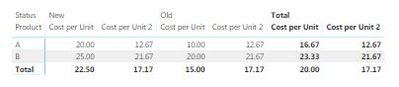
Currently I have a relationship by Product but the result Matrix visualization shows the same values under Columns Old / Target & New / Target.
Many thanks!
| Matrix Visualization Comparing Measures - Cost per Unit (For January) | |||||
| Status | Old | New | |||
| Product | Actual | Target | Actual | Target | |
| A | 10 | 8 | 20 | 15 | |
| B | 20 | 15 | 25 | 25 |
Solved! Go to Solution.
Hi,
You may download my PBI file from here.
Hope this helps.
Hi,
You may download my PBI file from here.
Hope this helps.
You are welcome.
Hi @Anonymous ,
you would need to create a 'Product' dimension and relate it to both the target table and the actual table (one to many relationship) and afterwards use the 'Product' column from the Product table in the matrix rows.
Did I answer your question correctly? Mark my answer as a solution!
Proud to be a Datanaut!
Thanks @LivioLanzo for the reply!
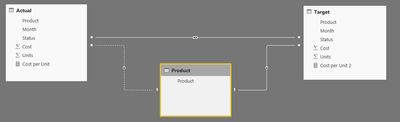
May I know what columns need to be in the 'Product' table ? I have setup a table with Product A & B (as below) and linked this to actual & target table but still matrix is not showing the correct result.
Product table
Relationship
Matrix outcome
The Power BI Data Visualization World Championships is back! Get ahead of the game and start preparing now!
Check out the November 2025 Power BI update to learn about new features.
| User | Count |
|---|---|
| 59 | |
| 43 | |
| 42 | |
| 23 | |
| 17 |
| User | Count |
|---|---|
| 190 | |
| 122 | |
| 96 | |
| 66 | |
| 47 |