Don't miss your chance to take the Fabric Data Engineer (DP-600) exam for FREE! Find out how by attending the DP-600 session on April 23rd (pacific time), live or on-demand.
Learn moreNext up in the FabCon + SQLCon recap series: The roadmap for Microsoft SQL and Maximizing Developer experiences in Fabric. All sessions are available on-demand after the live show. Register now
Hi All,
I dervied matrix table like below. This data contains each month requested, resolved incidents count. from below i need total unresolved incident count on each month . Example During April month end(Marked red) total 8+9+7+6+5 were un resolved incident count. So i need formula calulcate for open incidents (un resolved) on each l month end.
| January | February | March | April | May | June | July | August | September | october | unresolved | Requested | |
| January | 20 | 2 | 3 | 7 | 32 | |||||||
| February | 30 | 8 | 9 | 5 | 52 | |||||||
| March | 40 | 3 | 7 | 6 | 56 | |||||||
| April | 20 | 8 | 9 | 7 | 44 | |||||||
| May | 30 | 9 | 8 | 8 | 55 | |||||||
| June | 40 | 9 | 49 | |||||||||
| July | 20 | 7 | 8 | 10 | 45 | |||||||
| August | 30 | 11 | 41 | |||||||||
| September | 40 | 4 | 44 | |||||||||
| Resolved | 20 | 32 | 43 | 28 | 33 | 64 | 29 | 61 | 48 | 4 | 56 |
Hi @Anonymous ,
Could you pls advise me how to arrive at the result of the data in matrix with your sample data?
Best Regards,
Kelly
Did I answer your question? Mark my post as a solution!
Rows = Requested month
Column= Resolved month
Value = count of rows
@Anonymous
Can you share the source date of this Matrix?
You can paste the data from Excel with your rely or save your files in OneDrive, Google Drive, or any other cloud sharing platforms and share the link here.
____________________________________
How to paste sample data with your question?
How to get your questions answered quickly?
_____________________________________
Did I answer your question? Mark this post as a solution, this will help others!.
Click on the Thumbs-Up icon if you like this reply 🙂
⭕ Subscribe and learn Power BI from these videos
⚪ Website ⚪ LinkedIn ⚪ PBI User Group
I may not able load excel(due to security) , my source will be like this
so, i used matrix to get total count for individual requested date and resloved date. if resolved date = null. (Then is unresolved one). Hope this helps
| Num | Requested Date | Resolved Date |
| 528687 | 15 June 2020 | 26/06/2020 14:03 |
| 517722 | 11 May 2020 | 11/05/2020 10:20 |
| 517054 | 15 April 2020 | 15/04/2020 18:13 |
| 495898 | 02 March 2020 | 04/03/2020 11:27 |
| 453542 | 02 December 2019 | 04/12/2019 14:53 |
| 452741 | 04 November 2019 | 04/11/2019 15:26 |
| 426226 | 25 March 2019 | 26/03/2019 17:24 |
| 404603 | 29 January 2019 | 29/01/2019 14:48 |
| 404512 | 25 January 2019 | 28/01/2019 11:51 |
| 362479 | 09 November 2018 | 05/12/2018 10:44 |
| 294174 | 26 March 2018 | 26/03/2018 14:53 |
| 271443 | 08 January 2018 | 10/01/2018 11:31 |
| 271361 | 04 January 2018 | 10/01/2018 11:30 |
| 271361 | 04 January 2018 | null |
@Anonymous
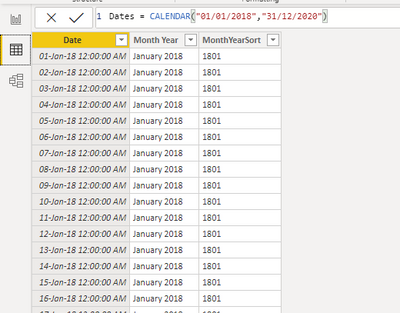
Create a Calendar Table and link it to your data table
Create the following Measure to calculate the Unresolved Tickets
Unresolved incidents =
VAR _MonthEnd = MAX(Dates[Date]) RETURN
COUNTROWS(
FILTER(
ALLSELECTED(Incidents),
Incidents[Requested Date] <= _MonthEnd && Incidents[Resolved Date] >= _MonthEnd
)
)________________________
If my answer was helpful, please consider Accept it as the solution to help the other members find it
Click on the Thumbs-Up icon if you like this reply 🙂
⭕ Subscribe and learn Power BI from these videos
⚪ Website ⚪ LinkedIn ⚪ PBI User Group
If you have recently started exploring Fabric, we'd love to hear how it's going. Your feedback can help with product improvements.
A new Power BI DataViz World Championship is coming this June! Don't miss out on submitting your entry.
Share feedback directly with Fabric product managers, participate in targeted research studies and influence the Fabric roadmap.
| User | Count |
|---|---|
| 48 | |
| 43 | |
| 39 | |
| 19 | |
| 17 |
| User | Count |
|---|---|
| 68 | |
| 63 | |
| 31 | |
| 30 | |
| 23 |