Get certified for free when you join Fabric Data Days 2026 and dive into Fabric, Power BI, SQL, AI, and other essential data skills.
Join nowTry your skills in the Power BI Dataviz World Championship! Round one ends June 26. Join now
Hi,
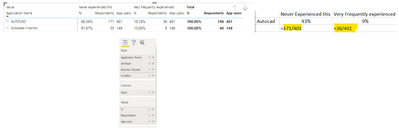
I am using matrix to display our survey results.
As you can see from the snapshot below, I am able to summarize results by applications where our survey responders provided the feedback.
Now, I want to show the survey feeback against the total number of app users (this is to mainly determine the percentage of survey respondents against the actual application users) . Please advise how to achieve it
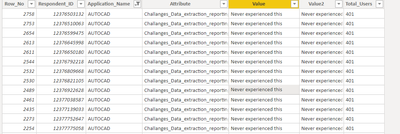
Here is the table structure for the reference.
thanks
Create a new measure
_pcnt = Count(table[respondent id])/Average(table[total Users])
This should give you the expected output.
If it doesn't, Please share details aboy below fields like DAX statement, Summarization level.
Is there a website where I can share my powerBI file for your review and feedback.
Thanks
https://drive.google.com/file/d/1-xq_y63djhMOpmtRgtoD1UN_4mhI0D9S/view?usp=sharing
Here is the file
Thanks
HI @talhaparvaiz,
I'd like to suggest you write a measure with summary function and add raw categories, then you can add the second aggregate function to calculate with the raw result:
Measure =
SUMX (
SUMMARIZE (
Sheet1,
[Application_Name],
[Attribute],
[Business Division],
[Value],
"rate", DISTINCTCOUNT ( Sheet1[Respondent_ID] ),
"total", VALUE ( MIN ( Sheet1[Total_Users] ) )
),
[Rate] / [total]
)
Regards,
Xiaoxin Sheng
Don't miss out on Data Days, June 15 through August 7. Learn Fabric, Power BI, SQL, AI and more.
Check out the May 2026 Power BI update to learn about new features.
| User | Count |
|---|---|
| 25 | |
| 22 | |
| 22 | |
| 19 | |
| 13 |
| User | Count |
|---|---|
| 68 | |
| 55 | |
| 43 | |
| 42 | |
| 30 |