cancel
Showing results for 
Search instead for 
Did you mean: 

We've captured the moments from FabCon & SQLCon that everyone is talking about, and we are bringing them to the community, live and on-demand. Starts on April 14th. Register now

Reply
Anonymous
Not applicable

Matrix Visualization - Time Availability Calculation Issue

I've been asked to create a capacity report to show if an employee has been committed to more projects\tasks than they have available in a month. Management has determined that each employee has approx. 174 hrs capacity per month. 


ProjectResourceWorkCatMonth CatHoursDemand HoursCapacity Hours
Project APMProjectJul 2020 Demand40400
Project APMProjectJul 2020 Commit4000
Project APMProjectJul 2020 Gap000
Project APMProjectJul 2020 Cap1740174
Project APMAdminJul 2020 Demand20200
Project APMAdminJul 2020 Commit2000
Project APMAdminJul 2020 Gap000
Project APMAdminJul 2020 Cap1740174
Project APMNon-ProjectJul 2020 Demand30300
Project APMNon-ProjectJul 2020 Commit3000
Project APMNon-ProjectJul 2020 Gap000
Project APMNon-ProjectJul 2020 Cap1740174


The end result I'm looking for should look like this:


Resource AJul-20
Capacity (Capacity Hours)174
Project (Demand Hours)40
Admin (Demand Hours)20
Non-Project (Demand Hours)30
Available84


The problem I'm having is that Power BI is using the sum of Capacity Hours so the value comes to 522 instead of 174. This is also affecting the Available Hours result, where Available Hours = Calculate(SumX([Capacity Hours]-[Demand Hours])).

1 ACCEPTED SOLUTION
dax
Community Support
Community Support

Hi @Anonymous , 

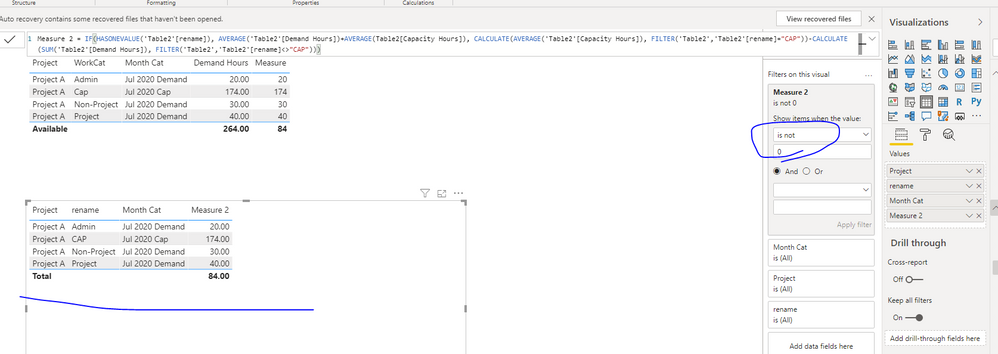
You could create a  calculated column(because you have a "Cap" row which need to show in table), then use measure to achieve this goal. You could refer to my sample for details.

802.PNG

Best Regards,
Zoe Zhi

If this post helps, then please consider Accept it as the solution to help the other members find it more quickly.

View solution in original post

3 REPLIES 3
dax
Community Support
Community Support

Hi @Anonymous , 

You could try below M code 

let
    Source = Table.FromRows(Json.Document(Binary.Decompress(Binary.FromText("i45WCijKz0pNLlFwVNJRCvAFERABIMurNEfByMDIQMElNTcxLwUoYmIAIwyUYnWI0+ycn5ubWYLQR4pe98QCuB6S7ATrMzQ3geoEsbDqdUzJzczD6lUjAxiBw1oMrXCPGhFwMIZOoryJaR+xnvTLz9PFF6vGBjACh9U4DIB72JiA03HoJ8rbuOzG5vlYAA==", BinaryEncoding.Base64), Compression.Deflate)), let _t = ((type text) meta [Serialized.Text = true]) in type table [Project = _t, Resource = _t, WorkCat = _t, #"Month Cat" = _t, Hours = _t, #"Demand Hours" = _t, #"Capacity Hours" = _t]),
    #"Changed Type" = Table.TransformColumnTypes(Source,{{"Project", type text}, {"Resource", type text}, {"WorkCat", type text}, {"Month Cat", type text}, {"Hours", Int64.Type}, {"Demand Hours", Int64.Type}, {"Capacity Hours", Int64.Type}}),
    #"Grouped Rows" = Table.Group(#"Changed Type", {"Project", "Month Cat"}, {{"avg", each List.Average([Hours]), type number}}),
    #"Filtered Rows" = Table.SelectRows(#"Grouped Rows", each ([Month Cat] = "Jul 2020 Cap")),
    #"Renamed Columns" = Table.RenameColumns(#"Filtered Rows",{{"avg", "Demand Hours"}}),
    #"Added Custom" = Table.AddColumn(#"Renamed Columns", "WorkCat", each "Cap"),
    #"Appended Query" = Table.Combine({#"Added Custom", #"Changed Type"})
in
    #"Appended Query"
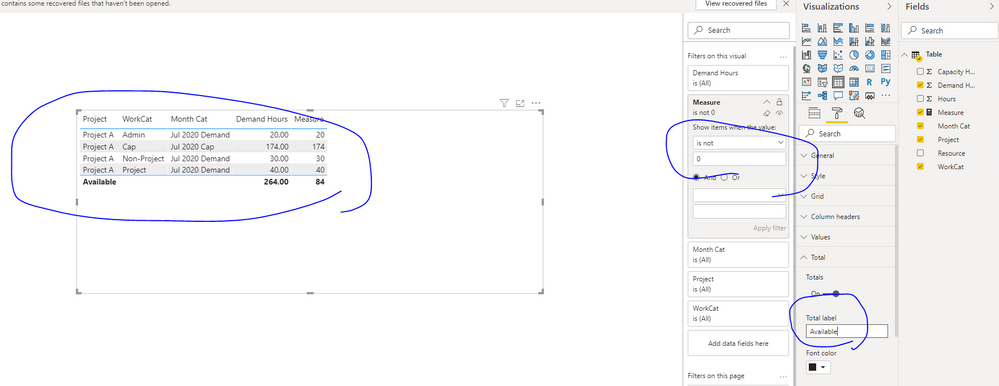
 797.PNG

Best Regards,
Zoe Zhi

If this post helps, then please consider Accept it as the solution to help the other members find it more quickly.

Anonymous
Not applicable

Hello Zoe, 


Thanks for your help on this problem, however I am not familiar with the programming language you are using and will have trouble explaining it to others. Is there a way to get the same thing accomplished using DAX functions?


Neel D

dax
Community Support
Community Support

Hi @Anonymous , 

You could create a  calculated column(because you have a "Cap" row which need to show in table), then use measure to achieve this goal. You could refer to my sample for details.

802.PNG

Best Regards,
Zoe Zhi

If this post helps, then please consider Accept it as the solution to help the other members find it more quickly.

Helpful resources

Announcements
New to Fabric survey Carousel

New to Fabric Survey

If you have recently started exploring Fabric, we'd love to hear how it's going. Your feedback can help with product improvements.

Power BI DataViz World Championships carousel

Power BI DataViz World Championships - June 2026

A new Power BI DataViz World Championship is coming this June! Don't miss out on submitting your entry.

Join our Fabric User Panel

Join our Fabric User Panel

Share feedback directly with Fabric product managers, participate in targeted research studies and influence the Fabric roadmap.