cancel
Showing results for 
Search instead for 
Did you mean: 

Vote for your favorite vizzies from the Power BI Dataviz World Championship submissions. Vote now!

Reply
Thorsten_P
Regular Visitor

Matrix Visual with calculated lines

Hello, I am an enthusiastic user of PowerBI. I have a challenge. I hope you can help me.

I have a table with this structure.


TABLE                  

Products             Value    Top

Product A            200         Top1

Product B            300         Top1

Product B            400         Top2

Product C            100         Top3

Produkt D           500         Top4


I would like to create a visual matrix. In the matrix I want to calculate more rows (like 'sum' in row 5).


VISUAL                                               

                                       Product A          Product B             Product C            Product D

Top1                                         200                   300                       

Top2                                                                  400                        

Top3                                                                                              100            

Top4                                                                                                                           500

sum(Top1,Top2)                       200                    700                        0                            0

sum(Top3,Top4)                           0                        0                   100                         500

sum(Top1,Top2)*1,05               210                    735                       0                             0


Is this possible?

1 ACCEPTED SOLUTION
lbendlin
Super User
Super User

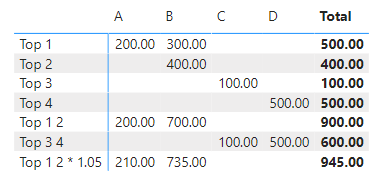
Create measures for all of your "rows" , then put the measures into the values well and switch values to "Switch values to rows".


lbendlin_0-1673141579716.png

See attached

View solution in original post

2 REPLIES 2
Thorsten_P
Regular Visitor

Thank you very much. It works.

lbendlin
Super User
Super User

Create measures for all of your "rows" , then put the measures into the values well and switch values to "Switch values to rows".


lbendlin_0-1673141579716.png

See attached

Helpful resources

Announcements
Power BI DataViz World Championships

Power BI Dataviz World Championships

Vote for your favorite vizzies from the Power BI World Championship submissions!

Sticker Challenge 2026 Carousel

Join our Community Sticker Challenge 2026

If you love stickers, then you will definitely want to check out our Community Sticker Challenge!

January Power BI Update Carousel

Power BI Monthly Update - January 2026

Check out the January 2026 Power BI update to learn about new features.

FabCon Atlanta 2026 carousel

FabCon Atlanta 2026

Join us at FabCon Atlanta, March 16-20, for the ultimate Fabric, Power BI, AI and SQL community-led event. Save $200 with code FABCOMM.