

Join us at FabCon Atlanta from March 16 - 20, 2026, for the ultimate Fabric, Power BI, AI and SQL community-led event. Save $200 with code FABCOMM.
Register now!Vote for your favorite vizzies from the Power BI Dataviz World Championship submissions. Vote now!
Hi Experts,
I have one logic to be implemented.
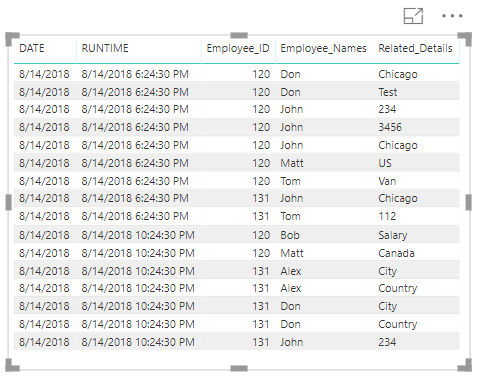
I have a table, all columns of which if taken into Power BI Table visual. We get option to select don't aggregate data for "Related_Details" column as shown:
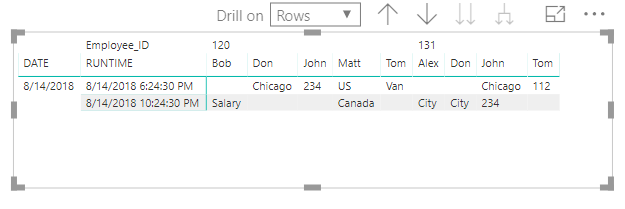
When I use Matrix visual I get:
By default "Related_Details" is only taking First Value when it is dragged in Values area of Matrix.
I want it to take don't aggregate value only like vertical table. So that output should be:
Can we somehow do this in Power BI?
Note: DATE and RUNTIME values can repeat on all rows.
Please help.
Hi @Anonymous,
Matrix visual not support analysis text value on value field, you can force drag text column to value field, they will auto switch to summary mode(last, first, count).
I haven't found effective solutions to direct expand all text values on matrix side, maybe you can try to write measure to CONCATENATE these text value to one.
Concatenate details =
CALCULATE (
CONCATENATEX ( VALUES ( Table[Related_Details] ), [Related_Details], "," ),
VALUES ( Table[RUNTIME] ),
VALUES ( Table[Enoktee_Names] )
)
Regards,
Xiaoxin Sheng
Hi Xiaoxin,
I have found this solution given by you in other post. This solution is great but it results into giving me the rows value in one row only as shown:
This was the test data but in my case volume of data is huge and even there are many columns which should come. I was thinking of using slicers for that. But if currently in Power BI values can't move to rows then is it possible in Excel Power Pivot? Any idea?
Thanks.
Hi @Anonymous ,
I had a similar need where I had to show several lines of text in a single cell. What I did was using UNICHAR(10) as the CONTATENATEX delimiter instead of a comma. In addition, for the numeric values I used a FORMAT function to preserve the proper formatting.
Example:
CONCATENATEX(AllDataTable,IF(ISERROR(VALUE([Related_Details])),[Related_Details],FORMAT([Related_Details],"#,##0")),UNICHAR(10))
I'm a PBI apprentice, so I hope it helps.
Best regards.
Hi @Anonymous,
Can you please provide a sample pbix file to testing and coding formula?
Regards,
Xiaoxin Sheng
Hi,
Where can I share the PBIX file for it.
Coding formula for the measure you mentioned was:
TestMeasure = CALCULATE(CONCATENATEX(VALUES(Test_Data[Related_Details]),Test_Data[Related_Details], ", "),VALUES(Test_Data[RUNTIME]),VALUES(Test_Data[Employee_Names]))
Thanks
Vote for your favorite vizzies from the Power BI World Championship submissions!
If you love stickers, then you will definitely want to check out our Community Sticker Challenge!
Check out the January 2026 Power BI update to learn about new features.
| User | Count |
|---|---|
| 63 | |
| 51 | |
| 41 | |
| 19 | |
| 16 |
| User | Count |
|---|---|
| 125 | |
| 108 | |
| 47 | |
| 30 | |
| 25 |