cancel
Showing results for 
Search instead for 
Did you mean: 

July 28 - August 9 | Final Round of the Power BI Dataviz World Championships. This is your chance. Learn more

Reply

Matrix Visual - No summarization or Table Visualization merge cells

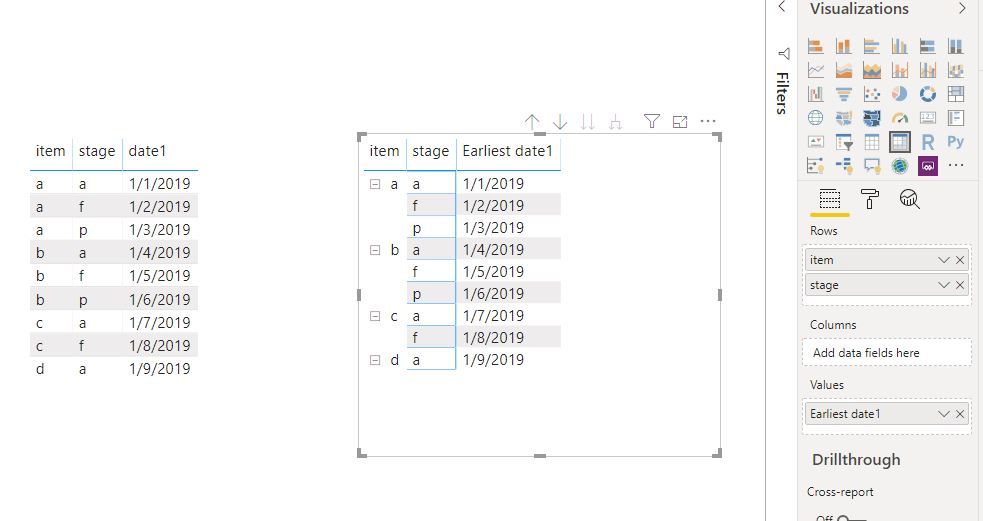
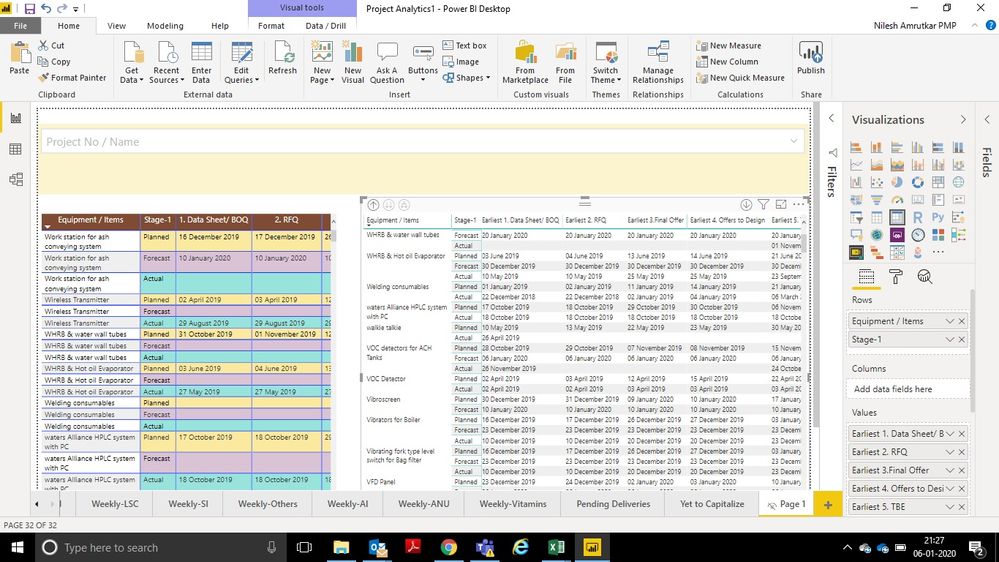
When I am getting the data in table visual I am not able to club the same row headers as merged and when I go with Matrix visual dates as values are not coming correct due to summarization (either earliest / latest).


Thanks and Regards,

1 ACCEPTED SOLUTION

Hi @nilesh_amrutkar 

As tested, if the [date1] has a unique value per [item]&[stage], the summarize for columns in a matrix wouldn't be wrong.

Capture10.JPG

If your data have mutiple dates per [item]&[stage], please let me know which dates should display on the matrix column.


Best Regards
Maggie
Community Support Team _ Maggie Li
If this post helps, then please consider Accept it as the solution to help the other members find it more quickly.

View solution in original post

4 REPLIES 4
amitchandak
Super User
Super User

You should able to right click on a measure in the visual pane and change its agg or move it rows in the matrix. Can you give an example what is needed and what are you getting?

Share with Power BI Enthusiasts: Full Power BI Video (20 Hours) YouTube
Microsoft Fabric Series 60+ Videos YouTube
Microsoft Fabric Hindi End to End YouTube


@parry2k , @amitchandak 


See Below screenshot,

On left side its table visual with same data and showing correct dates where as the items are repating and I want common item to merge. 

On Right hand there is matrix visual and the Items are merged but the dates are summarized hence wrong dates coming in display, ideally dates should come as shown in table visual.


I need any one solution either in table visual merging the row headers or in Matrix visual show dates without summarization.


Left side - Table and Right side - Matrix VisualLeft side - Table and Right side - Matrix Visual


Thanks and Regards,

Nilesh Amrutkar

Hi @nilesh_amrutkar 

As tested, if the [date1] has a unique value per [item]&[stage], the summarize for columns in a matrix wouldn't be wrong.

Capture10.JPG

If your data have mutiple dates per [item]&[stage], please let me know which dates should display on the matrix column.


Best Regards
Maggie
Community Support Team _ Maggie Li
If this post helps, then please consider Accept it as the solution to help the other members find it more quickly.

parry2k
Super User
Super User

@nilesh_amrutkar can you share some screen shots to explain the issue.


Subscribe to the @PowerBIHowTo YT channel for an upcoming video on List and Record functions in Power Query!!

Learn Power BI and Fabric - subscribe to our YT channel - Click here: @PowerBIHowTo

If my solution proved useful, I'd be delighted to receive Kudos. When you put effort into asking a question, it's equally thoughtful to acknowledge and give Kudos to the individual who helped you solve the problem. It's a small gesture that shows appreciation and encouragement! ❤


Did I answer your question? Mark my post as a solution. Proud to be a Super User! Appreciate your Kudos 🙂
Feel free to email me with any of your BI needs.

Helpful resources

Announcements
FabCon and SQLCon Barcelona 2026

FabCon & SQLCon – Barcelona 2026

Join us in Barcelona for FabCon and SQLCon, the Fabric, Power BI, SQL, and AI community event. Save €200 with code FABCMTY200.

Fabric Community Sticker Design Challenge Barcelona Carousel

Fabric Community Sticker Challenge - Barcelona 2026

If you love stickers, then you will definitely want to check out our community sticker challenge, Barcelona edition!

July Power BI Update Carousel

Power BI Monthly Update - July 2026

Check out the July 2026 Power BI update to learn about new features.

Power BI DataViz World Championships carousel

Power BI DataViz World Championships - June 2026

A new Power BI DataViz World Championship is coming this June! Don't miss out on submitting your entry.

Top Solution Authors