cancel
Showing results for 
Search instead for 
Did you mean: 

The Power BI Data Visualization World Championships is back! Get ahead of the game and start preparing now! Learn more

Reply
Setroc
Regular Visitor

Matrix | Values above rows

Hi experts!


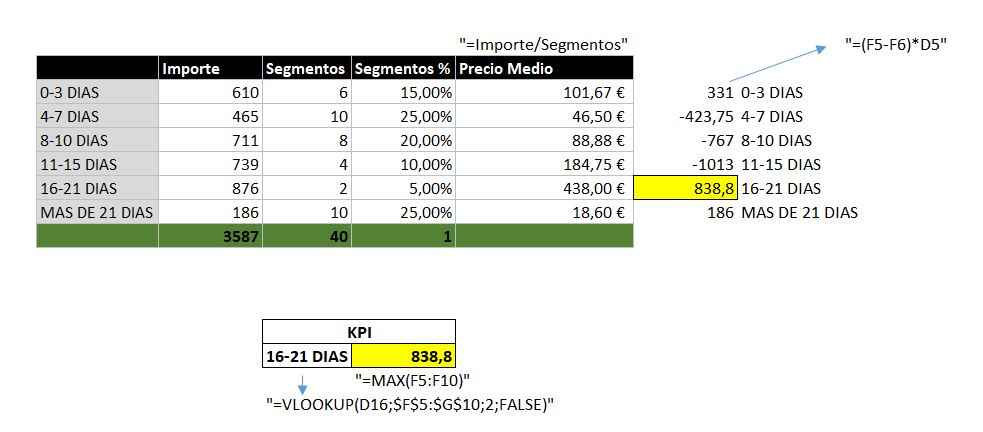
We have a basic matrix with columns, rows and values.  I need to calculate the KPI of the attached screen. The formula to calculate it can be found in the image, but is :


MAX((Precio Medio - ABOVE(Precio Medio))*Segmentos    GroupBy Antelación.


ThanksCaptura.PNG

1 ACCEPTED SOLUTION
v-lili6-msft
Community Support
Community Support

hi, @Setroc

After my research, you could do these as below:

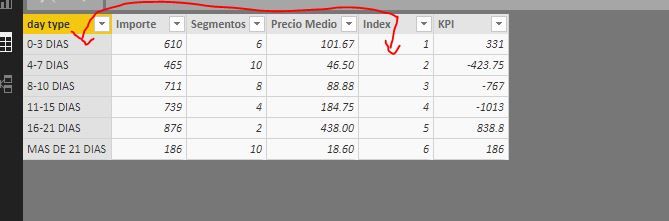
Add a index column for day type

10.JPG

Step2:

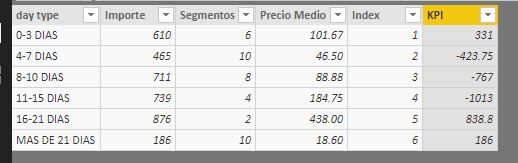
Use EARLIER Function to add a KPI column

KPI = (Table1[Precio Medio]-CALCULATE(SUM(Table1[Precio Medio]),FILTER(Table1,Table1[Index]=EARLIER(Table1[Index])+1 )))*Table1[Segmentos]

11.JPG

Step3:

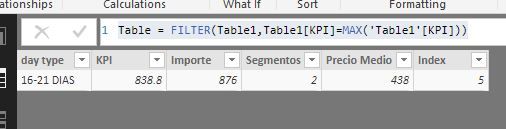
You could create a calculate table or a measure to find Max KPI value

a) create a calculate table 

Table = FILTER(Table1,Table1[KPI]=MAX('Table1'[KPI]))

12.JPG

b)create a calculate measure

MAX KPI = var _maxkpi= CALCULATE(MAX(Table1[KPI]),ALL(Table1[day type])) return
IF(MAX(Table1[KPI])=_maxkpi,_maxkpi,BLANK())

13.JPG


Here is pbix, please try it.

https://www.dropbox.com/s/incp3spymf8q2ba/Matrix%20%20Values%20above%20rows.pbix?dl=0


Best Regards,

Lin

Community Support Team _ Lin
If this post helps, then please consider Accept it as the solution to help the other members find it more quickly.

View solution in original post

2 REPLIES 2
v-lili6-msft
Community Support
Community Support

hi, @Setroc

After my research, you could do these as below:

Add a index column for day type

10.JPG

Step2:

Use EARLIER Function to add a KPI column

KPI = (Table1[Precio Medio]-CALCULATE(SUM(Table1[Precio Medio]),FILTER(Table1,Table1[Index]=EARLIER(Table1[Index])+1 )))*Table1[Segmentos]

11.JPG

Step3:

You could create a calculate table or a measure to find Max KPI value

a) create a calculate table 

Table = FILTER(Table1,Table1[KPI]=MAX('Table1'[KPI]))

12.JPG

b)create a calculate measure

MAX KPI = var _maxkpi= CALCULATE(MAX(Table1[KPI]),ALL(Table1[day type])) return
IF(MAX(Table1[KPI])=_maxkpi,_maxkpi,BLANK())

13.JPG


Here is pbix, please try it.

https://www.dropbox.com/s/incp3spymf8q2ba/Matrix%20%20Values%20above%20rows.pbix?dl=0


Best Regards,

Lin

Community Support Team _ Lin
If this post helps, then please consider Accept it as the solution to help the other members find it more quickly.

@v-lili6-msft Thanks a lot!


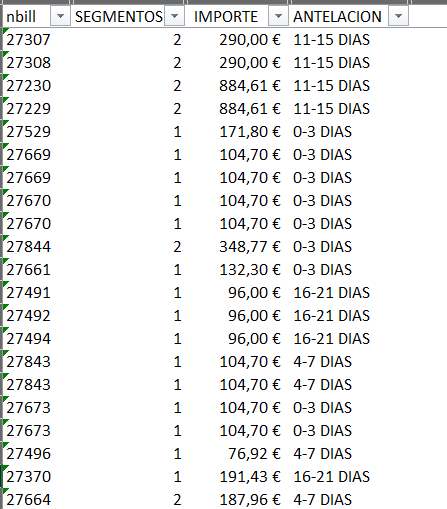
But the problem is my row-data is like :


rowdata.PNG


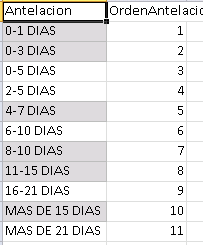
And i create the Master file to order de days field :


antelacion.PNG


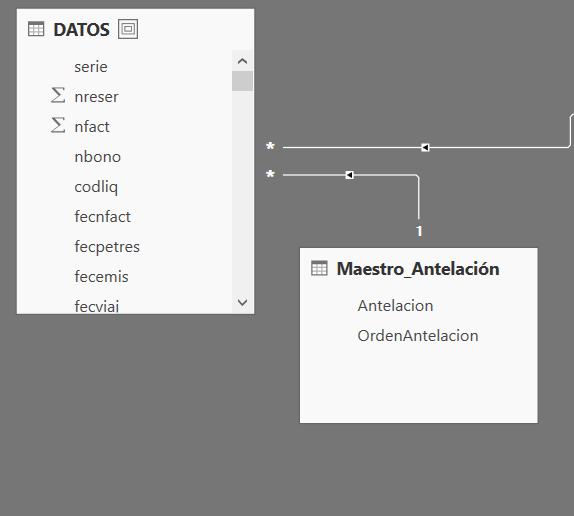
Finally, my model looks:


relation.PNG


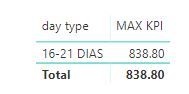
Your solution is finde in query view, but the data is not equal.


Thanks for ur help!

Helpful resources

Announcements
Power BI DataViz World Championships

Power BI Dataviz World Championships

The Power BI Data Visualization World Championships is back! Get ahead of the game and start preparing now!

December 2025 Power BI Update Carousel

Power BI Monthly Update - December 2025

Check out the December 2025 Power BI Holiday Recap!

FabCon Atlanta 2026 carousel

FabCon Atlanta 2026

Join us at FabCon Atlanta, March 16-20, for the ultimate Fabric, Power BI, AI and SQL community-led event. Save $200 with code FABCOMM.