Join us at FabCon Atlanta from March 16 - 20, 2026, for the ultimate Fabric, Power BI, AI and SQL community-led event. Save $200 with code FABCOMM.
Register now!The Power BI Data Visualization World Championships is back! It's time to submit your entry. Live now!
Hi experts!
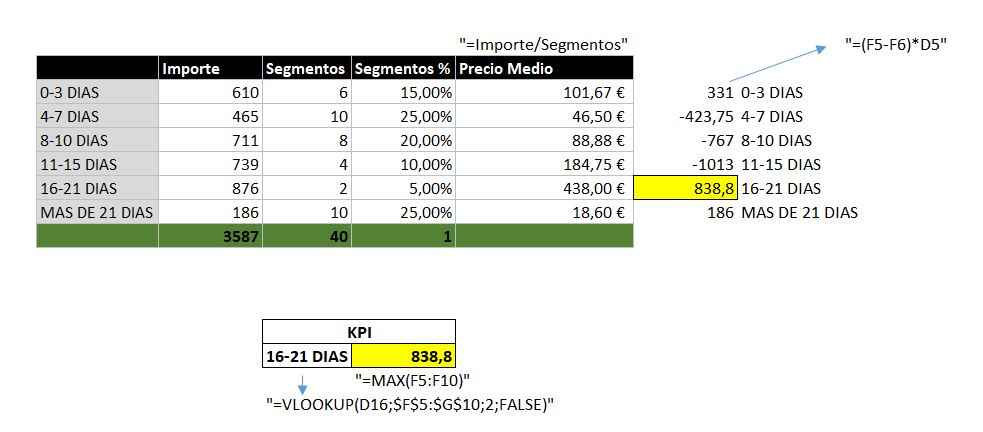
We have a basic matrix with columns, rows and values. I need to calculate the KPI of the attached screen. The formula to calculate it can be found in the image, but is :
MAX((Precio Medio - ABOVE(Precio Medio))*Segmentos GroupBy Antelación.
Thanks
Solved! Go to Solution.
hi, @Setroc
After my research, you could do these as below:
Add a index column for day type
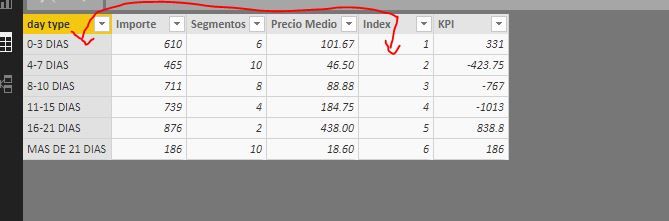
Step2:
Use EARLIER Function to add a KPI column
KPI = (Table1[Precio Medio]-CALCULATE(SUM(Table1[Precio Medio]),FILTER(Table1,Table1[Index]=EARLIER(Table1[Index])+1 )))*Table1[Segmentos]
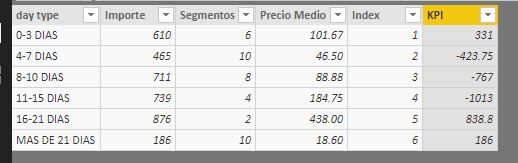
Step3:
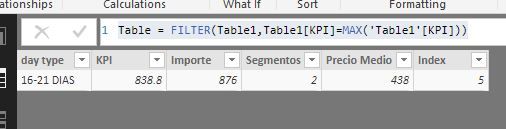
You could create a calculate table or a measure to find Max KPI value
a) create a calculate table
Table = FILTER(Table1,Table1[KPI]=MAX('Table1'[KPI]))b)create a calculate measure
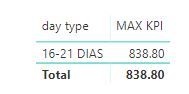
MAX KPI = var _maxkpi= CALCULATE(MAX(Table1[KPI]),ALL(Table1[day type])) return IF(MAX(Table1[KPI])=_maxkpi,_maxkpi,BLANK())
Here is pbix, please try it.
https://www.dropbox.com/s/incp3spymf8q2ba/Matrix%20%20Values%20above%20rows.pbix?dl=0
Best Regards,
Lin
hi, @Setroc
After my research, you could do these as below:
Add a index column for day type
Step2:
Use EARLIER Function to add a KPI column
KPI = (Table1[Precio Medio]-CALCULATE(SUM(Table1[Precio Medio]),FILTER(Table1,Table1[Index]=EARLIER(Table1[Index])+1 )))*Table1[Segmentos]
Step3:
You could create a calculate table or a measure to find Max KPI value
a) create a calculate table
Table = FILTER(Table1,Table1[KPI]=MAX('Table1'[KPI]))b)create a calculate measure
MAX KPI = var _maxkpi= CALCULATE(MAX(Table1[KPI]),ALL(Table1[day type])) return IF(MAX(Table1[KPI])=_maxkpi,_maxkpi,BLANK())
Here is pbix, please try it.
https://www.dropbox.com/s/incp3spymf8q2ba/Matrix%20%20Values%20above%20rows.pbix?dl=0
Best Regards,
Lin
@v-lili6-msft Thanks a lot!
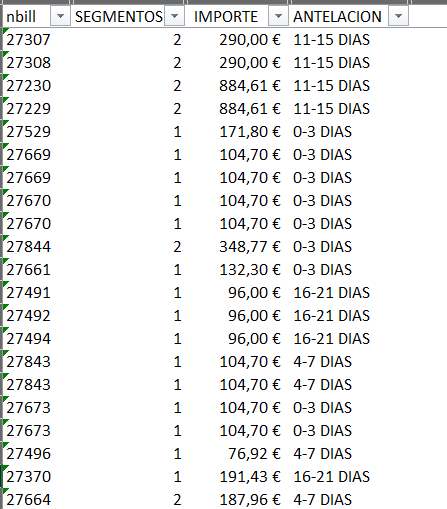
But the problem is my row-data is like :
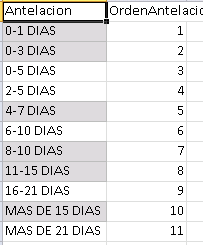
And i create the Master file to order de days field :
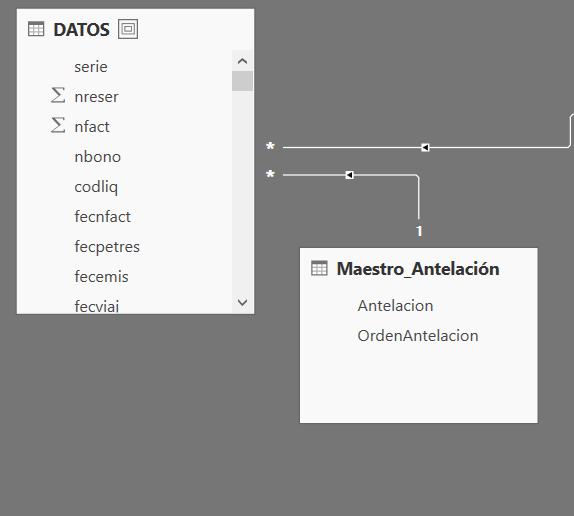
Finally, my model looks:
Your solution is finde in query view, but the data is not equal.
Thanks for ur help!
| User | Count |
|---|---|
| 56 | |
| 40 | |
| 38 | |
| 21 | |
| 21 |
| User | Count |
|---|---|
| 140 | |
| 102 | |
| 64 | |
| 36 | |
| 35 |