Get Fabric certified for FREE!
Don't miss your chance to take the Fabric Data Engineer (DP-700) exam on us!
Learn more- Power BI forums
- Get Help with Power BI
- Desktop
- Service
- Report Server
- Power Query
- Mobile Apps
- Developer
- DAX Commands and Tips
- Custom Visuals Development Discussion
- Health and Life Sciences
- Power BI Spanish forums
- Translated Spanish Desktop
- Training and Consulting
- Instructor Led Training
- Dashboard in a Day for Women, by Women
- Galleries
- Data Stories Gallery
- Themes Gallery
- Contests Gallery
- QuickViz Gallery
- Quick Measures Gallery
- Visual Calculations Gallery
- Notebook Gallery
- Translytical Task Flow Gallery
- TMDL Gallery
- R Script Showcase
- Webinars and Video Gallery
- Ideas
- Custom Visuals Ideas (read-only)
- Issues
- Issues
- Events
- Upcoming Events
The FabCon + SQLCon recap series starts April 14th at 8am Pacific. If you’re tracking where AI is going inside Fabric, this first session is a can't miss. Register now
- Power BI forums
- Forums
- Get Help with Power BI
- Desktop
- Matrix Timetable - Power BI solution
- Subscribe to RSS Feed
- Mark Topic as New
- Mark Topic as Read
- Float this Topic for Current User
- Bookmark
- Subscribe
- Printer Friendly Page

- Mark as New
- Bookmark
- Subscribe
- Mute
- Subscribe to RSS Feed
- Permalink
- Report Inappropriate Content
Matrix Timetable - Power BI solution
Hello Comunity,
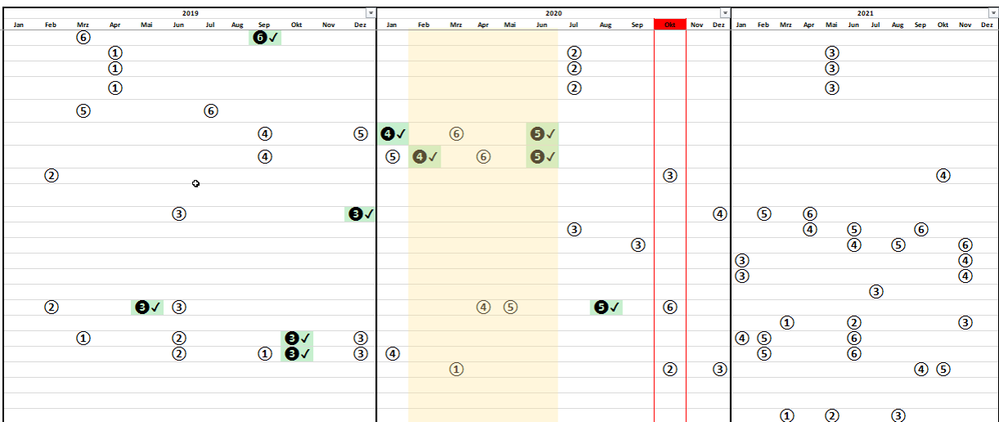
I want to create a kind of time table with a matrix as in the following example in excel.
I have 6 milestones. Each number in The Excel corresponds to a milestone.
Example in Excel
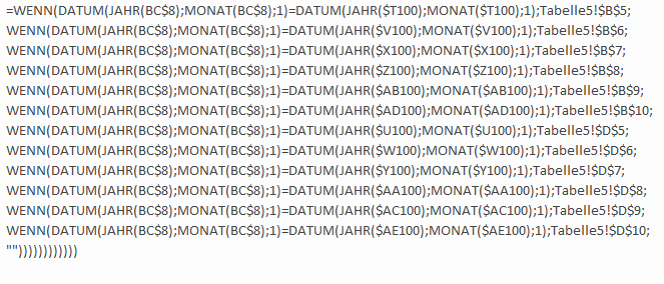
Excel Formel
how do I get this in Power bi?
- How can I highlight the current month in the Power BI Matrix?
- How can I enter my milestones in the matrix as in Excel?
--> If the scheduled date (month and year) corresponds to an appointment in the matrix (month and year), add 1.
Matrix in Power BI

Solved! Go to Solution.


- Mark as New
- Bookmark
- Subscribe
- Mute
- Subscribe to RSS Feed
- Permalink
- Report Inappropriate Content
Hello @Lachsforelle12 ,
Taking into account the need you have, I have taken the following steps:
Milestones =
VAR end_date =
    CALCULATE (
        CONCATENATEX (
            FILTER (
                'Table';
                'Table'[EndDate] <= MAX ( 'calendar'[Date] )
                    && 'Table'[EndDate] <> BLANK ()
            );
            'Table'[Milestone];
            UNICHAR ( 10 )
        );
        USERELATIONSHIP ( 'calendar'[Date]; 'Table'[EndDate] )
    )
VAR start_date =
    CONCATENATEX (
        FILTER ( 'Table'; 'Table'[Date] <= MAX ( 'calendar'[Date] ) );
        'Table'[Milestone];
        UNICHAR ( 10 )
    )
RETURN
    SWITCH (
        TRUE ();
        start_date = BLANK ()
            && end_date = BLANK (); "0";
        end_date = BLANK (); start_date;
        end_date & UNICHAR ( 10 ) & start_date
    )

Formatting =
SWITCH (
    TRUE ();
    EOMONTH ( MAX ( 'calendar'[Date] ); 0 ) = EOMONTH ( TODAY(); 0 )
        && [Milestones] = "0"; 2;
    EOMONTH ( MAX ( 'calendar'[Date] ); 0 ) = EOMONTH ( TODAY(); 0 ); 1;
    [Milestones] = "0"; 0
)
You must also create an inactive relationship between the calendar and the end date.
Now configure your condittional format according to this:
Check Attach File.
In terms of formatting things can be done in a different way depending on the way you need to do things, but you have the general idea.
Regards
Miguel Félix
Did I answer your question? Mark my post as a solution!
Proud to be a Super User!
Check out my blog: Power BI em Português
- Mark as New
- Bookmark
- Subscribe
- Mute
- Subscribe to RSS Feed
- Permalink
- Report Inappropriate Content
Hi @Anonymous ,
I assume you have a calendar table and a column with the current milesotne marked.
Created two measures:
Formatting = IF(SELECTEDVALUE('Table'[Current Milestone]) = "Current" ;1 ;IF(SELECTEDVALUE('calendar'[Month_Year]) = FORMAT(TODAY();"yyyymm");2;0))

Milestones = MAX(MAX('Table'[Milestone]);IF(SELECTEDVALUE('calendar'[Month_Year]) = FORMAT(TODAY();"yyyymm");1))
I have a colum with YYYYMM format on my calendar table now setup the matrix on the following way:
- Rows: Project
- Columns: Months
- Values: Milestones
Setup the condittional formatting on the milestones on the following way:
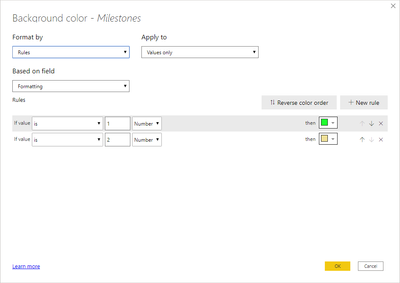
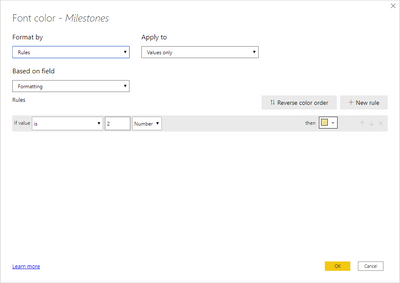
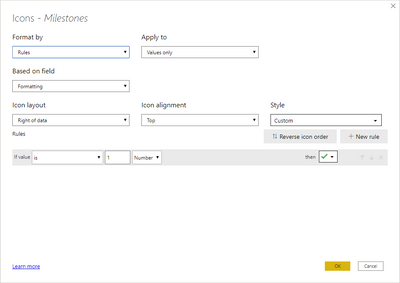
Final result below and in attach PBIX file (october2020 version)

Regards
Miguel Félix
Did I answer your question? Mark my post as a solution!
Proud to be a Super User!
Check out my blog: Power BI em Português- Mark as New
- Bookmark
- Subscribe
- Mute
- Subscribe to RSS Feed
- Permalink
- Report Inappropriate Content
Thank you. @MFelix
He needs other advice.
I have 6 milestones for each project (1.A, 2.B, 3.C, 4.D, 5.E, 6.F) and a start date and an end date.
How can I apply your proposal to my data?
My calendar table is in the main table. This was created with the "Calendaauto" function.
this is what it should look like (both tables are connected by an index)
- Mark as New
- Bookmark
- Subscribe
- Mute
- Subscribe to RSS Feed
- Permalink
- Report Inappropriate Content
Hi @Anonymous ,
There area couple of things that I'm missing:
- Why is your calendar table with repeated values? (this ttype of tables should only have unique values)
- Do you want to show the start and end date of the milestones on the visualization?
- Assuming you don't have milesotnes overlapsed
- If you only want one what is the one to be presented star or finish?
- How do you know it's the current one?
- When milestone are finish they stay with the same date for beggining and ending?
- Does your relationship between the calendar date how is it done by date?
Regards
Miguel Félix
Did I answer your question? Mark my post as a solution!
Proud to be a Super User!
Check out my blog: Power BI em Português- Mark as New
- Bookmark
- Subscribe
- Mute
- Subscribe to RSS Feed
- Permalink
- Report Inappropriate Content
https://www.youtube.com/watch?v=SO4mk1H94OA
--> That was my inspiration to build a Gantt in a year or a month's view
- Why does the calendar table have repeated values? (this table ttype should only have unique values)
--> have created a new date table with unique values (Period 2019 to 2030)
- Do you want to display the start and end date of milestones in the visualization?
--> Yes, I want to see the start and end date if possible.
- Assuming you don't have miles overlaid
--> milestones can overlap... is this generally not possible?
- If you only want one, which one is presented star or finished?
- How do you know it's the current one?
- When does the milestone end do you get the same date for the beginning and end?
- How is your relationship between the calendar date by date?
--> it is not important to know what the current MEilenstein is.
It is only important to see as a kind of summary of when the milestone is planned (start date).
It would also be nice to see when a milestone has been reached. It's supposed to be some kind of Gantt chart.
In addition, it would be nice to see what the current month is, as described at the beginning.
- Mark as New
- Bookmark
- Subscribe
- Mute
- Subscribe to RSS Feed
- Permalink
- Report Inappropriate Content
Hello @Lachsforelle12 ,
Taking into account the need you have, I have taken the following steps:
Milestones =
VAR end_date =
    CALCULATE (
        CONCATENATEX (
            FILTER (
                'Table';
                'Table'[EndDate] <= MAX ( 'calendar'[Date] )
                    && 'Table'[EndDate] <> BLANK ()
            );
            'Table'[Milestone];
            UNICHAR ( 10 )
        );
        USERELATIONSHIP ( 'calendar'[Date]; 'Table'[EndDate] )
    )
VAR start_date =
    CONCATENATEX (
        FILTER ( 'Table'; 'Table'[Date] <= MAX ( 'calendar'[Date] ) );
        'Table'[Milestone];
        UNICHAR ( 10 )
    )
RETURN
    SWITCH (
        TRUE ();
        start_date = BLANK ()
            && end_date = BLANK (); "0";
        end_date = BLANK (); start_date;
        end_date & UNICHAR ( 10 ) & start_date
    )

Formatting =
SWITCH (
    TRUE ();
    EOMONTH ( MAX ( 'calendar'[Date] ); 0 ) = EOMONTH ( TODAY(); 0 )
        && [Milestones] = "0"; 2;
    EOMONTH ( MAX ( 'calendar'[Date] ); 0 ) = EOMONTH ( TODAY(); 0 ); 1;
    [Milestones] = "0"; 0
)
You must also create an inactive relationship between the calendar and the end date.
Now configure your condittional format according to this:
Check Attach File.
In terms of formatting things can be done in a different way depending on the way you need to do things, but you have the general idea.
Regards
Miguel Félix
Did I answer your question? Mark my post as a solution!
Proud to be a Super User!
Check out my blog: Power BI em Português
Helpful resources

New to Fabric Survey
If you have recently started exploring Fabric, we'd love to hear how it's going. Your feedback can help with product improvements.

Power BI DataViz World Championships - June 2026
A new Power BI DataViz World Championship is coming this June! Don't miss out on submitting your entry.

Join our Fabric User Panel
Share feedback directly with Fabric product managers, participate in targeted research studies and influence the Fabric roadmap.

Power BI Community Update - March 2026
Check out the March 2026 Power BI update to learn about new features.

| User | Count |
|---|---|
| 52 | |
| 44 | |
| 44 | |
| 20 | |
| 19 |


| User | Count |
|---|---|
| 71 | |
| 70 | |
| 34 | |
| 33 | |
| 31 |


