Issue 1
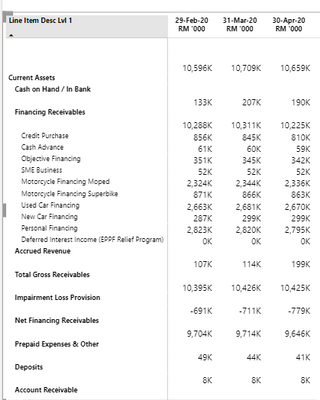
Hi, I have build this matrix table and I find that there is a random figure on the top of the table with no header.
Question: Any idea of how to remove the top figures (10,596K ; 10,709K ; 10,659K)?
In order for me to build this matrix table, I used the following:
1. Values: SUM(Table1[Data])
2. Columns: Hierarchy of 3 levels
3. Rows: Date
Issue 2:
Because I created a hierarchy of column headers, when I expand all 3 levels, the figures for 2nd hierarchy level goes down / drop down to another column with no header. (E.G: Cash on Hand; Financing Receivables; Accrued Revenue, etc)
Question: How do I make sure that when I expand all hierarchy, the numbers for 2nd level stays on the same row as the 2nd level header?