cancel
Showing results for 
Search instead for 
Did you mean: 

The Power BI Data Visualization World Championships is back! Get ahead of the game and start preparing now! Learn more

Reply
1001
Resolver II
Resolver II

Matrix Table Displaying Blanks

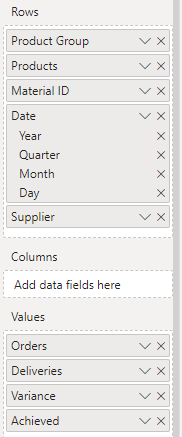
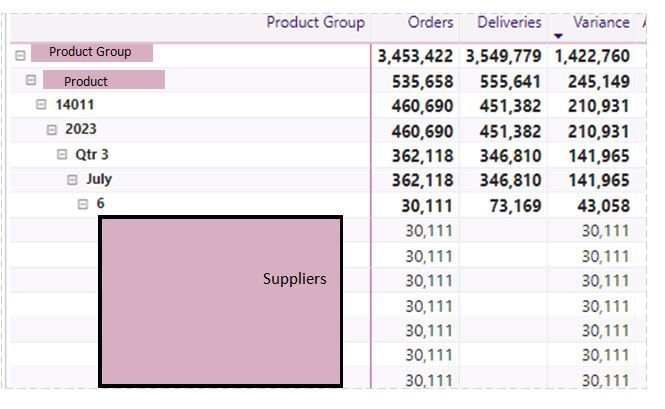
Hi All, I have a matrix table visual where I have dropped in my Suppliers to the rows to see which ones have accounted for Deliveries. But the entire list is showing (blank values as well as two with values at the very bottom out of screen). Just wondering how I can 'hide' those suppliers without deliviers?  Thanks.


Matrix Variables.PNGMatrix 2.JPG

4 REPLIES 4
Ritaf1983
Super User
Super User

Hi @1001 

It seems like you don't have suppliers' data on day granularity or some relationship issues.

Please provide sample data that covers your issue or question completely, in a usable format (not as a screenshot).
https://community.powerbi.com/t5/Community-Blog/How-to-provide-sample-data-in-the-Power-BI-Forum/ba-...
Please show the expected outcome based on the sample data you provided.

https://community.powerbi.com/t5/Desktop/How-to-Get-Your-Question-Answered-Quickly/m-p/1447523


Regards,
Rita Fainshtein | Microsoft MVP
https://www.linkedin.com/in/rita-fainshtein/
Blog : https://www.madeiradata.com/profile/ritaf/profile

Hi Rita, I just discovered the main issue. The Supplier Table is connected to the Product Deliveries Table via Supplier Name, but the Supplier Names don't exist in the Product Orders Table. So when I drag the Suplier Name to the Matrix table, it's not matching it to any corresponding names in the Product Orders table, therefore displaying all the suppliers with or without delivery values. That's the issue. So now, I wonder if there's  a measure I can write to filter out the Suppliers from the Product Deliveries table who don't have deliveries for a given date range. Does that make sense. Thanks.  

Hi @1001 

Unfortunately, I didn't understand much of your description.

Except that you realized there is a problem linking tables here because there is no key.

For this reason, I recommend attaching a sample file and an example of what you want to achieve.

Regards,
Rita Fainshtein | Microsoft MVP
https://www.linkedin.com/in/rita-fainshtein/
Blog : https://www.madeiradata.com/profile/ritaf/profile

Hi Rita, Thanks. I think the only way to do this successfully is for me to recreate my file with dummy data. I'll come back to this post later in the weekend when done. Thanks.  

Helpful resources

Announcements
Power BI DataViz World Championships

Power BI Dataviz World Championships

The Power BI Data Visualization World Championships is back! Get ahead of the game and start preparing now!

December 2025 Power BI Update Carousel

Power BI Monthly Update - December 2025

Check out the December 2025 Power BI Holiday Recap!

FabCon Atlanta 2026 carousel

FabCon Atlanta 2026

Join us at FabCon Atlanta, March 16-20, for the ultimate Fabric, Power BI, AI and SQL community-led event. Save $200 with code FABCOMM.