cancel
Showing results for 
Search instead for 
Did you mean: 

The Power BI Data Visualization World Championships is back! Get ahead of the game and start preparing now! Learn more

Reply
Anonymous
Not applicable

Matrix Table Column

Hi All,

I have a table with a column called FY_Budget(full year budget). It is the amount for YTD for amount in Decmeber e.g 89622100.00

SQL Table (Direct Mode)
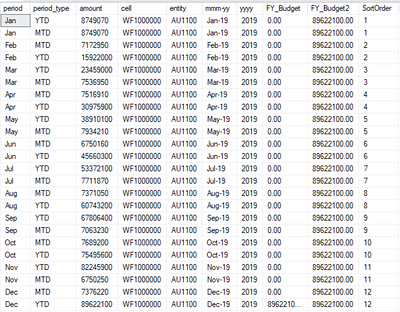
fy budget.PNG


I have also created column FY_Budget2 which has inserted the amount across all rows for that account.

The FY_Budget needs to display for every month which is selected.

Attempt 1, a Measure

FY Budget = CALCULATE((SUM(GrpCon_Leaf[Amount])),
FILTER(GrpCon_Leaf,GrpCon_Leaf[PCP/ACT/BUD/RFC] = "Budget"
&& GrpCon_Leaf[Period] = "Dec")
)
If I add ALL(Plan_Period[Date]) the table fails to display at all.
This only works when I select period for December, which is logical but not the required result.

missing FY_Budget as not Decmissing FY_Budget as not DecCorrect value with Dec selectedCorrect value with Dec selected
 
Attempt 2, columns FY_Budget & FY_Budget2

FY_Budget it is correct for December only & FY_Budget2 in the matrix table it displays for each month but the matrix multiply's it and the displayed amount is inorrect.

 

Not DecemberNot DecemberDecemberDecember


I have tried don't summarize and creating a duplicate table without a join to the period table but that didn't work and I am now out of ideas. I thought the matrix would just display the column as is particularly for FY_Budget2 but it's multiplying it, so IDK.


Any help would be appreicated.

Thanks

1 ACCEPTED SOLUTION
v-yuta-msft
Community Support
Community Support

@Anonymous ,


You can modify the measure as below:

FY Budget =
CALCULATE (
    ( SUM ( GrpCon_Leaf[Amount] ) ),
    FILTER (
        GrpCon_Leaf,
        GrpCon_Leaf[PCP/ACT/BUD/RFC] = "Budget"
            && GrpCon_Leaf[Period] = SELECTEDVALUE ( GrpCon_Leaf[Period] )
    )
)

Community Support Team _ Jimmy Tao

If this post helps, then please consider Accept it as the solution to help the other members find it more quickly.

View solution in original post

1 REPLY 1
v-yuta-msft
Community Support
Community Support

@Anonymous ,


You can modify the measure as below:

FY Budget =
CALCULATE (
    ( SUM ( GrpCon_Leaf[Amount] ) ),
    FILTER (
        GrpCon_Leaf,
        GrpCon_Leaf[PCP/ACT/BUD/RFC] = "Budget"
            && GrpCon_Leaf[Period] = SELECTEDVALUE ( GrpCon_Leaf[Period] )
    )
)

Community Support Team _ Jimmy Tao

If this post helps, then please consider Accept it as the solution to help the other members find it more quickly.

Helpful resources

Announcements
Power BI DataViz World Championships

Power BI Dataviz World Championships

The Power BI Data Visualization World Championships is back! Get ahead of the game and start preparing now!

December 2025 Power BI Update Carousel

Power BI Monthly Update - December 2025

Check out the December 2025 Power BI Holiday Recap!

FabCon Atlanta 2026 carousel

FabCon Atlanta 2026

Join us at FabCon Atlanta, March 16-20, for the ultimate Fabric, Power BI, AI and SQL community-led event. Save $200 with code FABCOMM.

