cancel
Showing results for 
Search instead for 
Did you mean: 

We've captured the moments from FabCon & SQLCon that everyone is talking about, and we are bringing them to the community, live and on-demand. Starts on April 14th. Register now

Reply
Anonymous
Not applicable

Matrix Subtotals Percentage Rounding Issue

I have built a matrix in power BI to show a data set as shown below. My issue is that due to rounding, the subtotals on the far right due not add up to 100% (100.1% in this case). Sometimes this will add to exactly 100% but not always, and I update this report weekly so it is becoming an issue. I know this is due to rounding, but I need this visual to add up to 100%. Is there some way to create a new table or measure to plug one of the values (in this case subtract .1%) so that it always adds up to 100.0%? 


Matrix Percentages.PNG

2 REPLIES 2
Anonymous
Not applicable

Hi@Anonymous,


I'm sorry I can't reproduce your visual, I did a simple test based on the sample you provided.

I found that the 100.1% problem you encountered occurs if the percentage has 1 decimal point in %total.xx

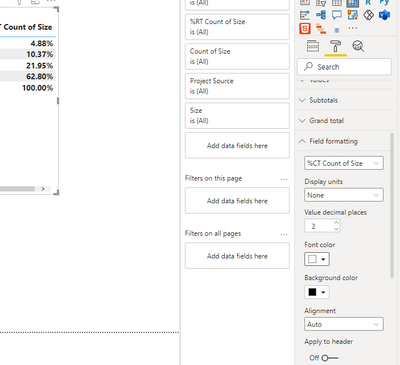
When I set the decimal point of the percentage to 2 digits, it seemed to resolve. It became a total of 100%.

I am not sure if this is what you need, please try it.

Here is how to format decimal places on Show Value As:

1. Select your visual

2. On the Visualization pane, Go to Format/Field Formatting/ Value decimal places - Input 2 - done.


vcaitlynmstf_0-1627623952913.png


If this does not solve your problem, please provide more details.


Hope it helps.


Best Regards,

Caitlyn Yan


If this post helps then please consider Accept it as the solution to help the other members find it more quickly.

Anonymous
Not applicable

Hi Caitlyn - thanks for getting back to me. While this solves the problem with this data set - it doesn't solve the underlying problem as the rounding issue can still be shown with other data sets. For example, 43, 7, 1, 8; the rounded percentages here total 99.99%. I work with several data sets that get updated weekly, so even with 0, 1, and 2 decimals I always seem to run into this problem.


So, adding a decimal point just pushes the same problem to the next decimal.

Helpful resources

Announcements
New to Fabric survey Carousel

New to Fabric Survey

If you have recently started exploring Fabric, we'd love to hear how it's going. Your feedback can help with product improvements.

Power BI DataViz World Championships carousel

Power BI DataViz World Championships - June 2026

A new Power BI DataViz World Championship is coming this June! Don't miss out on submitting your entry.

Join our Fabric User Panel

Join our Fabric User Panel

Share feedback directly with Fabric product managers, participate in targeted research studies and influence the Fabric roadmap.

March Power BI Update Carousel

Power BI Community Update - March 2026

Check out the March 2026 Power BI update to learn about new features.