cancel
Showing results for 
Search instead for 
Did you mean: 

The Power BI Data Visualization World Championships is back! It's time to submit your entry. Live now!

Reply
jup0
Frequent Visitor

Matrix: Sort by Date(-String)

Hi all,


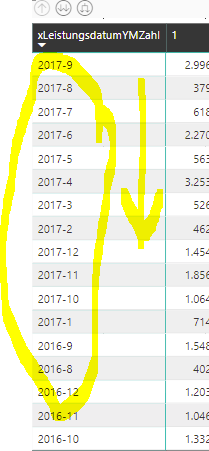
I have a Matrix with a date-month in string format (text):


Unbenannt.PNG


I want to sort it in the correct rank (top-down). The rersult should be:


2017-12

2017-11

2017-10

...

2017-1

2016-12

2016-11

...


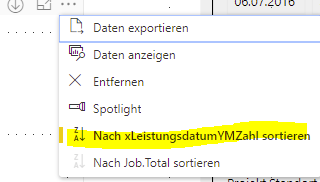
I can only use this sort options:


Unbenannt2.PNG


Please help!

Many thanks

1 ACCEPTED SOLUTION

@jup0


Maybe what you can do is extract the year from your column with 


Year = LEFT(YourColumn;4)


And do the same for your Month 

You will have two columns that will be more easy to order 


- Quentin

View solution in original post

5 REPLIES 5
quentin_vigne
Solution Sage
Solution Sage

Hi @jup0


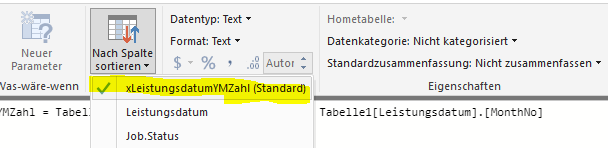
Did you try to go to the data tab, click the Modelisation tab and then click on "Sort by column"  ?


- Quentin

Yes - but no expected result: Man Sad


Unbenannt.PNGUnbenannt2.PNG


@jup0


Did you try to use an Order By YourColumn ASC in your server before importing it ? 


- Quentin

No - this is only 1 table - exported by another user.

I cant change the sql statement and import the data again. - i only got this table.


@jup0


Maybe what you can do is extract the year from your column with 


Year = LEFT(YourColumn;4)


And do the same for your Month 

You will have two columns that will be more easy to order 


- Quentin

Helpful resources

Announcements
FabCon Atlanta 2026 carousel

FabCon Atlanta 2026

Join us at FabCon Atlanta, March 16-20, for the ultimate Fabric, Power BI, AI and SQL community-led event. Save $200 with code FABCOMM.