Don't miss your chance to take exam DP-600 or DP-700 on us!
Request nowLearn from the best! Meet the four finalists headed to the FINALS of the Power BI Dataviz World Championships! Register now
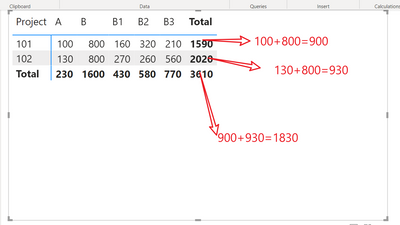
In my sample data B1,B2, B3 is child level of B, so we don't sum them in the total. However I need to show them in the detail. Please give me some idea
| Project | Code | Amount |
| 101 | A | 100 |
| 101 | B | 800 |
| 101 | B1 | 160 |
| 101 | B2 | 320 |
| 101 | B3 | 210 |
| 102 | A | 130 |
| 102 | B | 800 |
| 102 | B1 | 270 |
| 102 | B2 | 260 |
| 102 | B3 | 560 |
Final Result:
Solved! Go to Solution.
Hi, please try this
measure
SUM =
var select_code = SELECTEDVALUE (Code column)
return if (select_code <> blank(),SUM(Amount),CALCULATE(SUM(Amount), Code column in {"A","B"}))
Hi, please try this
measure
SUM =
var select_code = SELECTEDVALUE (Code column)
return if (select_code <> blank(),SUM(Amount),CALCULATE(SUM(Amount), Code column in {"A","B"}))
Thanks a lot, It works for me
Share feedback directly with Fabric product managers, participate in targeted research studies and influence the Fabric roadmap.
Check out the February 2026 Power BI update to learn about new features.
| User | Count |
|---|---|
| 50 | |
| 40 | |
| 37 | |
| 14 | |
| 14 |
| User | Count |
|---|---|
| 85 | |
| 69 | |
| 38 | |
| 29 | |
| 27 |